

Happiest Baby, makers of SNOO review
 Analysis by Appsdrops
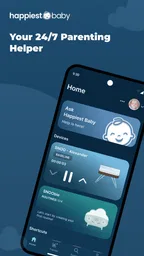
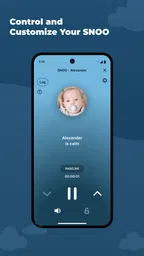
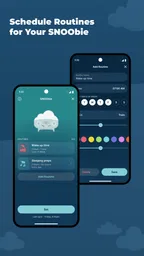
I would treat Happiest Baby as a companion for families already using SNOO or SNOObie, not as a general-purpose parenting tracker. Its job is to connect those products with a phone-based experience, so the first question is practical: do you have compatible Happiest Baby equipment, or are you planning to use it? If not, this app is unlikely to become a useful part of your routine on its own.
For a first-time parent, that distinction is reassuring once it is clear. You do not need to approach it as another all-in-one place to log every feed, diaper, nap, and milestone. Instead, think of it as the mobile companion for a particular sleep setup. That narrower purpose can make it easier to decide whether it belongs on your phone, especially when you already have plenty of newborn tasks competing for attention.
What to expect from this SNOO companion
Happiest Baby is a free Parenting app from Happiest Baby, Inc. The app replaced the SNOO App, the earlier mobile companion to SNOO and SNOObie. That history matters if you are returning to the product after a break or following an older setup guide: the current app is the one to look for, rather than assuming the older app remains the right starting point.
The basic expectation should be modest and specific. This is not a substitute for a pediatrician, a sleep-safety resource, or a broad baby diary. Its value is tied to the Happiest Baby products it accompanies. I would install it because I want a phone-based way to interact with that ecosystem, not because I expect it to solve every sleep challenge or organize the whole household.
The app has a 3.5 average from around 1.9 thousand ratings, alongside about 651 written reviews. Those figures suggest a mixed experience rather than universal satisfaction. I would read that as a reason to approach setup patiently and check that the app suits your equipment and routine, not as proof that it will be either effortless or disappointing for every family.
It has passed 100 thousand installs, and its content rating is Everyone. The current version is 3.3.0, with Android 10 as the minimum operating-system requirement. Those details help with basic compatibility planning: before you start, check that the phone you intend to use meets that requirement and that you are installing the current companion rather than relying on an old app already on a device.
Before you install: match the app to your household
My first recommendation is to identify which Happiest Baby product you intend to use with the app. If your household has SNOO or SNOObie, the app has a clear reason to be there. If you are comparing ordinary baby trackers, start with those instead: a tracker built around manual logs may be more relevant when your main goal is recording routines across multiple caregivers or products.
This is also a useful point to set expectations with another caregiver. Agree on which phone or account will be used during the initial setup, and keep the product information close by. A tired parent is more likely to lose patience when trying to remember details or switch repeatedly between devices. A few minutes of preparation can turn the first attempt into a straightforward household task rather than a late-night troubleshooting session.
The app is free to download, but it includes in-app purchases ranging from $19.99 to $149.99 per item. I would check the purchase details in the app store before committing to anything, and distinguish between installing the companion and paying for an optional item. That matters when you are budgeting for baby equipment: a free download does not automatically mean every related service or purchase is included.
Make the first setup calm and deliberate
For a first run, choose a time when you can pay attention rather than squeezing setup into the middle of a feeding or a crying spell. Have your phone charged, connect it to the household network you normally use if the app requests a connection, and keep the relevant SNOO or SNOObie nearby. I am not suggesting a particular setup sequence; the useful point is to avoid doing it while distracted and to follow the instructions shown for your own product.
Install the current app, open it, and work through the on-screen prompts one at a time. If the app asks you to sign in or identify a product, use the details associated with your household rather than guessing. A common source of confusion with companion apps is trying to troubleshoot the equipment before completing the app’s own requested steps. I would finish each screen in order, then check whether the app recognizes the setup before changing anything else.
If another caregiver will use the same system, settle on a simple handoff plan before inviting them into the process. Decide who completes the initial setup and how the other person will access the app afterward, using the options actually presented on screen. This avoids the familiar newborn-household problem of two people independently changing settings or assuming the other has already completed setup.
Should setup stall, pause before repeating the same action several times. Check that the phone meets the Android 10 minimum if you are using Android, confirm that you selected the current Happiest Baby app, and reread the prompt for the product you have. Then restart the process calmly. If the issue appears to involve the equipment rather than the app, it is more sensible to consult the product’s official support guidance than to keep tapping through unrelated screens.
Your first meaningful success is a reliable handoff
I would define the first success as getting the app and the intended product into a state where you can use them as a pair, then showing the other caregiver how to reach that same starting point. That is more useful than spending the first session exploring every screen. When a newborn wakes at an inconvenient hour, a familiar route to the relevant controls is worth more than a perfect understanding of every menu.
Try a low-pressure check while the baby is settled and another adult is available. Open the app, confirm that you are looking at the correct household product, and let the second caregiver repeat the basic route. If both of you can reach the same place without asking who set up what, you have made practical progress. This simple rehearsal is a non-obvious but valuable step: it tests the household workflow before sleep deprivation makes small uncertainties feel much larger.
For example, imagine one parent is handling an evening change while the other is preparing for bed. Rather than passing the phone back and forth and trying to remember where the app was left, use the calm part of the evening to agree which device will be used and how the other person will get access. The point is not to create a complicated routine. It is to remove one avoidable question from a moment when both adults are tired.
Once that handoff works, keep the first few sessions focused. Use the app for the SNOO or SNOObie-related task that brought you to it, and notice where you naturally hesitate. That tells you what needs a second look. It is a better way to learn than exploring menus without a clear purpose, especially when your available attention comes in short bursts.
Common confusion: companion app or complete baby tracker?
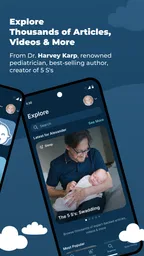
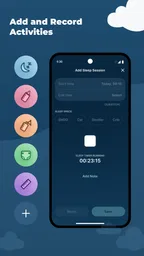
The biggest mismatch is expecting a general baby-care dashboard. Parents often want one place for sleep, feeding, diapers, soothing notes, and shared schedules. Happiest Baby is positioned around its own equipment, so I would not choose it as the sole organizer for all those records unless the app itself clearly meets that need for your household. A dedicated tracker or a shared family note may be a better fit for broad logging.
Another possible confusion is the relationship between the old SNOO App and the current one. Because Happiest Baby replaced the older companion, a search result, saved icon, or remembered instruction may not reflect the app you should use now. If the name or screens do not match what you expect, confirm that you opened the current Happiest Baby app before assuming the equipment is at fault.
It is also easy to read “free” as “no further cost.” The download costs nothing, but in-app purchases are available, with listed items ranging from $19.99 to $149.99. I would avoid making a purchase while rushing through setup. First confirm that the core companion role works for your equipment, then inspect any purchase description carefully and decide whether it addresses a need you actually have.
Finally, do not assume that an app connection replaces hands-on checks or safe sleep practices. A phone companion can help manage a product, but it cannot judge whether a baby is comfortable, unwell, or in need of direct care. In my view, the right mental model is “useful tool alongside attentive caregiving,” not “remote reassurance that everything is fine.”
Where it fits compared with other parenting apps
Compared with a manual baby-tracking app, Happiest Baby has a narrower job and a more equipment-specific reason to exist. A manual tracker can be preferable if you want flexible records across feeding methods, caregivers, and sleep locations. A product companion makes more sense when your priority is managing the Happiest Baby setup from a phone. These are different needs, so I would not judge one by how many unrelated tracking features the other offers.
Compared with using no app at all, the advantage depends on whether a phone connection makes your particular product easier to manage. If you are comfortable with the equipment’s own controls and do not need a mobile companion, adding an app may create another account or screen to maintain without much benefit. On the other hand, if more than one caregiver needs a consistent way to interact with the setup, a shared companion workflow can be worthwhile.
A useful trade-off is to keep your tools limited. If you already use a trusted app for feeds and diapers, there is no need to migrate that information simply because you are installing this one. Let Happiest Baby serve its equipment-related purpose and keep the broader log elsewhere. That separation can prevent duplicate records and make it clearer which app to open when you need a specific kind of information.
Who should use it, and what to do next
I would recommend trying it if you own or plan to use SNOO or SNOObie and want the current mobile companion. It is especially relevant for first-time parents who benefit from rehearsing a shared handoff before the busiest part of the day. The free download makes it possible to begin without paying upfront, while the available in-app purchases are worth reviewing separately rather than treating as part of the basic install.
I would skip it if you do not use Happiest Baby equipment, or if what you really need is a flexible, all-purpose baby journal. In those cases, a general tracker, a shared calendar, or even a simple household note may answer your actual question with less setup. I would also avoid relying on this app as a medical or safety monitor; its role is tied to the products it accompanies, not to replacing attentive care.
After the first successful setup, the next step is not to explore every option. Ask the other caregiver to repeat the basic handoff, then use the app naturally for a few ordinary routines. If both adults can find the relevant product and operate the companion without confusion, keep it in your routine. If the app adds friction or does not match how your household uses the equipment, reconsider whether it is earning its place on your phone.
My overall view is that Happiest Baby is best understood as a focused tool for a specific ecosystem, not a universal answer to new-parent organization. Its usefulness depends heavily on having the associated product and wanting a mobile companion. Go in with that expectation, set it up when you have a quiet moment, and test the handoff with another caregiver. That practical first step will tell you more than browsing the app in the abstract.
What we like
- SNOO can respond automatically to fussing with soothing motion and sound.
- The app lets parents adjust SNOO settings from a phone.
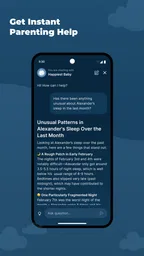
- Sleep tracking can help caregivers notice changes in a baby's routine.
- Caregivers can share access to the same SNOO account.
- App controls make it possible to manage the bassinet without disturbing the baby.
What could be better
- SNOO app features depend on having a compatible SNOO bassinet.
- Remote controls require a stable Wi-Fi connection.
- Sleep tracking is not a substitute for medical advice.
- Shared access may require extra setup for caregivers.
- The app offers limited value for families who do not use SNOO products.





