
Grok Bot review
 Analysis by Appsdrops
I’m cautious about productivity apps that promise to turn a plain-English request into finished work. The idea is appealing, but the difference between a helpful assistant and another tool to supervise comes down to how clearly you can define a task and how safely you can trust the result. Grok Bot is built around that trade-off: you describe an automation you want, and its AI-agent approach is meant to handle practical work rather than simply offer suggestions. I see its clearest appeal in routine tasks with a well-defined goal, not in handing over anything that needs delicate judgment.
Where the agent approach can save effort
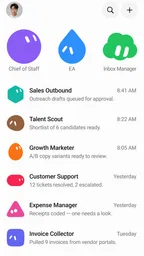
As a productivity app from SpaceXAI, Grok Bot makes a distinct promise compared with a conventional to-do list or a chatbot used only for questions. Its premise is that an agent should act on a request, so the useful question is not merely whether it can produce a clever response, but whether you can explain a repeatable task in a way that makes the intended result unmistakable.
That framing can be valuable for work people postpone because it involves several small steps. Think of preparing a consistent first draft, sorting out a recurring administrative task, or turning a loosely stated goal into a concrete piece of work. In those situations, the effort of writing a clear instruction once may be worthwhile if it reduces repeated manual prompting later. I would start with a task whose outcome is easy to inspect, then expand only after I understand how the agent handles my wording.
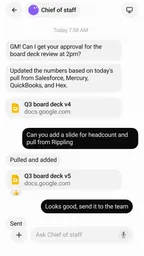
A practical everyday example is the end-of-day wrap-up. I might want help turning a set of rough notes into a concise summary and a short list of follow-ups. The important part is to spell out the audience, tone, and boundaries: distinguish decisions from open questions, preserve names and dates exactly, and do not invent missing details. That kind of request gives an agent useful structure while leaving me with an obvious review step before anything is shared.
The strongest potential benefit is the change in how you approach automation. Instead of learning a complicated sequence of settings before you can try an idea, you begin by describing the result you want. That is a more approachable starting point for someone who knows the task but does not think of themselves as a workflow designer. It does not remove the need to think carefully; it shifts more of that effort into writing a precise request and checking the output.
That distinction is easy to underestimate. A vague instruction such as “handle my messages” leaves too much room for interpretation. A bounded one that asks for a draft, names the intended recipient, and says what must remain unchanged gives you a safer first experiment. My recommendation is to treat prompt-writing as part of setting up the task, not as a one-line shortcut. Specific instructions make the agent easier to evaluate, and they also make mistakes easier to spot.
Check the work before relying on it
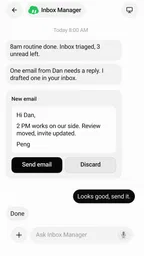
For anything involving factual details, I would keep a human review in the loop. An agent may produce a polished result that still needs correction, and polish can make an error less noticeable rather than less likely. Check names, numbers, dates, and any claim that could affect a decision. If the task has consequences outside your own notes, use the app to prepare work for review rather than assuming the output is ready to send or act on.
A useful way to test a new automation is to give it a small, low-stakes task with a clear success condition. Compare its result with what you would have done yourself, note where it misunderstood the request, then revise the instruction before using it again. This creates a simple feedback loop without needing to trust a broad, loosely defined task from the start. It also helps you learn whether your request was unclear or whether the agent’s result simply does not fit your needs.
There is a trade-off here: plain-language setup may feel easier than building a workflow by hand, but it can make the process less transparent. With a manually configured routine, you can often see each step. With an agent, you may focus more on the request and outcome than on the path taken between them. If you need to understand or control every intermediate action, a more explicit automation tool may be the better fit.
What the ratings and cost suggest for a first try
The app is free to download and carries an Everyone age rating. It has an average rating of 4.8 from around 22,000 ratings, with roughly 1,400 written reviews and over 1 million installs. Those figures suggest substantial interest and broadly positive feedback, but they cannot tell me whether a particular automation will work well for your routine. I would treat them as a reason to investigate, not as a substitute for a careful test.
There are in-app purchases, with listed items ranging from $6.49 to $2,600.00. That wide span is worth considering before you build a habit around the app. A free starting point lowers the barrier to trying it, but anyone expecting to use AI agents regularly should check the available purchase details in the app store and decide what level of spending makes sense for their needs. I would not assume that every useful task is covered at no cost.
The current version is 1.19.1, and the stated minimum operating-system requirement is version 9. If you are choosing a device specifically for this app or troubleshooting compatibility, check that your system meets that baseline before planning a workflow around it. The app is listed as released on September 1, 2026, so its place in a changing productivity landscape may also matter to readers comparing it with tools they already know.
Where it may frustrate you
The central limitation is inherent in the promise: describing an outcome is not the same as guaranteeing a dependable process. If you cannot explain what success looks like, the agent has little to work with. Even a clear request may need refinement, and the more important the task, the less comfortable I would be with an unchecked result. This is not a set-and-forget solution for work where a small misunderstanding could cause a serious problem.
There is also a learning curve hidden inside the simple setup. You may need to discover which details the agent needs, how much context is useful, and where to draw a firm boundary. Too little detail invites guesswork; too much can make a request cumbersome and harder to maintain. I would keep reusable instructions focused: state the outcome, include essential constraints, and say what the agent should do when information is missing instead of encouraging it to fill gaps.
For tasks that are mainly about remembering an appointment, tracking a short list, or moving through a fixed sequence, a standard calendar, notes app, or rule-based automation may be more predictable. Those alternatives can be less flexible, but their simplicity is a real advantage when you want to see exactly what will happen. Grok Bot makes more sense when interpreting a request is part of the work; it is less compelling when the task is already a straightforward checklist.
I would also avoid treating an agent’s confident-looking answer as proof that it completed the task correctly. Before using it for a recurring workflow, test several ordinary variations: incomplete notes, an unexpected wording change, or a request with one important exception. If the result remains useful and easy to verify, you have a better basis for relying on that workflow. If you find yourself correcting the same kind of mistake repeatedly, the time saved may not justify the supervision.
Who should give it a try
I’d recommend Grok Bot to people who can name repetitive tasks that require some interpretation, and who are willing to review the result. It may suit a solo worker preparing routine drafts, someone organizing recurring administrative work, or a curious user who wants to experiment with agent-style assistance without first designing a technical system. The best early tasks are low-risk, frequent enough to matter, and easy to judge for accuracy.
It is a weaker choice for anyone who expects a vague instruction to produce a flawless outcome, needs complete visibility into every step, or cannot afford to check the work. It may also be unnecessary if your current calendar, task manager, or fixed automations already solve the problem cleanly. In that case, adding an AI agent could create another place to monitor instead of removing effort.
If you are deciding whether to install it, I would begin with one narrow workflow rather than trying to automate an entire workday. Write the request as if you were briefing a careful assistant: define the finished result, include the details that must not change, and specify how uncertainty should be handled. Review the output, adjust the instruction, and only then decide whether the process is dependable enough to repeat. That approach gives you a fair test without overcommitting.
A useful experiment, not an automatic replacement
My verdict is that Grok Bot is most interesting as a low-friction way to explore AI-agent productivity, especially when your work includes repeatable tasks that are hard to express as rigid rules. Its natural-language premise can make automation feel less intimidating, and a careful user can get value from delegating the first pass on bounded work. The same flexibility demands clear instructions and sensible checking, so I would not confuse ease of asking with certainty of execution.
Try it if you have a real, modest task you can test and the patience to refine your request. Keep a conventional tool when predictability matters more than interpretation, and keep your own review for anything consequential. Used that way, the app has a practical role: it can help move routine work forward, while you remain responsible for deciding whether the result is actually right.
What we like
- Provides quick answers to questions in a conversational format.
- Can help summarize information and explain complex topics.
- Supports follow-up questions within an ongoing conversation.
- Offers a playful tone that can make interactions feel engaging.
- May save time when brainstorming or drafting text.
What could be better
- AI responses can be inaccurate or out of date.
- Sensitive information may not be suitable to share in chats.
- Some features may require a paid subscription.
- Access and available features can vary by region or platform.
- Generated text may need fact-checking and careful editing.





