

Grok AI review
 Analysis by Appsdrops
I approached Grok AI as a pocket assistant for questions, writing, and image creation—not as an authority that should make decisions for me. That distinction matters: the app can be useful when I want a quick starting point, but I still need to judge its answers and be careful about what I share. Its trustworthiness is best assessed through the choices I can actually see while using it, rather than assumptions about how an AI service handles information behind the scenes.
Using an AI assistant without handing it the final say
Grok AI is a free productivity app from xAI, available on Android and iOS. It has a 4.9 average from around 4.2 million ratings, and has passed 100 million installs. Those figures suggest that it has reached a large audience, but popularity is not a substitute for checking an answer or deciding whether an app fits your privacy needs. I found its most sensible role is as a fast helper for low-stakes tasks: explaining an unfamiliar term, getting a rough draft moving, or exploring an image idea.
The experience is built around asking rather than navigating through a complicated productivity suite. That makes it approachable if you already know what you want to ask, and less useful if you need a carefully structured project system with calendars, task ownership, or a dependable record of decisions. I would treat it as a flexible conversation partner, not as a replacement for a notes app, a specialist research tool, or a human expert.
The app’s age rating is Teen, which is a useful signal for families, but it does not remove the need for adult judgement. A conversational assistant can produce material that needs context, and generated images or text may not suit every audience. If a young person uses it, I would talk through what kinds of questions are appropriate and why personal details should not be casually entered into an AI chat.
Where it fits in a normal day
A practical example is planning a meal from ingredients already at home. I might ask for a few dinner directions, then follow up with constraints such as needing a quick option or wanting to avoid a particular ingredient. The value is not that the first suggestion must be perfect; it is that the exchange can help me narrow the choices. I would still check food-safety advice and labels rather than rely on a generated answer for anything consequential.
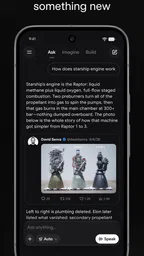
That same back-and-forth can help when I am trying to understand a work topic before a meeting. I can ask for a plain-language explanation, request an analogy, and then ask what assumptions the explanation depends on. A useful habit is to ask for the answer in a format I can inspect—such as a short outline or a comparison—rather than accepting a fluent paragraph as proof. The app is most helpful when I use it to expose questions I should investigate, not to close the investigation prematurely.
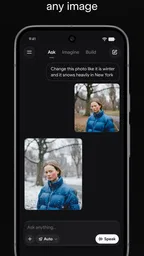
For image generation, I would start with a small, specific concept and refine one part at a time. Changing the setting, mood, or composition in separate follow-ups makes it easier to see which instruction affected the result. This is more informative than piling every desired detail into one long prompt, especially when I am still learning how the assistant interprets visual language. I would also avoid treating an appealing image as evidence that a depicted event, product, or person is real.
Trust begins with what I can inspect
Because Grok AI is an AI assistant, a natural question is what happens when I type something into it. I would not infer a particular data-retention practice, permission request, or privacy safeguard simply from the app’s purpose or its developer’s name. The responsible approach is to read the current privacy information and any permission prompts shown in the app store or on the device, then decide whether those terms fit the task I have in mind.
In practical use, I keep the information I provide proportionate to the question. A request to rewrite a generic announcement does not need a real customer’s name, account details, or private correspondence. I can replace identifying details with placeholders and restore them myself after receiving a draft. This small workflow preserves much of the convenience while reducing unnecessary exposure.
The same caution applies to images. Before asking an assistant to work with a personal photo or a picture containing other people, I would pause and consider whether I have permission to use it and whether the task truly requires the original. A description of the image may be enough for brainstorming. When the material is sensitive, confidential, or tied to someone else, choosing not to submit it is a reasonable form of control.
For health, legal, financial, or safety questions, I would use the app to help translate jargon or prepare questions for a qualified professional—not to make the final call. The risk is not limited to an obviously strange response; a confident, plausible answer can still omit an important condition. Asking for uncertainty or alternatives can make a conversation more useful, but it does not turn the result into verified advice.
Small habits that give the user more control
One helpful technique is to separate brainstorming from fact-checking. I might first ask for several possible approaches, choose one, and then start a fresh, narrower question focused on what needs verification. That prevents a creative suggestion from silently becoming a factual claim. For anything I plan to publish or share at work, I would check names, dates, figures, and quotations against a reliable source instead of copying them straight from the chat.
Another is to avoid placing an entire private document into a prompt when only one passage matters. I can extract the relevant paragraph, remove names and account identifiers, and ask for a clearer version. This also tends to produce a more focused response. If I need a record of an important decision, I would save the final checked version in my usual document or project system rather than assuming a chat is the best long-term archive.
There is also a useful trade-off between convenience and precision. A broad prompt can generate a quick range of ideas, but a narrow prompt with audience, tone, and constraints is more likely to yield something I can use. I get better results by saying what the answer is for and what it should avoid, then reviewing the output line by line. That extra review is not busywork: it is the part that keeps an AI-assisted draft aligned with my intent.
Users should also pay attention to visible account settings, permission requests, and choices presented in the app as they appear. I would not assume that controls work a certain way without checking them directly. If a prompt asks for access that seems unrelated to my immediate task, I would decline it and see whether the feature still works. For sensitive use, I would review the app’s current disclosures before starting rather than relying on another user’s description or an old screenshot.
How it compares with familiar alternatives
Compared with a conventional search engine, a conversational assistant can be easier for turning a vague question into a follow-up discussion. Search is often the better choice when I want to inspect source pages myself, compare current information, or trace a claim to its origin. I would not use a conversational answer as a substitute for that source-checking step when accuracy or recency matters.
Compared with a dedicated writing app, Grok AI can help generate and reshape text, but it is not the place I would rely on for document versioning, collaborative editing, or a structured approval process. A notes or office app is better for maintaining a clean, dependable working copy. My preferred workflow is to use the assistant for possibilities and revisions, then move the reviewed result into the tool designed to store or share it.
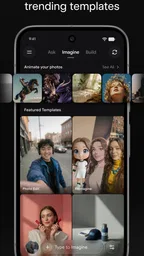
Image creation is another area where expectations matter. An assistant can help turn an idea into a visual direction, but someone who needs precise control over layers, typography, reusable design assets, or a production-ready file may be better served by a dedicated design application. I would use generated images for exploration and rough concepts, then switch tools if exact editing or repeatable brand consistency is essential.
Costs, updates, and the decision to install
The app is free to install, while in-app purchases range from $4.99 to $2,600.00 per item. That is a broad span, so I would inspect the purchase screen carefully before approving anything and make sure I understand the selected item and recurring terms, if any are shown. Someone who only wants occasional help should avoid assuming that every capability is included at no cost; checking the in-app options first is the practical way to avoid an unwanted surprise.
The current version is 1.2.57-release.01, and the app requires Android 9 or later. I would keep it updated through the app store if I chose to use it, both for access to the current release and because app behaviour and visible controls can change over time. The exact version matters less than reviewing the permission and account choices on the device where I install it.
Grok AI is a good fit for curious users who want a quick conversational tool for everyday explanations, early drafts, idea development, and image prompts. It is less suitable for anyone who needs guaranteed factual answers, strict document management, or a workflow where sensitive information must remain tightly controlled. My recommendation is conditional: try it with low-risk tasks, keep personal and confidential details out of prompts unless you have reviewed the relevant terms, and verify anything important elsewhere. Used with those boundaries, it can save time without asking me to surrender my judgement.
What we like
- Supports natural conversations with follow-up questions.
- Can analyze images shared in a chat.
- Offers voice interaction for hands-free use.
- Can search the web for current information.
- Provides access to multiple AI models in some plans.
What could be better
- Some features require a paid subscription.
- Responses can contain inaccurate or outdated claims.
- Usage limits may apply to free accounts.
- Web search results may not fully support generated answers.
- Availability of features can vary by region and platform.





