

GoTune: MP3 Music review
 Analysis by Appsdrops
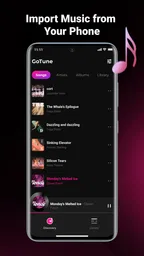
When I want music to keep playing without relying on a data connection, I care less about an elaborate streaming catalogue and more about whether my own MP3s are easy to reach and control. That is the useful idea behind GoTune: it is an offline music player built around local MP3 playback, playlists, and background controls. Its focus is refreshingly clear, though it also means the app is best judged as a convenient way to listen to music you already have, not as a substitute for a streaming service.
Offline listening is the point
In everyday use, offline playback changes the listening routine in a simple but meaningful way: once your music is available on the device, you can play it without depending on mobile data or a steady connection. That can be handy on a commute through poor reception, while travelling, or in places where you would rather not stream. The value is practical rather than flashy. You choose from your own music instead of searching a large online catalogue.
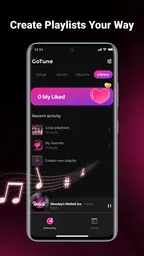
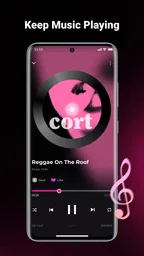
The app’s other central tools support that same routine. Playlists help group tracks into a listening order, while background controls let playback continue when you move to another app or lock the screen. Together, these are the basics I want from a local player: choose a set of songs, start listening, and avoid having to keep the music app open. The strongest reason to try GoTune is that it keeps offline MP3 listening straightforward.
What that means for a real music library
A local player is only as useful as the music you can access on the device. I would first make sure the MP3 files I care about are already available on the phone, then build a couple of playlists around how I actually listen: perhaps one for a familiar commute and another for quieter background music. This keeps selection simple without turning every listening session into a fresh search through the whole collection.
There is a useful trade-off here. With a personal MP3 library, I decide what goes into a playlist and do not need to browse recommendations to find something familiar. But a local collection also asks me to do the organising. If a track is not among the music available on my device, an offline player cannot fill that gap with an online catalogue. That is the key distinction from streaming, not a flaw unique to this app.
Background controls make short sessions easier
Background playback matters most when music is part of something else. I can imagine starting a playlist before setting off, locking the screen, and leaving the phone in a pocket rather than keeping the player in view. The same arrangement suits desk work: begin a chosen set of tracks, switch to another task, and let the music carry on. Those are modest conveniences, but they are exactly the sort that make a basic player useful more than once.
For a smoother routine, I would prepare playlists before I need them rather than sorting tracks on the move. A playlist for an ordinary day can save repeated choices, while a separate one for a particular mood avoids reshuffling a larger collection each time. This is not a hidden automation feature; it is simply a sensible way to get more from the playlist option the app offers. If you tend to play a few familiar songs repeatedly, that small amount of setup can make offline listening feel much less fiddly.
A good fit for commutes and connection gaps
The clearest everyday scenario is a commute where reception comes and goes. I would pick a playlist at home or before leaving, start it, and rely on the stored MP3s rather than expecting a stream to remain stable. The same approach makes sense for a long trip, a walk in a low-signal area, or any routine where using a data connection is inconvenient. The appeal is predictability: the music is already on the device, so the listening plan does not depend on a network being available at that moment.
It can also suit someone who wants a small, dependable soundtrack while doing chores. A playlist avoids pausing to choose each next song, and background controls let the phone remain available for other tasks. I would not treat that as a reason to ignore storage or library organisation, though. The tracks still need to be present locally, and a little thought about playlist contents pays off when you want to press play and get on with the day.
Where it differs from streaming apps
Compared with a typical streaming service, GoTune puts control of the music selection in the listener’s hands. That is a strength if you have MP3s you want to keep close and prefer a familiar set of songs. It is a limitation if you expect a broad catalogue, online discovery, or a service that supplies music you have not already collected. The app’s offline-first role is narrower, but that narrowness can be welcome when your main goal is simply to play personal files.
Compared with a general-purpose audio app that mixes local playback with many other functions, this player’s stated focus is easier to understand: music files, playlists, and controls while the app is in the background. I would choose between these approaches based on the source of my listening. If most of my music comes from an online subscription, the subscription app is the more natural home. If I already keep MP3s on my phone and want a direct way to play them, a dedicated local player is the better match.
One practical question is whether this can replace a streaming subscription. For listening to tracks you already have as MP3 files, it can cover the basic playback routine. It does not make a personal library equivalent to an online catalogue, so I would not switch expecting access to music that is not stored on the device. Another question is whether it suits someone who changes songs constantly: it can still be used that way, but playlists are likely to be more convenient than repeatedly choosing tracks one by one.
Honest limits to keep in mind
The biggest limitation is also the clearest boundary: this is for offline MP3 music, so the listener needs to bring the collection. If you do not have local tracks ready, the core benefit has little to work with. Someone who prefers an app to suggest new artists or make a large catalogue instantly searchable will probably be happier with a streaming service. I would also look elsewhere if my priority were a feature-rich audio toolkit rather than straightforward playback.
Playlist organisation can involve some up-front effort, especially if a collection is large or spread across many different listening moods. I would start with a few useful groups instead of trying to catalogue everything at once. That makes the app easier to use immediately and helps reveal whether a local-player routine suits you. The trade-off is time spent organising now for less decision-making later.
There is another small but important expectation to set: offline playback is not the same as effortless access to every song. The app’s role is to play MP3s available on the device; the listener remains responsible for having the music there. If your usual routine involves switching among newly released tracks or discovering unfamiliar music, that responsibility may feel like friction rather than freedom. For a stable collection of favourites, it is much less of an issue.
Who is most likely to enjoy it
I would recommend GoTune to someone who already owns or keeps MP3s on an Android phone and wants a simple way to arrange them into playlists and listen while using other apps. It is especially appealing if you often face unreliable connectivity or simply prefer not to stream during everyday listening. The app is free, and its Everyone age rating makes it broadly accessible. It is from Technology Hub Pro, and its current version is 1.1.1.
It has an average rating of 4.2 from around 1,800 ratings, with over one million installs. Those figures suggest that it has found an audience, but I would still make the decision based on your own library and habits. A high install count cannot make a local player useful if you mainly listen through a subscription service, while a modest set of carefully chosen MP3s may be all another listener needs.
GoTune is also listed for Android 8.0 and later, so I would check that against the device I plan to use before settling on it. For someone on a compatible Android phone, the key question is not whether it can replace every music app; it is whether a focused offline player solves a real annoyance. If the annoyance is losing access to familiar tracks when reception drops, playlists and background playback address it directly.
My recommendation
I see GoTune as a practical choice for a particular kind of listener: one who has MP3s ready, likes to decide what goes into a playlist, and wants music to continue without keeping the player open. Its best use is not discovering a new world of music, but making a personal collection easier to enjoy in ordinary moments—on a commute, during chores, or whenever a connection is not part of the plan.
If you want a broad online catalogue, personalised discovery, or a library that appears without any preparation, I would choose a streaming app instead. If you value access to your own files and are willing to organise a few playlists, this app’s focused approach makes sense. My advice is to begin with one playlist you will actually use, try it during a normal day, and see whether offline access makes listening simpler. That is where GoTune’s strengths are most convincing, and where its limits are easiest to judge.
What we like
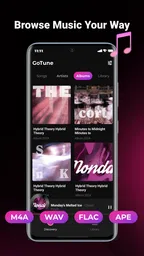
- Offers a simple way to browse and play music files stored on your device.
- Useful playback controls make it easy to pause and skip tracks.
- A lightweight design can suit users who want a focused music player.
- Playlist support helps organize tracks for different listening moods.
- Can play music without relying on a streaming subscription.
What could be better
- Does not include a licensed catalog of songs for streaming.
- The experience depends on having music files saved on your device.
- Some audio formats may not be supported.
- Free use may include advertisements.
- Music discovery features may be limited compared with streaming apps.





