


Good Lock review
 Analysis by Appsdrops
I think Good Lock makes the most sense when you want a Galaxy phone to feel more like your phone, rather than a device whose layout and behavior you simply accept. It is a free customization and convenience app from Samsung Electronics Co., Ltd., and its tools are aimed at changing parts of the Galaxy experience beyond the usual wallpaper and icon choices. My view is that it can be genuinely useful, but it is not a one-tap makeover: the payoff comes from choosing a few adjustments that solve problems you actually have.
What Good Lock is like today
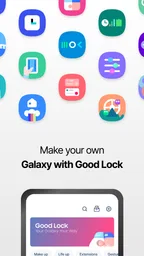
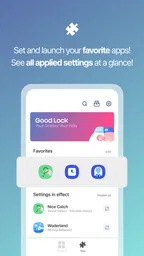
Good Lock belongs to the tools category, though it behaves less like a single-purpose utility and more like a home for separate customization modules. That distinction matters. You can explore options for different parts of the phone and focus on the ones that suit your habits, instead of having to apply one complete theme or use every setting. Its strongest idea is giving Galaxy owners more control over how their phone behaves and looks.
The app is developed by Samsung itself, which gives it a natural place in the Galaxy ecosystem. It is not a general Android customization suite intended to work the same way on every manufacturer’s phone. If you use a Galaxy device, the appeal is that these tools are designed around Samsung’s interface. If you use another Android brand, this is not a substitute for that maker’s own settings or customization options.
Good Lock is free, has an Everyone content rating, and has reached over ten million installs. It holds a 3.8 average from around eleven thousand ratings, with hundreds of written reviews. I would treat those figures as context rather than a guarantee of how well a particular module will suit you: people may be judging different parts of the experience, and customization is especially personal.
The current version is 3.0.16.6, and the app was released on January 20, 2025. It requires Android 12 or newer. Those details give a useful picture of the current app, but they do not tell me that every tool will work identically on every Galaxy model or software setup. Before planning around a specific adjustment, I would check what appears on my own phone and try the relevant module directly.
Why modules change the experience
The module-based approach is both Good Lock’s main strength and its first bit of friction. Instead of one crowded control panel for every tweak, the app presents customization as a collection of focused areas. That can make it easier to keep changes limited: if you only want to rethink one part of your interface, you do not have to redesign the rest of the phone along with it.
It also means you may need to spend time discovering which module relates to the change you have in mind. Someone arriving with a precise goal can explore purposefully; someone expecting a single “make my phone better” switch may find the choices less obvious. I recommend changing one area at a time, living with it for a day, and then deciding whether to continue. That makes it easier to identify which adjustment helped and which one only looked appealing in a menu.
For ordinary customization, the practical question is not how many options are available but whether an option improves a repeated interaction. A small change to a familiar part of the interface can save annoyance every time you unlock or handle the phone. On the other hand, an elaborate layout that looks clever during setup may become clutter when you are in a hurry. Good Lock rewards restraint more than collecting tweaks for their own sake.
What the current version means for existing users
If you already use Good Lock, the version number gives you a clear reference point for the edition available now. I would not read that number alone as proof of a particular new feature or a specific change to an older module. What matters in daily use is whether the tools you rely on remain present and behave as you expect after an update to the app or to the Galaxy software around it.
My sensible update routine would be to note the adjustments I depend on, update when convenient, then check those areas instead of assuming that every personal setup will remain untouched. This is especially worthwhile if you have spent time tuning several parts of the interface. The wider benefit is that Good Lock lets you build around habits, but the trade-off is that you become more invested in keeping those choices comfortable as the phone changes.
For someone who has never tried it, the latest version is a starting point, not a reason to overhaul a familiar phone immediately. Begin with one annoyance: perhaps the way you reach a frequently used control, or an interface detail that makes the phone feel less suited to you. Explore only the relevant area, test the result in normal use, and keep it if it saves effort. That approach is less likely to leave you with a collection of changes you later have to untangle.
A realistic everyday use
Imagine checking your phone repeatedly during a busy day, with one hand occupied and only a moment to get to the information or controls you need. A useful Good Lock setup would start by identifying the repeated point of friction, then adjusting the relevant part of the Galaxy experience so it better fits that routine. The key is to judge the change while doing the actual task, not just while looking at a preview or browsing settings.
There is also a good reason not to customize everything at once. If several interface choices change together, you may not know which one made the phone easier to use. I would make a single adjustment, use the device as usual, and revert it if it slows me down. This is a simple but valuable workflow for an app whose appeal is personal control: experimentation should stay easy to evaluate, not turn into a weekend project.
Good Lock can also be useful to someone who wants a phone to feel distinctive without replacing the entire launcher or rebuilding the home screen. The trade-off is that system-level familiarity still matters. If you change too many behaviors at once, the device can feel inconsistent, especially when you rely on muscle memory. I would preserve the interactions that already work and customize only the parts where the default experience genuinely gets in the way.
Where it fits among alternatives
Compared with ordinary Android settings, Good Lock offers a more Galaxy-focused route to personalization. Standard settings are usually the better place to make a basic adjustment quickly, because they are already part of the phone’s familiar setup. Good Lock is more attractive when those usual controls do not offer the degree or kind of customization you want.
A third-party launcher is a different kind of alternative. It may be a better fit if your goal is to replace the home-screen experience broadly or use a style that is not tied to Samsung’s interface. Good Lock makes more sense when you want to retain the Galaxy environment and refine parts of it rather than move to another layer. I would not install it just because a launcher can be customized; first decide whether you want a different home screen or more control within the phone you already have.
Theme and wallpaper tools also solve a narrower problem. They can change the phone’s appearance, but visual polish is not the same as improving a repeated interaction. Good Lock stands out when your goal involves convenience as well as appearance. If all you want is a new background or a coordinated look, a simpler option is likely enough and may take less time to manage.
Friction, limits, and who should skip it
The biggest limitation is the learning curve created by choice. More flexibility is useful only if you can find the relevant control and tell whether it helps. The separate-module approach can make discovery feel fragmented, and the amount of customization may be overkill for someone who is already happy with the default Galaxy setup. In that case, leaving the phone alone is a reasonable choice, not a missed opportunity.
Another practical caution is that a change that looks good in isolation may not work well with your own habits. A setting that saves one person a gesture could interrupt another person’s routine. I would be particularly careful with adjustments to frequently used interface areas, since even a small difference can become irritating when repeated throughout the day. Reversibility and testing matter more than chasing the most dramatic result.
I would also skip Good Lock if you expect it to function as a universal Android tool or to transform every part of a phone in one step. Its purpose is tied to Samsung’s Galaxy experience, and the right choice depends on what you want to change. For a non-Galaxy user, the manufacturer’s own tools are the more relevant starting point. For a Galaxy owner who wants no more than a basic look change, standard settings or a simple theme may be less work.
What to watch as you use it
For existing users, the most useful thing to watch is whether the particular customization you rely on continues to fit your device and daily routine after updates. For new users, watch for a clear benefit rather than a larger count of changes. If an adjustment does not make a task easier, reduce friction, or make the interface more comfortable, there is little reason to keep it simply because it is available.
I also recommend keeping your setup understandable. If you later forget why you changed something, it becomes harder to distinguish a helpful customization from an accidental complication. Making changes one at a time gives you a simple mental record of what each one does. It is a small habit, but it makes experimenting with a modular app less confusing and gives you an easier path back to a familiar setup.
My overall opinion is that Good Lock is worth exploring if you own a Galaxy phone and can name a specific interface or convenience problem you want to solve. It is not essential for every owner, and its choices take some patience, but the modular approach can make customization feel purposeful rather than cosmetic. I would start small, test changes in real routines, and keep only the ones that make the phone easier or more pleasant to use.
What we like
- Good Lock offers extensive customization for compatible Samsung phones.
- Its modules let you adjust the interface without replacing the launcher.
- The app is free to download from Samsung's Galaxy Store.
- Modules can be installed individually to suit your preferences.
- Samsung regularly updates modules to support newer Galaxy devices.
What could be better
- Good Lock is unavailable on phones from other Android brands.
- Some modules may not work on older or unsupported Galaxy models.
- Availability varies by country and device software version.
- Installing many modules can make settings harder to manage.
- Certain changes may reset after a system update.





