


GIPHY: GIFs, Stickers & Clips review
 Analysis by Appsdrops
GIPHY: GIFs, Stickers & Clips is built around a simple, familiar idea: finding a GIF that says what a plain message cannot. Its appeal is easy to understand, whether you want a quick laugh, a reaction image, a sticker, or a meme to share. There is also a creative side, since the app invites you to make your own. I see it as a handy visual-content app rather than a video editor in the traditional, timeline-focused sense.
Finding the right reaction
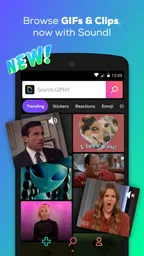
The central draw is the promise of a large library of free GIFs, stickers, and memes. That breadth matters because reaction content is only useful when you can find something that fits the moment. A quick search can be more convenient than saving images elsewhere and trying to remember where they came from. The app’s purpose is clear: browse, discover, and use short visual pieces to make conversations feel more expressive.
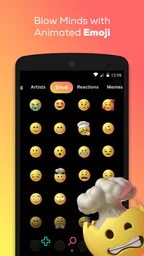
In practice, the best way to think about GIPHY is as a searchable source of shareable reactions. A GIF can convey enthusiasm, disbelief, awkwardness, or a joke without forcing you to write a long explanation. Stickers offer another visual style, while memes bring a more familiar internet-humor format. Having these kinds of content gathered in one app gives it everyday usefulness, especially for people who communicate heavily through messaging and social platforms.
I also like that the app is not limited to browsing. The invitation to create your own GIFs, stickers, or memes makes the experience feel more personal. A library helps when you need a ready-made reaction; creation is appealing when you want something with your own image, idea, or sense of humor. That combination gives the app more staying power than a simple collection of images, even if browsing is likely to be the main attraction for many users.
What the free access means
GIPHY is free to download and use, so there is no purchase price to weigh before trying it. That makes the initial decision straightforward: if you regularly share GIFs or enjoy browsing visual reactions, you can explore the app without paying an upfront fee. Free access is a meaningful part of its value because the core appeal is discovery and creative expression, not a one-time purchase of a specific media collection.
Still, “free” is best understood narrowly here: the app has no listed price. It does not, by itself, tell you that every possible feature or experience is free under every circumstance, so I would avoid assuming more than that. For a casual user, the practical point is simple: there is no purchase required just to get started. You can judge whether the library and creation options suit your habits before making GIPHY part of your routine.
That low barrier makes the app easy to recommend as a try-it-and-see option. If you only send a GIF now and then, there is little commitment involved in checking whether its collection matches your taste. If you use visual reactions throughout the day, the value can build through convenience: having a dedicated place to look for a fitting image can save time compared with hunting through old chats or scattered saved files.
How much value is in the library?
The store summary describes GIPHY as offering the largest library of free GIFs, stickers, and memes. That is a strong pitch, but the practical value is less about a superlative and more about whether you can find something that works for your conversation. A big collection is useful when it offers variety; it is less useful if you cannot quickly narrow down the choices. The app’s core promise, then, is variety and discovery, with the user’s own searches and interests shaping how rewarding it feels.
Its popularity suggests that the format has broad appeal. GIPHY has more than fifty million installs, and it has an average rating of 3.8 from around 231,000 ratings. Those figures indicate that many people have tried it, while the rating also leaves room for mixed experiences. I would take that as a reason to set realistic expectations: the app is a widely used option for GIFs, but no single library or interface will be perfect for everyone.
The app has been available since March 25, 2015, and its current version is 4.19.5. That history gives it a long presence in the GIF-sharing space, but longevity alone does not guarantee that every part of the experience will match your preferences. What matters most is whether you enjoy the content and find the app convenient. If you like browsing visual humor and expressive images, the basic concept has plenty of room to be useful without requiring you to treat it as an essential tool.
Creation adds a personal touch
Being able to create your own content is a welcome complement to browsing. Ready-made GIFs are great for familiar reactions, but a personal creation can feel more specific to a friend, a running joke, or a moment you want to capture. The app’s invitation to make your own GIFs, stickers, and memes suggests that it aims to support both consumption and expression. That makes it more flexible than an app whose only purpose is to display a fixed collection.
I would still approach the creative side with the right expectations. The app is categorized among video players and editors, but its identity is centered on GIFs, stickers, and memes. Someone looking for a full professional video-editing workflow may have a different idea of what an editor should provide. For casual visual creation and reaction content, however, the concept fits. It is a lightweight creative outlet, not something I would choose solely on the assumption that it replaces a dedicated editing suite.
The strongest value comes when browsing and making content serve different moods. Sometimes you just want to react quickly, and a searchable library is enough. Other times, a generic image does not quite fit, and creating something of your own is the more satisfying option. That range gives GIPHY a broader role in everyday communication, even though the app’s usefulness will naturally depend on how often you share this kind of media.
Tradeoffs to keep in mind
The biggest tradeoff is that a vast collection can feel less helpful when you are not sure what to search for. Looking for a specific reaction is one thing; casually browsing an enormous range of visual content is another. If you prefer a small, carefully selected set of images, a broad library may feel overwhelming rather than convenient. GIPHY is most compelling for people who enjoy exploring and are comfortable choosing among many possible reactions.
Another consideration is that GIFs, stickers, and memes are not equally useful in every conversation. They can add personality and humor, but they can also be unnecessary when a simple message is clearer. I see the app as a supplement to communication, not a replacement for it. Its value is highest when visual expression is welcome and when a reaction image genuinely adds something to the exchange.
The rating profile reinforces the idea that experiences vary. Around thirteen thousand written reviews accompany the app’s rating, so there is a substantial amount of user feedback behind the overall picture. Rather than treating a rating as a promise, I would use it as context: GIPHY has a large audience and a generally positive average, yet individual preferences around content, convenience, and creative tools still matter. It is sensible to try it for yourself rather than expect it to suit every style of user.
Age suitability is another detail worth noticing. The content rating is Teen, so the app is positioned for teen audiences and older users rather than as a specifically child-focused experience. For families, that label is a practical signal to consider when deciding whether it fits a younger user. It does not change the basic appeal for adults, but it helps set expectations about the audience the app is intended to serve.
Who is most likely to enjoy it?
GIPHY makes the most sense for people who already share GIFs, stickers, or memes in their chats and want a dedicated place to discover more. It is also a natural fit for users who enjoy internet humor and like matching a reaction to the tone of a conversation. If you regularly look for a visual way to say “that’s hilarious,” “same,” or “I can’t believe it,” a large library can make those exchanges more fun and less repetitive.
Creative users may get extra mileage from the ability to make their own content. You do not need to be a professional editor to appreciate the appeal of turning a personal idea into a GIF, sticker, or meme. The app’s free entry point also makes it approachable for curious users who are not yet sure how often they will use it. In my view, the best audience is anyone who treats visual reactions as part of ordinary online conversation, not only people who want a tool for occasional video work.
On the other hand, if you rarely send visual content, the app may be more of a novelty than a regular utility. Someone who wants a conventional video editor should also look carefully at the difference between casual GIF creation and a more comprehensive editing workflow. GIPHY’s central strength is its visual library and its playful creative angle; users seeking something entirely different may not get much from that focus.
My verdict
For a free app centered on GIFs, stickers, and memes, GIPHY offers an easy-to-understand reason to install it: browse a broad collection, find a reaction, or create something of your own. I like the mix of discovery and creativity, and the lack of an upfront price makes it a low-risk option for anyone who enjoys sharing visual content. Its popularity also shows that this kind of quick, expressive media has a sizeable audience.
My recommendation is to try GIPHY if GIFs and reaction images are already part of how you communicate. It can make everyday conversations feel more playful, and the creative option gives it an extra dimension beyond searching a library. If you hardly ever use this format, you may not find enough reason to keep it in your routine. Either way, the no-cost starting point makes the decision easy: install it if the idea appeals to you, explore the collection, and see whether it earns a place among your regular apps.
Overall, GIPHY is best judged as a free, social-minded source of visual expression, not as a paid editing package or an all-purpose video studio. For frequent GIF users, the combination of browsing and making content can deliver clear everyday value. For everyone else, it is an optional bit of fun that is simple to sample and easy to leave behind if it does not match the way you communicate.
What we like
- Search makes it easy to find GIFs by topic or reaction.
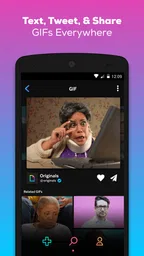
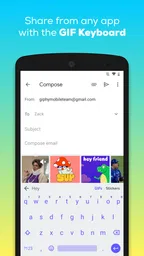
- GIFs and stickers can be shared directly to many messaging apps.
- Users can create GIFs from videos or camera footage.
- Trending content offers quick inspiration for posts and chats.
- The app includes short video clips as well as GIFs.
What could be better
- Some content may be unsuitable for younger users.
- Search results can vary in quality and relevance.
- Creating custom GIFs may require access to photos or the camera.
- The large media library can use significant mobile data.
- Availability of sharing options depends on the apps installed.





