
Gemini Notebook review
 Analysis by Appsdrops
I like productivity tools that help me make sense of information I already have, rather than asking me to rebuild my workflow around them. Gemini Notebook is most compelling when treated as a focused place to investigate a subject with AI assistance. That can be useful when I am sorting through reading for a project, trying to understand an unfamiliar topic, or turning scattered research into questions I can actually answer.
It is a free productivity app from Google LLC, and its audience is broad: the age rating is Everyone. Its central appeal is easy to grasp, but the practical value depends on how you use it. I would approach it as a companion for understanding and organizing research, not as an automatic authority or a replacement for careful reading.
Why a research-focused assistant changes the task
Gemini Notebook puts the emphasis on exploring a subject with a personalized AI research assistant. That framing matters. A general chatbot is often best for a single question and a quick response; a research-oriented tool is more useful when I want to keep returning to a topic, ask follow-up questions, and build a clearer picture over time.
The difference is less about making research effortless and more about changing where the effort goes. Instead of spending all my time deciding what to search for next, I can use an assistant to help surface useful questions and explain ideas in plain language. I still need to judge whether an explanation is accurate and whether it addresses the problem I care about.
That distinction is important for students, people preparing reports, and anyone learning something outside their usual field. A confident-sounding answer can feel complete even when it is only one way of interpreting a subject. I find the app most valuable when I treat its responses as a starting point for thought, not as a final citation or decision.
Google’s app has drawn a 4.7 average from around 360,000 ratings, and it has more than 50 million installs. Those figures suggest that it has reached a wide audience, but they do not tell me whether its research style fits every person. The better question is whether I want an AI assistant involved in making a topic easier to navigate.
From a vague subject to better questions
The strongest use of an AI research assistant is often not asking it to “tell me everything.” That request is too broad to produce a useful working understanding. I get more out of narrowing the subject, asking for a plain-language explanation, and then following up on the part that remains confusing.
For example, if I were learning about a complicated policy issue, I would begin by asking for the central concepts and the distinctions that are easy to mix up. Then I would ask how those concepts affect a particular real-world case. This turns the assistant into a guide through the subject rather than a machine for producing a long, undirected summary.
A useful habit is to ask the same question from different angles. I might request a simple explanation, then ask what assumptions it depends on, and finally ask what evidence would change the conclusion. That sequence can reveal where my understanding is shallow. It also makes it easier to notice when an answer has skipped an important qualification.
The most useful shift is from collecting answers to building questions. When an explanation raises a new uncertainty, I can pursue that uncertainty instead of immediately moving on. This is a better fit for research than treating every response as a finished result, and it helps me stay actively involved in learning.
A practical routine for a real project
Imagine I have to prepare a short presentation about a subject I barely know. I would first use the app to clarify the basic vocabulary and identify the main themes. Once I have a rough outline, I would explore each theme separately, asking what it means and why it matters to the audience I have in mind.
After that, I would use follow-up questions to test my understanding. Could I explain the idea without repeating the assistant’s wording? Which parts are still uncertain? What would someone with a different perspective challenge? These questions make the session more useful than simply asking for a presentation and copying the response.
For a recurring project, I would also keep my questions specific enough to remain useful later. “Explain this topic” is hard to revisit because it does not say what I was trying to learn. A question such as “What is the difference between these two approaches, and when would each be useful?” gives me a clearer trail of reasoning to return to.
This workflow is especially handy when I am reading about several connected ideas and losing track of how they relate. Instead of switching immediately between unrelated searches, I can use the assistant to clarify the connection, then decide what I need to verify in my own reading. That keeps the learning process moving without pretending the assistant has done all the research for me.
Where it fits among familiar tools
Compared with a conventional search engine, a conversational research assistant can be more approachable when I do not yet know the right search terms. Search is still the stronger choice when I need to locate a particular original source, compare a broad range of pages, or inspect information directly. I would not use an AI explanation as a substitute for checking a source that will support an important claim.
Compared with ordinary note-taking apps, this kind of tool is better suited to exploring meaning than simply storing what I have already learned. A notes app can be the better home for carefully organized personal records, durable project documentation, or material I want to manage without an AI in the middle. The two approaches solve different problems: one helps me investigate; the other helps me preserve and arrange.
It also differs from a general-purpose chatbot in its research emphasis. A chatbot can be convenient for writing help, brainstorming, or a one-off explanation. I would choose a research-centered notebook when I expect a subject to take more than one question and want the interaction to support ongoing understanding. If I only need a quick definition, opening a dedicated research space may be more process than the task deserves.
The limits I would keep in view
AI can make difficult material sound smooth, but smooth wording is not proof that the reasoning is sound. For health, legal, financial, or other consequential topics, I would use the app to help me understand terminology and prepare questions, then consult sources or qualified people suited to the decision. The more serious the consequence, the less comfortable I am relying on a generated explanation alone.
There is also a risk of accepting the first framing the assistant offers. If I ask a narrow question, I may get an answer that is coherent but misses a larger disagreement or an important exception. I try to ask what the explanation leaves out and to phrase a follow-up from another viewpoint. That takes extra work, but it is a sensible trade for a tool that can make research feel deceptively simple.
Another practical tradeoff is that conversation is not always the best way to work. If I already know exactly what document, fact, or passage I need, direct search or a structured reference may be faster. Likewise, if I am collecting many details that need precise tracking, a conventional document or spreadsheet may make the final organization clearer than a string of questions and answers.
For those reasons, I would not recommend using an AI assistant as the only record of research that needs to be auditable. I would keep the important source material and my own notes, and use the assistant to interpret, compare, or clarify. That separation makes it easier to tell the difference between what a source says and what the AI has inferred from it.
Who gets the most from it
I think Gemini Notebook is a good fit for curious learners, students beginning a research task, and people who regularly encounter subjects that feel opaque at first. It is especially useful for someone who benefits from asking follow-up questions in ordinary language and wants help finding a path through a topic before committing to a polished conclusion.
It may be less suitable for people who want a traditional search tool, a plain notebook with no AI role, or a strictly controlled research process where every statement must be traced directly to a source. In those cases, search engines, reference materials, and conventional note-taking can be more dependable foundations. The app can still help clarify questions, but it should not be asked to replace those tools.
Google released the app on May 16, 2025. For me, the most sensible way to judge it is not by how much it can say, but by whether it helps me understand a subject well enough to ask sharper questions and make better use of my own reading. It is free, and the store lists 3,500 reviews; those details make it easy to consider, though my recommendation rests on the fit of its research-centered approach rather than popularity alone.
My advice is to start with a real topic you are currently trying to understand, not an abstract test prompt. Ask for a clear explanation, probe one confusing point, and then challenge the answer with a question about exceptions or assumptions. If that process helps you learn without making you careless about verification, the app earns a useful place in your productivity toolkit. If you need primary sources or exact record-keeping first, use those tools directly and bring AI in only where it genuinely helps.
What we like
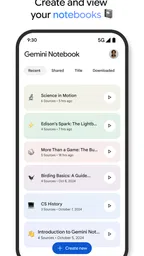
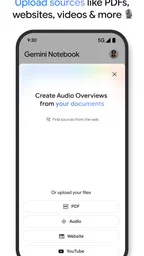
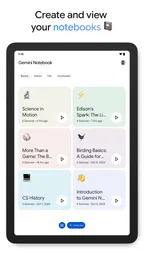
- Organizes related sources into focused notebooks.
- Answers can be grounded in the sources you add.
- Useful for reviewing notes and research in one place.
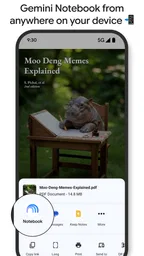
- Notebook content can be accessed across supported devices.
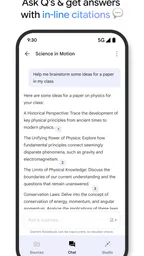
- Source references help you check where answers came from.
What could be better
- Features and availability can vary by account and region.
- AI responses may still contain errors or omit context.
- Quality depends on the relevance of your uploaded sources.
- Some advanced capabilities may require a paid plan.
- Large collections of sources can take time to organize.





