

GEICO Mobile - Car Insurance review
 Analysis by Appsdrops
I see GEICO Mobile as a practical companion to a GEICO car insurance policy, not a reason on its own to choose an insurer. Its main appeal is having insurance-related tasks close at hand when you need them, rather than having to search through paperwork or switch between several tools. That makes it most useful to existing GEICO customers who prefer handling routine account matters on a phone. If you want a broad financial dashboard or an independent way to compare insurance options, I would look elsewhere.
Where the app earns its place
Developed by GEICO Insurance, this free finance app is centered on the relationship between a driver and the insurer. That focus is both its strength and its limit: it is designed to support GEICO customers, rather than serve as a neutral insurance marketplace or an all-purpose money manager. The name GEICO Mobile is familiar, but I would judge it by whether it makes your own policy easier to manage, not by the brand alone.
The clearest everyday benefit is convenience. When a car-related task comes up, a mobile account can be easier to reach than a folder of documents or a desktop session. I find that especially valuable for drivers who want to check in on their insurance while away from home. The app’s usefulness is less about browsing for entertainment and more about reducing friction around a service you may only think about when something needs attention.
That distinction matters. Some finance apps try to pull together banking, budgeting, credit and investing in one place. GEICO Mobile is narrower. Its insurance-first purpose can make it a more direct choice for a policyholder who wants to deal with their insurer, while someone seeking an overview of all household finances will still need other apps. I would not install it expecting a general-purpose financial hub.
The app has been available since August 10, 2010, and its current version is 5.112.1. That long-running presence gives it the feel of an established account tool rather than a brand-new experiment. It has a 4.4 average from around 513,000 ratings, with around 139,000 written reviews, and more than 10 million installs. Those figures suggest that many people have tried it, but they cannot tell you whether it fits your policy needs or how smoothly it will work on your particular device.
A useful role in a real driving routine
Imagine you are away from home and realize you need to deal with an insurance matter before your next drive. The practical value of keeping the insurer’s app installed is that you can start with your account in one place instead of hunting for a paper document or trying to remember which service handles the task. I would make sure I can sign in and find the parts of the account I use before an urgent moment arrives; a calm setup session is a better test than discovering a login problem in a parking lot.
Another sensible workflow is to treat the app as a companion to, not a replacement for, your own records. If you are preparing for a trip, review the insurance information you expect to need ahead of time and keep any important details accessible in the way that works for you. An insurer’s app can make account access more convenient, but it should not be your only plan for every situation, particularly if you may have limited connectivity or a low battery.
I also like the idea of separating routine account management from comparison shopping. Use a policyholder app when you already know which insurer you are dealing with; use independent comparison tools when you are deciding whether that insurer is still right for you. Mixing those jobs can make a convenient account app seem more comprehensive than it is. GEICO Mobile’s value is in the first job, not in showing the whole market.
What the focused design does—and does not—solve
A specialist app can be less confusing than a broad finance product because it does not have to serve several unrelated goals. The trade-off is that its usefulness depends on having a reason to interact with GEICO. If you do not have a GEICO policy, the app is unlikely to become a regular part of your routine. And if you have policies with multiple insurers, you may still need separate apps or account channels to manage them.
That is a meaningful limitation for households where different drivers or vehicles are insured in different places. A single insurer’s app cannot automatically become a unified view of every policy simply because it is convenient. I would not assume that installing it removes the need to keep track of documents or accounts elsewhere. Before relying on it as your main reference, check that it supports the specific account tasks you personally need.
There is also a broader choice to make between app convenience and insurer choice. If your priority is getting the best fit across coverage, service and cost, comparing providers matters more than the quality of any one company’s app. A polished digital experience can make existing customer tasks easier, but it does not by itself establish that a policy is right for you. I would compare insurance on its own merits first, then treat mobile account management as one factor in the decision.
As with any account-based finance app, the experience depends on being able to access your account and on the app working well with your device. If you prefer not to manage insurance through a phone, or you usually handle policy matters with a person, a mobile app may add little. I would keep another way to reach the insurer available for situations where you cannot sign in or do not want to use a screen.
Who should install it, and who can skip it
I would recommend GEICO Mobile to current GEICO customers who regularly use a smartphone and want their insurer’s account close by. It makes the most sense if you are comfortable completing routine tasks digitally and value having a dedicated channel for your policy. The app is free, and its content rating is Everyone, so the basic decision is less about an upfront purchase and more about whether it fits your insurance relationship.
It is a weaker fit for someone who is shopping for insurance and wants an impartial comparison before choosing a company. A GEICO-branded app is naturally tied to GEICO, so I would not use it as my only research tool. It is also easy to skip if you rarely use a phone for account management and are content with your existing way of handling insurance. Installing an app simply because it exists is not a benefit if it adds another account to maintain without making your routine easier.
For a family, the useful question is not just whether one person can install it, but who actually needs access and how the household keeps important information organized. I would decide whose phone should be used for policy tasks and make sure the people who may need to act know how to find the information they need. That small bit of planning can matter more than adding another icon to everyone’s home screen.
Device compatibility is worth checking before downloading. The listed minimum operating system is version 9, so a device running an older system may not be suitable. If you are choosing between using the app and the app store’s other ways of accessing an insurer, think about where you are most likely to need the information and which method you will reliably keep available.
My verdict on GEICO Mobile
My overall view is positive but deliberately narrow: this is most compelling as a convenient account companion for GEICO policyholders, not as a substitute for comparing insurers or managing every part of your finances. Its focused purpose is easy to understand, and a free, established app can be worthwhile when it helps you handle insurance from your phone. The strongest reason to keep it is that you already have a GEICO relationship and want a direct mobile route to it.
Before depending on it, I would sign in when you have time, check that your account is accessible, and work out how you will keep essential information available when your phone is not. If those basics fit your routine, the app is a sensible addition. If you are not a GEICO customer, need one place for policies from several insurers, or want to shop across the market, a different tool or a direct conversation with insurers will serve you better.
What we like
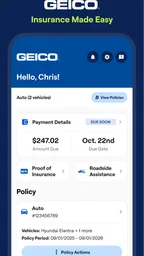
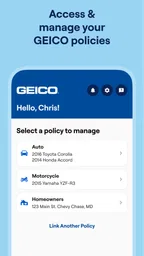
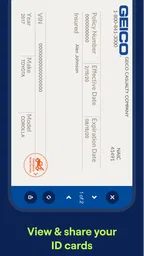
- View policy details and insurance cards from your phone
- Start a claim and follow its status in the app
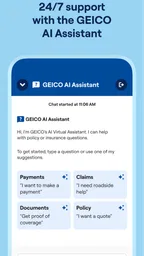
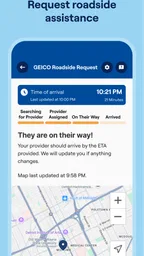
- Get roadside assistance without calling customer service
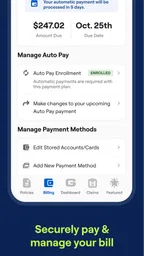
- Pay premiums through a secure mobile payment feature
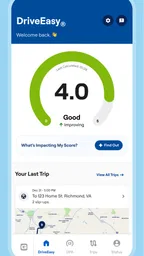
- Use the vehicle care tools to track maintenance records
What could be better
- Some features require an active GEICO policy
- A stable internet connection is needed for most tasks
- Available tools can vary by state and policy
- Login issues may prevent access to policy information
- The app may request location access for certain services





