


FreePrints review
 Analysis by Appsdrops
Printed photos still have a way of bringing people together: they end up in albums, on shelves, and in the hands of relatives who rarely scroll through a phone gallery. FreePrints is built around that simple idea, offering a way to order photo prints from a mobile device. I find the appeal easy to understand for a household: instead of leaving favorite pictures buried among thousands of digital snapshots, you can choose some to have printed and share them in person.
Turning a shared photo library into prints
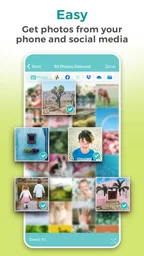
In a home where several people take pictures, the challenge is often choosing which ones are worth printing. A family gathering, a school event, a holiday, or an ordinary afternoon can produce a lot of images. FreePrints gives that selection process a practical destination: pick photos on a phone, arrange an order, and bring the images into the physical world. It’s a straightforward concept, and that focus is part of what makes the app easy to recommend to people who want prints rather than another elaborate editing workspace.
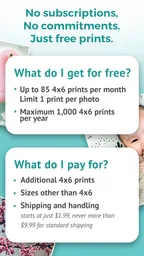
The app is in the photography category, and its central purpose is clear. The store summary says users can print up to 1,000 4x6 photos a year for free, with no subscription or commitment. That offer makes the app especially relevant to people who want to print regularly without signing up for a recurring plan. As with any print order, it makes sense to review the order details in the app before placing it, so you know what you’re selecting and what applies to that order.
I like that the basic proposition is easy to explain to someone else in the household. One person might be the family photographer, while another is more interested in keeping an album or sending pictures to grandparents. FreePrints can fit into that routine as a tool for turning selected phone photos into prints, rather than asking everyone to adopt a complicated new way of managing images.
The app is free to download, and its audience is broad: it carries an Everyone content rating. It has been available since May 23, 2013, and the current version is 4.50.0, with Android 10 as the minimum operating-system requirement. These details help set expectations about compatibility and the app’s long-running presence, while the main appeal remains the same: a simple route from digital pictures to printed keepsakes.
One person can lead without making the phone a family account
For shared-device use, I’d treat FreePrints as an app that a household member can operate on a personal device, rather than assume that one login or one device automatically suits everybody. If multiple people use the same phone or tablet, it’s worth being deliberate about who is selecting photos and placing orders. A quick check before ordering can prevent confusion between one person’s snapshots and another person’s choices.
That distinction matters because a photo library can be personal even when the device is shared. Pictures may include friends, relatives, children, or moments that one person would rather not include in a print order. I’d make the selection together when the order is intended for the whole household, and let the person responsible for the device review the final choices before moving ahead.
The most useful household habit is to agree on the photos before placing an order. It’s a small step, but it keeps the experience comfortable for everyone. One person can gather suggestions, another can help narrow them down, and the person handling the order can check the selections. That kind of coordination doesn’t require a special family feature; it’s simply a sensible way to use any photo-printing app around shared memories.
Keep account and device boundaries clear
If a phone is used by more than one person, I’d avoid treating the app as a communal space without first agreeing on who is responsible for it. The person placing an order should understand which photos are being chosen and should be comfortable handling the account and order process. For a household with separate devices, each person can decide whether they want to use the app themselves or pass selected pictures to the person who coordinates printing.
This is particularly helpful when adults and children share a device. A parent or caregiver can manage the ordering step while inviting younger family members to help choose pictures. That approach gives children a role in preserving memories without making them responsible for account decisions or purchases. It also keeps the process clear: choosing a photo is one thing, placing an order is another.
I wouldn’t assume that shared access is the same as shared permission. If someone else’s phone or account is involved, ask before using it, and be clear about who is making the final selection. A little communication is more useful than leaving the device unlocked and hoping everyone understands what will happen next.
Making group choices feel easy
Choosing prints together can be part of the fun. Instead of asking everyone to scroll through an entire camera roll, start with a specific occasion or a small group of favorites. That keeps the decision manageable and helps people focus on images they genuinely want to see again. It can also make the app useful for more than one person’s personal prints: a household can build a small collection of shared moments without needing to agree on every photo ever taken.
For relatives who don’t use the same device, coordination can stay simple. One person can ask which pictures others would like printed, then make the selection on the phone they use for the order. If the pictures are intended as gifts or keepsakes, checking names and occasions before submitting can help avoid mix-ups. This is ordinary planning rather than a special feature, but it makes a difference when several people contribute ideas.
The app’s free-print offer may encourage households to make printing a regular habit, but I’d still be thoughtful about what to select. A handful of meaningful images often feels more personal than an indiscriminate batch. For example, a family might choose a few highlights from a celebration, then decide later whether they want another set. That keeps the experience focused on preserving memories instead of turning photo selection into a chore.
FreePrints has a substantial audience, with an average rating of 4.8 from around 362,000 ratings, and more than 10 million installs. Those figures suggest that the app has reached many people looking for a convenient way to order photo prints. I take popularity as useful context, not a guarantee that every household will have the same experience; the best fit depends on whether its simple print-focused approach matches what you want to do.
Age, trust, and a sensible adult role
Because the app has an Everyone rating, it’s suitable for a broad audience in terms of its content classification. Still, an age rating doesn’t replace adult judgment about how a shared device or account should be used. In a family setting, an adult can oversee photo choices and order decisions, especially when children are helping. That keeps the activity centered on selecting pictures together while making responsibilities clear.
Photo selection also involves a bit of trust and courtesy. Before printing an image that includes other people, consider whether it’s appropriate to keep or share as a physical copy. This is especially worth remembering for group photos or pictures taken during private moments. Asking first can prevent an awkward surprise and makes the process more respectful for everyone represented in the image.
The app is developed by PlanetArt and is free to install. The offer of up to 1,000 4x6 prints per year without a subscription or commitment is a strong reason to consider it, but I’d still read the order information carefully each time. That’s a practical habit for any service involving printed products: confirm the pictures, the format, and the order details before you finish.
On Android, the listed minimum requirement is Android 10. If a shared household device runs an older system, checking compatibility in the app store before planning around it is the simplest way to avoid disappointment. The current version is 4.50.0, which gives users a clear version reference when checking whether their app is up to date.
A practical fit for households that value keepsakes
What I appreciate most is the app’s narrow, understandable purpose. It isn’t trying to turn every family member into a photo editor or make printing feel like a complicated project. It gives people a way to pick pictures and order prints, which is exactly the job many households want to get done. The free-print allowance makes that proposition especially approachable for people who would otherwise leave their camera roll untouched.
There are a few practical limits to keep in mind, without treating them as flaws in the idea. Someone still needs to choose the photos, coordinate with anyone whose pictures are included, and handle the final order. That may be easy in a small household and more involved when lots of people share devices or have different preferences. A clear point person and a quick review of the selections can keep the process smooth.
For a family, I’d use FreePrints as a shared activity with clear boundaries: invite everyone to suggest favorites, let an adult or account holder manage the order, and pause before printing images that involve other people. That balances convenience with a bit of care. It also makes the prints more meaningful, because the selection reflects what the household actually wants to keep.
Overall, FreePrints is a sensible choice for people who want to turn phone photos into physical keepsakes without committing to a subscription. Its appeal is easy to grasp, and the free annual 4x6 print offer gives households a reason to try a more regular printing routine. I’d recommend it to anyone who enjoys sharing printed memories and is happy to spend a little time choosing and coordinating pictures. Used thoughtfully, it can help a collection of digital snapshots become something the whole household can revisit.
What we like
- Order prints directly from your phone without visiting a photo lab.
- Choose from standard print sizes to suit albums and frames.
- Preview photos before placing an order.
- The app makes it easy to reorder prints.
- Shipping is available to your address.
What could be better
- Prints beyond the monthly free allowance incur charges.
- Shipping and handling fees may apply to free prints.
- Print size options may be limited compared with a local lab.
- Delivery times can vary by location and order volume.
- Print quality may differ from how photos appear on your screen.





