





Freecash: Earn Money review
 Analysis by Appsdrops
I tend to judge a rewards app less by its promise of extra cash than by how clearly it explains the work involved. Freecash is a finance app built around earning rewards through activities such as playing games. That idea is easy to understand, but using it well depends on whether you can comfortably read offer details, keep track of requirements, and fit the tasks around your day. My overall impression is that it can suit patient users who enjoy mobile games, while people who need predictable income or a low-effort experience should look elsewhere.
Finding your way through offers
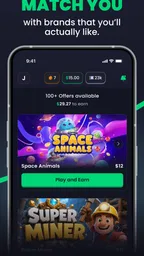
The basic appeal is straightforward: browse available activities, choose one, and work toward a reward. Freecash is developed by Freecash, is free to download, and has an average rating of 4.6 from around 579,000 ratings. More than 10 million installs suggest that the model has attracted a substantial audience, though popularity alone does not tell you whether a particular offer will suit your needs.
The app’s usefulness rests on details rather than on the headline promise. Before starting an offer, I would make a habit of reading its conditions carefully: what action counts, what progress is expected, and whether there are time limits or other qualifications. In reward apps, a task that sounds simple can become a poor fit if its completion rules are easy to overlook. Check the requirements before committing time, rather than treating the reward amount as the whole story.
That habit also helps with navigation. A list of offers is only helpful if you can compare them without rushing. I recommend looking for a task that matches what you already want to do, such as trying a game you would enjoy anyway, instead of picking solely by the apparent payout. This is a practical way to reduce wasted effort if the activity turns out to be repetitive or more demanding than expected.
The app is currently at version 1.271.1 and requires Android 7.0 or later. Its content rating is Mature 17+, which matters if you are choosing apps for a younger household member or sharing a device. Those details are useful before installation, but they do not determine whether the interface itself will be comfortable for you; that depends on your vision, dexterity, attention, and the specific offers you choose.
Reading carefully is part of the task
For a user with low vision, small text, dense offer descriptions, or visually busy game screens can make a rewards workflow tiring. I would inspect the app on the device you plan to use and see whether your usual text-size and display settings make the important terms comfortable to read. Do not assume that a reward is worth pursuing if you have to strain to understand its conditions.
There is a useful trade-off here: taking a minute to compare an offer can prevent a much longer stretch of play on an activity that does not suit you. If reading long descriptions is difficult, try reviewing one offer at a time and pausing before you begin. That slower approach may feel less convenient, but it is safer than tapping through quickly and later discovering a requirement you missed.
Motor and sensory demands depend on the activity
Freecash’s reward model involves games and other offers, so the physical and sensory demands are not necessarily the same from one task to the next. A game may require quick repeated taps, precise movement, sustained attention, or tolerance for animation and sound. Someone with limited dexterity, hand fatigue, motion sensitivity, or difficulty concentrating may find some choices much more comfortable than others.
I would treat the offer selection as a way to manage those demands. Favor activities that let you proceed at your own pace when available, and stop if a game’s controls or visual effects become uncomfortable. If a task requires repeated actions that aggravate pain or fatigue, the possible reward is not a good reason to push through. The app is most appealing when the activity itself remains enjoyable or manageable, not when earning becomes a test of endurance.
Sound can be another consideration. If you use a phone in a shared space, have hearing-related needs, or prefer a quiet environment, check the game’s own sound controls before settling in. A quiet setting and a comfortable grip can make a long session easier, but neither removes the need to assess the specific game. The app should not be treated as one uniform experience: the activity you select shapes much of the sensory and motor burden.
Making it work around everyday life
A realistic use case might be someone who already spends a little leisure time playing mobile games and wants to see whether an offer aligns with that habit. They could browse during a break, choose one activity, and return to it later when they have free time. That can be more sensible than opening the app whenever a spare minute appears and starting several tasks without a plan.
One practical workflow is to keep your attention on a single offer until you understand its conditions and progress. Switching between several activities makes it harder to remember what each one requires, and can make reward tracking feel like another chore. I would also reserve a moment to review the offer before beginning, rather than doing so while distracted or in a hurry. This is especially useful if you are managing other responsibilities or have limited energy for screen time.
For people with fluctuating concentration or stamina, short, planned sessions may be easier than long stretches. Choose a stopping point that feels comfortable and avoid treating an unfinished task as a reason to sacrifice rest, work, or time with other people. If you need to use a phone outdoors or while commuting, be cautious about gameplay that demands sustained visual attention or frequent interaction. The reward is not worth losing awareness of your surroundings.
Freecash is less compelling if you need money on a reliable schedule. Reward tasks are better understood as optional activities than as a substitute for wages, and the time required can vary with the offer. If your priority is predictable earnings, a conventional paid job or a clearly defined freelance assignment is a more appropriate comparison. If your priority is earning something while exploring games, this format may be worth trying, provided you keep expectations modest.
Where it sits beside other finance options
Compared with budgeting tools, banking apps, or expense trackers, this is not primarily about organizing money you already have. Its focus is earning rewards through participation. That makes it a different kind of finance app: less useful for tracking bills or building a spending plan, and more relevant to someone who wants optional, game-centered tasks.
Compared with other rewards platforms, the key question is not simply which one advertises the largest incentive. It is whether the available tasks fit your interests and whether their terms are understandable before you invest time. A survey-oriented service may suit someone who prefers answering questions, while a cashback app may be a better match for someone who already shops through eligible channels. Freecash makes more sense when game-based activity is genuinely appealing to you.
I would also avoid letting a displayed reward steer every decision. Think about the time, attention, and device use a task will demand, then decide whether the activity is still worthwhile without exaggerating what the reward means to your budget. That simple comparison helps keep an optional app from becoming a source of pressure.
Barriers to consider before installing
The largest practical barrier is that earning is tied to completing activities, not merely opening the app. A person who dislikes mobile games, has little free time, or finds extended screen use uncomfortable may see more effort than value. The Mature 17+ rating also makes it unsuitable for younger users, regardless of whether a particular game seems harmless at first glance.
There is also a learning burden: you need to understand each offer’s terms and make choices with care. If you have trouble processing dense text, remembering multiple conditions, or navigating visually busy screens, that burden may outweigh the appeal. Using a larger display, adjusting device text settings, or asking someone you trust to help review an offer may make the process more manageable, but these are workarounds rather than guarantees of an accessible experience.
Freecash is free to download, but “free” does not mean costless in time or attention. A task can take leisure hours, and the app may not be a good fit if you want an immediate, dependable return. I would skip it if the only reason you are considering it is urgent financial need. For that situation, a rewards app is not a reliable solution.
A measured recommendation
Freecash is worth considering for adults who enjoy mobile games, can comfortably review offer requirements, and are happy to treat rewards as an occasional extra. Its 4.6 average across a large audience gives useful context about its reach, but individual suitability still comes down to the activities available and how they fit your abilities and routine.
My advice is to start slowly: browse before committing, choose one activity that genuinely interests you, and check its conditions in a calm moment. Pay attention to how much reading, tapping, concentration, and screen time it asks of you. If those demands feel manageable, the app can turn some existing playtime into a structured reward activity. If they do not, or if you need dependable income, a different option will serve you better. For me, its strongest point is the choice to connect rewards with games; its main limitation is that the user must do the careful work of deciding whether each task is worth the effort.
What we like
- Offers several ways to earn rewards through games and surveys.
- Displays offer details and progress in one place.
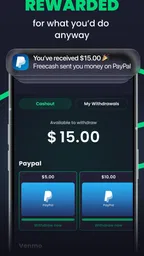
- Lets users track earnings toward withdrawal thresholds.
- Supports cash and gift card reward options.
- Provides a low-cost way to try mobile games and surveys.
What could be better
- Some offers require substantial time or in-app spending.
- Survey availability can vary by location and profile.
- Rewards may take time to verify after completing an offer.
- Withdrawal methods and minimums can differ by region.
- Offer terms may exclude users who previously installed an app.