





Frameo: Share to photo frames review
 Analysis by Appsdrops
The appeal of a digital photo frame is easy to understand: favorite pictures can stay visible without anyone needing to scroll through a phone. Frameo is the companion app for sending smartphone photos to a Frameo WiFi frame, and its usefulness depends less on novelty than on whether sharing becomes a comfortable habit. I like that the idea is focused: choose a picture, send it to the frame, and let it become part of the room rather than another item buried in a camera roll.
Developed by Frameo, this free photography app is rated for Everyone. It has a 4.8 average from around 151,000 ratings, with over 5 million installs. Those figures suggest a well-established audience, but the more important question for a new user is practical: will the people who own the frame actually keep sending photos after the first burst of enthusiasm?
Why the first week feels rewarding
The first round of sharing has a clear payoff. A family member can add a recent picture to a frame at home without needing to visit, print anything, or explain how to use a separate photo service. For the person receiving the frame, the result feels personal; for the sender, the action is small enough to fit into an ordinary day.
A useful way to start is to send a handful of pictures that work well when seen at a glance: a family meal, a child’s drawing, a view from a walk, or a candid moment with a clear subject. A frame is not the same as a phone gallery. People may see the image from across a room, so a photo that is charming when enlarged on a screen can be too busy or dark in a shared space. I’d choose images with an obvious focal point and avoid sending several near-identical shots in one go.
The app is most compelling when the frame belongs to someone who would enjoy new pictures but does not want to manage a complicated device. A relative can keep the frame in a familiar place while other family members contribute from their own phones. That makes the setup feel less like a one-time gift and more like an ongoing way to stay present in each other’s lives.
There is a small but meaningful difference between sending photos to a frame and sharing them in a group chat. In a chat, a picture competes with replies, links, and newer messages. On a frame, it gets a place in the home. That visibility is the product’s strongest emotional advantage, especially for families who live apart or for anyone who likes having personal photographs around without turning a room into a wall of prints.
Make sharing feel natural, not like a task
I would not try to populate the frame with a huge batch on the first day. Sending a few varied images gives the recipient something to enjoy immediately, while leaving room for later contributions to feel fresh. It also helps the person choosing pictures learn what looks good on that particular frame and in the room where it sits.
For a realistic routine, imagine taking a photo at a weekend gathering and sending just one or two highlights while the moment is still recent. That is more sustainable than promising to curate a perfect album every week. If several relatives contribute, it can help to share the informal expectation that a good photo is welcome but nobody needs to send something constantly. The goal is a living frame, not a new chore.
What keeps it useful after the novelty fades
The lasting value comes from the relationship around the frame, not from endless app interaction. Once the device is in place, the app can recede into the background until someone has a picture worth sharing. That is a strength: it does not need to become a daily destination to remain useful. A photo from a school event, a visit, or an ordinary afternoon can be enough to make the frame feel current again.
Compared with printing photos, this approach is quicker for spontaneous updates and does not require choosing prints in advance. Compared with a shared cloud album or group chat, it gives the recipient a passive, room-based way to see pictures rather than asking them to open an app. But those alternatives are better for different needs: a cloud album is more suited to browsing and organizing a large collection, while a chat is better when the point is conversation around each image.
One non-obvious trade-off is that the sender’s convenience can create a curation problem for the recipient. A frame is visible to everyone in the room, so pictures that are funny in a private chat may not be right for a shared household display. Before sending, I’d consider who might see the frame and whether the image makes sense outside the context in which it was taken. That quick check helps keep the experience pleasant for the person who lives with the device.
Another practical tip is to treat the frame as a small rotating highlight reel rather than a backup for the phone’s entire camera roll. The app’s purpose is to get selected photos onto a compatible Frameo WiFi frame, not to replace a full photo library. If you want searchable archives, detailed albums, or a complete record of every image, keep using your usual gallery or storage option as well.
Frameo is free to download, with in-app purchases listed from $1.99 to $69.99 per item. I’d think of the app and the physical frame as parts of one experience: the app’s value is tied to having a compatible frame and people willing to contribute. If you are only looking for a way to organize or edit pictures on your phone, this is not the right tool. If you already have the relevant frame, the app’s focused role makes more sense.
The upkeep is light, but the frame still needs attention
The app itself does not demand a elaborate maintenance routine, but the shared display benefits from occasional human attention. Someone needs to decide which pictures are worth sending, and the household may need to agree on who contributes. If one person does all the work, the frame can gradually become their project instead of a shared family habit.
I’d make upkeep easy by using moments that already prompt photo sharing: a birthday, a visit, a trip, or a funny everyday scene. There is no need to invent a schedule if that would make the process feel forced. A simple family norm—send a favorite when you have one, rather than forwarding every snapshot—keeps the stream manageable and gives each image a little more significance.
It is also worth thinking about the recipient’s comfort. A constantly updated display may be delightful for one household and distracting for another. If the frame is in a common room, contributors should be considerate about what they send and how frequently they do it. The app makes remote sharing convenient, but convenience does not automatically mean every picture belongs on a prominent display.
For anyone wondering whether they need to be especially technical, the central action is straightforward: use the phone app to send pictures to the Frameo frame. The broader experience still depends on the frame being set up and available to receive them. I would choose this arrangement for someone who wants pictures to appear in their home with little browsing, not for someone who wants to spend time building elaborate digital albums.
Where repetition and friction can creep in
The same simplicity that makes the app approachable can also make the experience feel narrow. If you rarely take photos, do not enjoy sharing them, or prefer keeping family pictures in a private archive, you may not open the app often. The frame can still display what has already been sent, but the ongoing contribution that makes it feel fresh may not suit every family.
There is also the risk of sameness. If contributors send only the same kinds of posed group shots, the display may start to feel repetitive. I’d vary the subject: a detail from a meal, a pet being ridiculous, a view from a walk, or a small achievement can give the frame more texture than a steady stream of formal portraits. The point is not to curate like a gallery; it is to make the pictures feel like real life.
People who want more control over a large photo collection may find a dedicated album or cloud library more satisfying. Those tools are designed for browsing, sorting, and keeping many images together. Frameo’s appeal is narrower and more domestic: a selected photo reaches a physical frame. That focus is a limitation if you expect an all-purpose photography manager, but it is exactly why the app can work well for a relative who would never browse a complicated collection.
The app has been available since November 29, 2016, and its long presence gives it a more established feel than a brand-new sharing experiment. Still, longevity alone does not guarantee that it will become part of your routine. The deciding factor is whether you have a compatible frame in a place where people enjoy seeing new photos, and whether at least one person is happy to send them now and then.
My long-term take
I’d recommend Frameo to families and friends who want a low-effort way to put selected phone photos in someone’s home, especially when the recipient is less interested in browsing apps than in seeing pictures appear naturally. It is also a thoughtful option for people who live apart but already share photos informally. The best results come when sending a picture feels like a small gesture, not an obligation.
I would skip it if you do not own or plan to use a Frameo WiFi frame, if you need a comprehensive photo organizer, or if the people involved are unlikely to keep contributing. In those cases, a shared album, a messaging group, or printed photos may fit better. The choice depends on whether you want to preserve and browse a collection or keep a small display feeling current.
For me, the app earns lasting space when it supports a habit that already exists: noticing a good moment and sharing it with someone. It does not need constant attention, but it does benefit from occasional thoughtful updates and sensible boundaries around what gets displayed. The strongest reason to use Frameo is that it turns a quick phone share into something the recipient can enjoy in the room, long after the message itself would have disappeared from view.
What we like
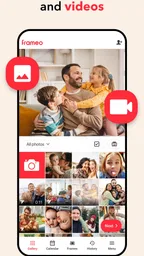
- Send photos and short videos directly to a compatible digital frame.
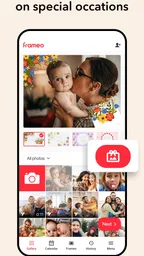
- Add captions to give shared photos extra context.
- Choose which connected frames receive each photo.
- Invite family members to share photos with the same frame.
- A simple interface makes sending photos easy for new users.
What could be better
- A compatible Frameo photo frame is required to display shared content.
- Frame owners must approve connection requests before sharing begins.
- The app depends on an internet connection for remote sharing.
- Free storage and video limits may vary by frame model.
- Shared photos may be visible to everyone with access to the frame.





