






FOX Nation: Celebrate America review
 Analysis by Appsdrops
I’d think of FOX Nation: Celebrate America as a place to spend time with FOX Nation programming, not as a general-purpose news reader. Its focus is entertainment, television shows, movies, and documentaries, which makes it a better fit for planned viewing than for quickly checking a stream of headlines. I’d use it when I want to choose something to watch, rather than when I need a broad overview of the day’s news.
Making it part of a viewing routine
The simplest way to get value from the app is to arrive with a viewing mood in mind. If I have a few minutes, I can browse for a short program; if I have a longer stretch, I can look for a movie or documentary. That distinction matters: a catalog centered on programs is most useful when I treat it like a viewing destination, not an endless feed I expect to summarize everything happening in the world.
A realistic routine might be opening it after dinner, scanning the available choices, and settling on one program instead of switching repeatedly between television apps. On a commute or during a short break, I’d be more cautious: watching requires attention and a suitable connection, and the app’s entertainment focus may not serve someone who only wants a quick text update. I’d save it for a moment when I can actually watch.
FOX Nation is a free app in the News & Magazines category, developed by FOX News Network, LLC. The free starting point makes it easy to try, but it should not be confused with a promise that every viewing option is included without cost. In-app purchases range from $9.99 to $79.99 per item, so I’d check the offer and any payment details shown in the app before committing.
Choose deliberately, rather than browsing on autopilot
For a better first session, I’d browse with a specific question: do I want a documentary, a show, or something lighter? That small choice helps keep a broad entertainment catalog from becoming a time sink. If I find myself opening the app without knowing what I want, I’d set a simple limit—choose one program, or spend a few minutes browsing, then decide whether to watch or leave.
This is also where the app differs from a typical news aggregator. Aggregators are built around headlines, multiple publishers, and fast scanning. FOX Nation is more appropriate when I want a program from its own viewing environment. If I want competing coverage, local reporting, or a quick comparison of how several outlets frame the same story, I’d use a broader news app alongside it rather than expecting this one to do both jobs.
Check the practical details before settling in
Before a longer viewing session, I’d check the app’s available settings and the device controls that affect playback, notifications, and data use. I’m not assuming a particular setting or shortcut exists in every version; the useful habit is to inspect what the installed app actually offers. That avoids relying on a feature I may not have, and it makes it easier to keep viewing comfortable on a phone or tablet.
Notifications are worth reviewing early. If the app offers alerts, I’d keep only the ones I genuinely want to receive, since entertainment prompts can become distracting when they arrive at the wrong time. If notification controls are handled partly through the phone’s system settings, those are worth checking too. A calmer setup makes it easier to open the app by choice instead of reacting to every interruption.
I’d also consider where and how I plan to watch. At home, a larger screen may be more comfortable for a documentary or film; away from home, I’d be mindful of mobile data and battery. The app’s store information describes video programming, so a stable connection and enough time to watch are practical considerations. If either is missing, a text-based news source is often the more sensible option for that moment.
Build repeatable habits for quicker decisions
Experienced users can make the app feel more useful without relying on hidden tools. I’d start by repeating a simple path: open the app, choose the type of program, make one selection, and watch. If I’m browsing with family or friends, I’d agree on the kind of content first; that cuts down on passing the phone around while everyone searches for something different.
Another helpful habit is to separate discovery from viewing. When I have time, I can explore the available selection; when I have only a short window, I can go straight to a program I already recognize or know I want to try. This is a general workflow, not a claim that FOX Nation has a particular saved-list or recommendation feature. The point is to make the decision before a limited viewing window disappears.
If I’m evaluating whether to pay for something, I’d pause at the purchase screen and check exactly what the item includes, whether the charge is one-time or recurring, and how it fits my intended use. The listed in-app purchase range is wide, so I would not assume all offers work the same way. For occasional viewing, trying the free experience first is a sensible way to learn whether the programming matches my tastes before spending.
Where the app’s limits become important
The main trade-off is focus. FOX Nation is centered on its own entertainment and program selection, so it is not the app I’d choose as my only source for breaking updates, local information, or a wide range of editorial viewpoints. Someone who wants a neutral, multi-source news briefing will likely be better served by a news aggregator or a mix of publications. That doesn’t make this app a poor choice; it means its best use is narrower than its category label might suggest.
There is also a difference between free to install and free to use for every purpose. The app costs nothing to download, but paid in-app items can affect the experience. I’d avoid tapping through a purchase quickly, especially if I’m only curious about one program. Read the terms shown at the point of purchase and decide whether the content is worth the cost to you.
The Teen age rating is another practical cue for households. If a young person will use the app, I’d review the content and the device’s parental controls rather than assuming every program is suitable for every age. A rating gives a broad guide, but a parent may still want to choose what is appropriate for their family.
Its audience response is mixed enough to make a trial more useful than relying on reputation alone: it has a 3.9 average from around 20,000 ratings, and more than a million installs. Those figures suggest a substantial audience, but they cannot tell me whether the catalog fits my preferences or whether I’ll enjoy the way I watch. I’d judge it by trying a session and checking the purchase details before making it part of a routine.
Who will get the most from it
I’d recommend giving it a try if you already enjoy FOX Nation programming and want a dedicated way to watch its shows, films, and documentaries. It can also suit someone who prefers choosing a longer program over scrolling through short news updates. The strongest use case is a deliberate viewing session at home or during another quiet part of the day, with enough time to settle in.
I’d skip it, or keep it as a secondary app, if your priority is fast headlines, a wide mix of news sources, or a constantly updated local briefing. I’d also be cautious if you mainly want free video and don’t want to review paid offers. In those cases, a conventional news reader or another video service that better matches your budget and viewing preferences may be a better fit.
A measured verdict after weighing the trade-offs
FOX Nation has a clear purpose: it brings FOX Nation entertainment programming into an app, and it works best when I approach it as a place to choose and watch a program rather than as a complete news service. Its free download lowers the barrier to trying it, while the in-app purchase range makes it important to check each offer instead of assuming everything is included.
For me, the best way to use it is simple: check the settings that affect interruptions and viewing, browse with a specific type of program in mind, and make purchase decisions slowly. That repeatable approach keeps the app useful without expecting it to replace a general news source. If the programming is what you’re looking for, it is worth exploring; if you need broad, quick, multi-source reporting, I’d choose a different primary app and use this one only when I want its particular viewing lineup.
What we like
- Offers a broad library of documentaries and original series.
- Includes live streams of select news and special events.
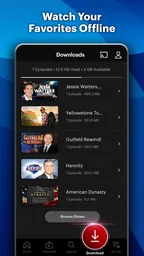
- Supports offline viewing for downloaded titles.
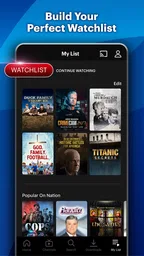
- Lets subscribers create watchlists for later.
- Works across supported phones and tablets.
What could be better
- A paid subscription is required for most content.
- The catalog focuses heavily on conservative viewpoints.
- Some titles may be unavailable outside the United States.
- Live content can require a stable internet connection.
- The app may collect usage data for analytics.





