






FOX LOCAL: Live News & Weather review
 Analysis by Appsdrops
I judge local news apps by how well they fit into ordinary routines, not by how dramatic their headlines look. FOX LOCAL is most useful when a household wants a quick way to check what is happening nearby and whether weather might affect the day. I would treat it as a convenient local-news companion, rather than the one source I rely on for every story or forecast.
One household, several reasons to check
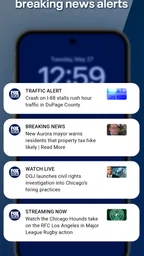
The appeal of a local-focused app is that different people under one roof can have different reasons to open it. One person may want a sense of what is happening around town; another may be checking conditions before leaving for work or school. FOX LOCAL brings local reporting and weather alerts together, which can make that quick check feel more purposeful than opening a broad national news feed.
A realistic use is the morning rush: while deciding whether to leave earlier, someone checks local coverage and weather information, then shares the relevant detail aloud with the rest of the household. That is a modest but useful role. The app can help people notice a developing local situation or weather concern without requiring everyone to follow the same news habits.
That shared usefulness should not be confused with shared personalization. I would expect each person to make their own choices about what to read and when to check, rather than treating the app as a household dashboard that automatically coordinates everyone. If one family member follows local breaking news closely and another only wants weather context, a short conversation about what matters is still more reliable than assuming they see the same information.
A useful second screen, not a household control panel
On a shared phone or tablet, the sensible approach is to think of FOX LOCAL as a source anyone can consult, while keeping personal account or device boundaries in mind. I would avoid leaving a device unlocked with sensitive notifications visible if other people routinely use it. That is ordinary shared-device hygiene, not a special feature of the app.
For a household that shares one device, the app may be convenient for a quick glance, but it is less ideal if different people need separate reading histories, notification preferences, or private settings. I would not assume that one installation will neatly distinguish between family members. When that separation matters, using individual devices or checking the device’s own user and notification settings is a better plan.
Set expectations before relying on alerts
Weather alerts can be valuable because they bring attention to changing conditions, but I would use them as prompts to check details, not as a complete safety plan. If someone in the home needs to act on a warning, make sure they know where the alert came from and what practical step the household has agreed to take. An alert on a phone is easy to miss when the device is muted, charging in another room, or being used by someone else.
One useful habit is to decide who will check local information at key moments, such as before a commute or an outdoor activity, instead of expecting every person to monitor the app continuously. That reduces notification fatigue and makes the information easier to act on. For urgent decisions, I would compare the app’s coverage with official local guidance rather than relying on a headline alone.
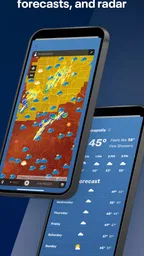
The app is free, which makes it easy to try without committing household money. It is published by Fox Television Stations, Inc., and sits in the news-and-magazines space, where it competes with local station apps, general news aggregators, and dedicated weather tools. Its core distinction is the combination of local reporting and weather alerts; someone who wants only radar or highly detailed forecast controls may prefer a specialist weather app alongside it.
What it does well—and where I would draw the line
FOX LOCAL has an average rating of 4.4 from around 12,000 ratings, with about 1,300 written reviews and more than a million installs. Those figures suggest that many people find a place for it in their routine, but they do not tell me whether its local coverage matches a particular town or whether its alert style suits an individual household. I would make that judgment by checking the app’s coverage for the places that matter to me.
The practical trade-off is breadth versus depth. A combined local-news and weather app can save a little friction when I want a quick overview, but it may not replace a dedicated forecast source for detailed planning or a broader news service for national and international context. If my main question is “what is happening near me?”, FOX LOCAL is a reasonable starting point. If I need specialized weather information, extensive topic controls, or a wide-ranging news digest, I would use another app for that job.
Make the first check a coverage check
Before turning on notifications or building a daily habit around the app, I would first see whether its local reporting is relevant to the area I care about. This is a non-obvious but important step: a local app is only as useful as its fit with your location and interests. If you split time between home and another city, check whether the coverage you need is easy to find rather than assuming the app will follow your routine automatically.
Then I would keep alerts selective. The point is not to receive every update; it is to hear about information that could change a decision. If the app offers alert choices, use only those that suit your routine. If it does not offer the level of control you want, device-level notification settings can help reduce interruption, though they may also suppress updates you would have preferred to see.
Another useful workflow is to separate “notice” from “verify.” A headline or alert can tell me that a local issue deserves attention; I can then open the story, check its timing and details, and decide whether it affects my plans. That extra step is particularly worthwhile when passing information to other household members. It avoids turning a brief notification into an overconfident summary of a developing event.
Age context and trust at home
The app is rated for Everyone, so its stated age classification is broad. In a household, though, that should not be read as a promise that every news item will feel comfortable or suitable for every child. News can include upsetting events simply because of what is happening locally. I would use judgment about whether a younger person should browse independently, and I would be ready to explain or discuss a story that raises questions.
For trust, I would treat the app as one reporting source rather than a substitute for conversation or official instructions. Local coverage can help a family notice what is unfolding, while weather alerts can make a changing situation harder to overlook. Still, the person making a decision should read the actual information and consider its relevance, not pass along a clipped notification without context.
That distinction matters on shared devices. A child might open the app while looking for weather, then encounter a news story that is more serious than expected. An adult can reduce surprises by checking in about how the device is used and by keeping the app’s purpose clear: it is for local information, not an entertainment feed tailored to each household member.
Who should choose it—and who should skip it
I would recommend FOX LOCAL to someone who wants a straightforward local source and appreciates having weather alerts in the same place. It is especially sensible for people who do not want a separate app for every quick check, or for households that often coordinate around local conditions. Its free price lowers the barrier to trying it, and its release date was April 21, 2023.
I would skip it as a primary choice if I mainly want national or international coverage, deep weather analysis, or strong separation between several people using one device. It may still be useful alongside those tools, but it should not be expected to replace them. People who dislike news notifications should also be cautious about enabling them broadly; a local app is only helpful if its updates add value rather than become another source of interruptions.
My household verdict is that FOX LOCAL works best as a shared point of reference, not a shared account system or a complete family safety solution. It can help someone spot local developments, check weather-related information, and start a useful conversation about plans. I would try it, confirm that its coverage fits the places I care about, and keep notifications limited to what I will actually act on. Used that way, it earns a practical place on a phone without asking the whole household to rely on one app for everything.
What we like
- Offers local news coverage tailored to your area.
- Live newscasts make it easy to follow breaking stories.
- Weather forecasts help you plan for changing conditions.
- On-demand reports let you watch news at your convenience.
- The app is free to download and use.
What could be better
- Coverage and features vary by location.
- Some areas may have limited local reporting.
- Live streams require a stable internet connection.
- Video playback can use substantial mobile data.
- Ads may interrupt the viewing experience.





