Fly Go 4 Drone Camera Control review
 Analysis by Appsdrops
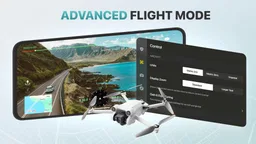
Choosing a drone controller app is less about finding the one with the most buttons and more about finding one that works with your aircraft, feels manageable on your phone, and gives you useful information before you take off. Fly Go 4 Drone Camera Control is aimed at people who want a mobile control option across a broad range of camera drones, with flight-zone information as part of the appeal. I see it as a practical option to investigate when you are trying to simplify the space between your drone, its controller, and your phone—not as a reason to assume every drone will work equally well.
What matters before you install it
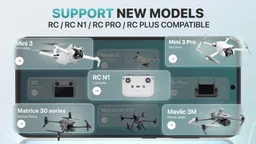
Compatibility should be your first decision point. The app’s focus is support for more than forty drone cameras, but that broad aim does not remove the need to check your exact drone model and how it connects. Before planning a flight around it, confirm that your aircraft is supported and that your phone meets the app’s requirements. An app that looks promising in general is not useful if it cannot communicate with the particular drone you own.
That check matters especially if you already have a manufacturer’s controller app. The manufacturer’s option may be the safer starting place for someone who values a single, purpose-built setup and already gets reliable camera and flight controls there. Fly Go 4 is more compelling when you want to explore a separate controller app that is designed to cover multiple camera drones, or when you are comparing ways to manage a compatible aircraft from a mobile device.
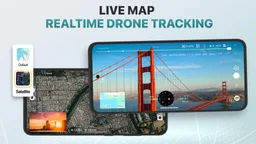
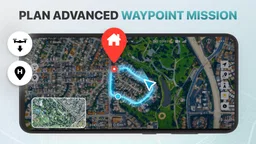
I would also treat the zone map as a planning aid, not as permission to fly. A map can help you think about where a flight might be appropriate, but it does not replace checking local rules, current restrictions, or conditions at the actual location. That distinction is easy to miss when a useful map sits alongside controls in the same app. For a drone, a convenient interface is not a substitute for a safe and lawful flight plan.
There is a straightforward way to test the fit without making the app the center of a trip: install it at home, check the connection with your drone, and learn where the relevant controls and map information sit before you head outdoors. That small rehearsal can reveal whether the layout makes sense to you and whether the basic connection behaves as expected. I would not make a first attempt in a crowded or time-sensitive situation.
Where Fly Go 4 makes sense
As a photography app from Apponfire Co. Ltd., Fly Go 4 is aimed at a particular kind of camera user: someone who wants their drone and phone to work together as part of taking aerial pictures or video. Its appeal is not simply that it is another place to view images. The more useful question is whether its control approach and flight-zone information make your preparation easier than the setup you currently use.
That combination can be helpful for a casual outing. Imagine bringing a compatible drone to an open space to take a few landscape shots before the light changes. You can use the time before takeoff to check the map, confirm your setup, and decide whether the location suits the flight you have in mind. If the app is already familiar, that preparation may feel more organized than juggling an unfamiliar controller interface after arriving.
A less obvious benefit of a multi-drone-oriented app is that it gives owners a reason to investigate one control workflow before buying or borrowing another compatible camera drone. That does not mean you can assume all supported aircraft behave the same way. It does mean that people who use different drones may find it useful to see whether one app can meet more of their needs. I would still test each aircraft individually rather than carrying expectations from one model to another.
The zone map also changes how I would use the app: I would check it before choosing a launch point, rather than waiting until I am already standing there with the drone ready. Doing that early makes it easier to rethink the location or the purpose of the flight without pressure. For a photographer, that can save a wasted trip even when the eventual decision is not to fly.
The app is free to download, which makes a cautious compatibility check easier to justify. It has a 4.3 average from around thirty-six thousand ratings, and it has passed one million installs. Those figures suggest that many people have tried it, but they cannot tell you whether your specific drone, phone, and preferred workflow will be a good match. Your own connection test is more relevant than popularity when the purchase decision depends on compatibility.
It is rated for Everyone and is currently at version 2.0.1. The minimum operating system is version 10, so checking your phone before installing is a sensible first step. The app also offers in-app purchases, with items priced from $3.99 to $69.99. I would explore the free experience and confirm that the core workflow suits you before spending anything; the price range alone does not tell you which paid option, if any, is useful for your needs.
When another kind of app may suit you better
If you fly one drone and its manufacturer’s software already gives you a dependable setup, changing apps may create extra work without solving a real problem. The familiar app is often the better choice when it is tailored to your aircraft and you depend on its established controls. I would only add Fly Go 4 to that routine if its compatibility and the way it handles your intended use offer a clear advantage.
On the other hand, a generic phone-based controller may be the wrong tool for someone whose work depends on a carefully repeatable camera workflow. If you need a particular feature set, precise settings, or a predictable process for frequent paid shoots, verify those requirements directly before relying on any alternative controller. The fact that an app targets many camera drones does not establish that it will meet every professional need.
People who mainly want to edit, organize, or share aerial images may also be looking in the wrong category. Fly Go 4 is about drone control and flight preparation, so it should not be chosen on the assumption that it replaces a photo editor or media library. A separate photography workflow may still be necessary after landing. That division is worth considering if your main frustration is managing pictures rather than controlling a drone.
There is also a practical trade-off in trying an additional controller app: you must learn its layout and establish whether it connects reliably with your equipment. If you are comfortable testing that at home, the trial can be low-pressure. If you need a guaranteed, familiar setup for a one-off occasion, staying with the controller system you already know may be the more sensible decision.
The real cost of changing your routine
Switching is not just a matter of installing an app. You need to check the aircraft model, confirm your phone’s operating system, become comfortable with the interface, and decide how the map fits into your preflight routine. I would do those steps in that order. It keeps a promising download from turning into a last-minute experiment at the launch site.
For a useful first test, choose a familiar, appropriate place and give yourself time to check the connection and controls before taking off. Keep the test flight simple; do not combine learning a new interface with trying a difficult shot or flying somewhere unfamiliar. If something does not behave as expected, you can stop and return to the setup you know. This is a small but important trade-off: a new app may offer a better fit, but it earns that role through testing rather than expectation.
Paid options deserve the same deliberate approach. Since individual in-app purchases range from $3.99 to $69.99, I would not treat the presence of purchases as proof that you need to buy anything. First establish whether the free version is compatible and useful for your routine. Then consider a purchase only if you understand what it adds and can connect that benefit to a real need. That keeps the decision grounded in your use rather than curiosity about a paywall.
Released on November 25, 2024, the app is still a relatively recent entry in its current form, so I would make personal testing part of the decision rather than relying solely on general impressions. A rating and a large user base can be useful context, but neither settles the question of how it will work with your specific combination of drone and phone.
Who I would recommend it to
I would recommend Fly Go 4 to a drone owner who has checked compatibility, wants a phone-based control option, and finds the idea of having flight-zone information alongside the control workflow useful. It is also worth considering if you use more than one camera drone and want to see whether a broader controller app can simplify your routine. The strongest case is practical: you have a compatible aircraft, a clear reason to try a different setup, and enough time to test before depending on it.
I would skip it, or at least postpone switching, if your current manufacturer app already does everything you need, if you cannot confirm support for your exact model, or if you need a specialist workflow that you have not tested here. I would also avoid treating a map as a final safety check. The app can support preparation, but responsibility for choosing a suitable location and following the rules remains with the pilot.
Overall, I see Fly Go 4 as a worthwhile free app to evaluate, not an automatic replacement for every drone’s existing controller. Its combination of multi-drone intent and map-based preparation gives it a distinct reason to try, while compatibility checks, learning time, and optional purchases are real considerations. If your drone is supported and you test it calmly before a real outing, it may become a useful part of your photography routine. If not, the best choice may simply be the controller app you already trust.
What we like
- The interface is straightforward for basic flight controls.
- Live camera viewing helps with framing shots.
- A phone can serve as a convenient backup controller.
- The app brings camera and flight controls into one place.
- It can make short drone sessions easier to manage.
What could be better
- Compatibility may depend on the specific drone model.
- Live video performance relies on a stable wireless connection.
- Phone controls may feel less precise than a dedicated remote.
- Camera features can vary across supported drone models.
- A small phone screen can make outdoor viewing difficult.





