

Find My Phone by Clap Launcher review
 Analysis by Appsdrops
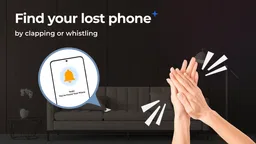
I keep a phone-finding app for the small, ordinary mishaps: setting my phone down in another room, leaving it under a cushion, or forgetting which bag pocket I used. Find My Phone by Clap Launcher is aimed at that sort of nearby search. Its basic idea is to let a clap or whistle help you locate a misplaced handset, rather than making you retrace every step in silence. That is a useful niche, but it is important to understand what it is—and what it is not—before relying on it.
How it fits into everyday phone finding
This is a free Android tools app from AtomApplications, with a simple job: help you find a phone that is close enough for a sound-based cue to be useful. I see the appeal most clearly at home or in a familiar workspace. If the phone has slipped between sofa cushions or is buried beneath a jacket, a clap-based search can be quicker than asking someone else to call it or checking every likely spot.
The approach is different from the usual remote-device services. Those are better suited to a phone left somewhere outside the home, or to situations where you need a map, account-based controls, or security options. A sound-triggered finder is more immediate when the handset is nearby but out of sight. It does not replace those services; it covers a smaller, more everyday problem.
That distinction also sets a practical limit. A clap or whistle cannot help much if the phone is far away, switched off, or somewhere noisy enough that the sound cue is hard to distinguish. I would treat this as a convenience tool for nearby mix-ups, not as a complete lost-device plan. For a phone left on a bus or in a café, the standard device-finding service is the more sensible first choice.
A good fit for small, repeatable mishaps
The strongest use case is a short search in a space you can access: a bedroom, kitchen, office, or car. Imagine coming home with shopping, putting your phone down while unloading, and then being unable to remember whether it is on the counter or still in a coat pocket. A sound-based search gives you a quick next step without turning the moment into a room-by-room hunt.
It can also suit people who often put a handset down while doing something else, or who have trouble spotting a dark phone on a dark surface. The value is less about sophisticated tracking and more about reducing the friction of a familiar annoyance. If you rarely misplace your phone, or already find it easily by calling it, the benefit may be modest.
What the current release tells me
The current version is 2.2.2, and the app was released on July 15, 2025. Those details give a reader a useful point of reference: this is a relatively recent utility with a current version that can be checked against the version offered on the app store. They do not, by themselves, show what changed between releases, so I would not assume that a particular feature or improvement arrived in this update.
For someone already using it, the practical question is whether the version installed on the phone is current and whether the clap-or-whistle method still fits their routine. I would not update expecting a specific new capability just from the version number. Instead, I would check the app’s current screen and try the core search in the places where I most often lose track of my phone.
The app has a 4.5 average from around 29,000 ratings, and it has more than a million installs. That level of use suggests that the basic idea is understandable to a broad audience, though ratings cannot tell me whether it will work well in every room, household, or sound environment. The best test is still a quick trial in the conditions where you expect to use it.
Making the sound-based workflow more dependable
One useful habit is to test the trigger before you actually need it. Try a clap from the doorway, then from a nearby room, and notice whether ordinary household sounds interfere. A short practice run reveals whether you need to be close, whether the room carries sound clearly, and whether the phone’s response is easy to notice. This is more valuable than discovering the limits while already stressed and in a hurry.
I would also choose a consistent place to keep the phone when it is not in use. The app can help locate a misplaced handset, but it cannot prevent the everyday pattern of putting it down in a different spot each time. Pairing the finder with a predictable charging or drop-off point makes the tool more useful: the sound search becomes a backup for an occasional lapse, rather than the only way to keep track of the device.
Noise is an important trade-off. In a quiet room, a clap or whistle is easy to produce and distinguish. In a busy kitchen, around music, or near several people talking, it may be less convenient to trigger a search and notice the response. I would use it when the surroundings are reasonably calm, and switch to calling the phone or using a remote locator when the sound-based approach is unlikely to help.
There is also a social consideration: clapping or whistling to find a phone can feel awkward in a shared office, library, or public place. For those settings, a discreet alternative may be preferable. I would not make the app my only plan if I regularly need to find my phone quietly or while away from familiar surroundings.
Where it differs from the usual alternatives
Calling your own number is the simplest alternative when another phone is available and the missing handset can receive the call. It is familiar and does not require a special sound cue, but it is less convenient when you are alone or do not have another device nearby. A clap-and-whistle finder is appealing precisely when you want a quick local search without asking someone to call you.
Built-in remote-finding services have a broader role. They are the better option when a phone may be lost outside your home, because their purpose is to help locate a device at a distance and manage a more serious loss. This app’s approach is narrower and easier to understand: make a sound, then use the phone’s response to help find it nearby. I would keep both kinds of tools in mind rather than treating them as competitors.
There is no single best choice for every user. If you mostly misplace your phone within arm’s reach, a sound-triggered utility can save time. If you are concerned about theft, travel, or losing the phone in public, use the phone’s built-in location and security tools as your primary protection. If your main problem is a phone that is always on silent and tucked away in a noisy room, a sound-based approach may not be enough on its own.
What to consider before installing
The app is rated for Everyone, and it is free. It requires Android 10 or later, so a phone running an older Android release is not a match. Those are straightforward checks to make before installing. The developer is AtomApplications, and the app sits in the tools category rather than being a general-purpose security suite.
I would also think about where I expect to use it and whether I am comfortable making a sound to trigger a search. That small behavioral detail matters more than the app’s broad promise. Someone who routinely loses a phone at home may find the method natural; someone who needs silent, remote recovery should lean on different tools instead.
For existing users, the main question is whether the app has earned a place in a real routine. If it has helped you find a phone once or twice in the same kinds of situations, keeping it available makes sense. If you installed it but never remember to use it, a simple charging station or a consistent storage spot may solve more of the problem with less effort.
What I would watch as the app develops
Because the current release is identified as version 2.2.2, I would watch future updates for clear changes to the core finding experience rather than assuming that a higher version number means a better search in every setting. For a utility built around sound, the details that matter most to users are practical ones: whether the trigger is easy to use, whether the response is noticeable, and whether the app remains straightforward when a phone is misplaced.
I would also pay attention to whether the app continues to suit the way I use my phone. A finder that works well in a quiet home might be less useful in a shared or noisy space. That does not make it a bad tool; it means the right expectation is a quick nearby locator, not a universal answer to every lost-phone situation.
Overall, I would recommend Find My Phone by Clap Launcher to someone who often misplaces a handset in familiar surroundings and wants a simple sound-based way to search. Its appeal is specific and practical, and that focus is a strength when the phone is nearby. I would pair it with the built-in remote-finding option for more serious losses, and I would test it in my own rooms before depending on it. If you want help with everyday hide-and-seek around the house, it is worth considering; if you need quiet, long-distance recovery, another option is the better fit.
What we like
- Can help locate a misplaced phone from another device.
- A simple interface makes its main features easy to find.
- Useful for people who often misplace their phone at home.
- May save time compared with searching room by room.
- Offers a practical tool for everyday device recovery.
What could be better
- Location accuracy depends on the phone's settings and signal.
- The app may need permissions to access location data.
- It cannot locate a phone that is powered off.
- Some features may require an active internet connection.
- Background location access can affect battery life.





