






Financial Times: Business News review
 Analysis by Appsdrops
I find Financial Times: Business News most useful when I want to understand what a market move, political decision, or company announcement means beyond the headline. It is a news app from The Financial Times Limited, focused on business, finance, politics, the arts, and wider global affairs. Its reporting is the main reason to open it; the experience works best when I have a dependable connection and enough time to read with attention.
Reading works best with a steady connection
News is time-sensitive, and the app’s strongest use case is keeping up with developments as they unfold. A commuter might check a developing story before a meeting, then return later to read a fuller account. That pattern suits the Financial Times better than treating it as a stream of quick, interchangeable headlines: the value is often in the explanation, context, and reporting attached to a story.
Connectivity matters most when moving between an alert or a headline and the article itself. On a reliable network, that transition is straightforward. On a weak signal, loading can become the part that interrupts the reading rather than the story. I would avoid relying on a just-in-time check when the news is essential and the connection is uncertain; if I need a report for a meeting, I open it while I still have stable access and give myself time to finish it.
The app has a 4.6 average from around 50,000 ratings, and it has passed a million installs. Those figures suggest a substantial audience, but they do not tell me whether its reporting style will suit every reader. The better question is whether you want a publication with a strong business and international perspective, rather than a broad feed designed mainly for rapid scanning.
Different moments call for different reading habits
On a phone, I use the app in short sessions to check what has changed, but I try not to judge a long article by a quick glance between tasks. A practical routine is to scan the headlines first, choose one or two stories that matter, and return to them when I can focus. That is especially helpful when a report covers a policy decision or financial development whose consequences are not obvious from its title.
For a daily reader, the app can serve as a morning briefing and a more deliberate evening read. I might check the news before work, then spend a quieter stretch following a topic that affects my industry or investments. The key is to distinguish “what happened?” from “what should I understand?” A quick visit can answer the first; the second usually rewards a complete article and a little concentration.
The phone format is convenient when I am away from a desk, but it also makes distractions more likely. If I am constantly switching between the article and messages, the app cannot solve the attention problem for me. I get more from it by treating reading as a short, intentional task: identify the issue, read the explanation, and then decide whether I need to follow the story further.
What to do when a story will not load
A dropped connection can leave a reader uncertain whether the article is still loading or whether the app needs attention. My first move would be simple: check the network, then try opening the story again rather than repeatedly tapping several headlines. If a report is important, I would switch to a more reliable connection before continuing. This avoids turning a small network hiccup into a frustrating session.
There is a useful habit here for anyone who reads on the move: do not wait until the last minute to open material you know you need. If I am about to board transport or enter a building with poor reception, I check the relevant story beforehand. I would not assume that an article will remain available after a connection disappears; the safe approach is to read while the app is connected and not plan around unconfirmed offline access.
When an article appears slow, it is also worth separating network trouble from the reading experience itself. A brief delay may come from the connection rather than the reporting or the app’s layout. I would give it a moment, retry once, and move on to another task if service remains unreliable. That is more sensible than refreshing repeatedly, which can consume time and still leave the story inaccessible.
Keeping data use intentional
If you read on mobile data, a little planning helps. I would reserve longer sessions for Wi-Fi when practical, especially if I expect to open several articles in succession. For a quick check, I would choose the story that matters most rather than opening every headline out of habit. This is a useful trade-off: the app’s depth is a strength, but following many articles can make a casual browse into a longer session.
I would also pay attention to how often I return to breaking coverage. Reopening the same developing story again and again can use both attention and connectivity without adding much understanding. A better workflow is to read the latest report, note what remains unresolved, and check back later when there is a meaningful update. That approach makes the app more useful for following events without turning the day into constant refreshes.
The Financial Times is free to install, while in-app purchases range from about $2.49 to $719 per item. That makes it important to check the purchase details in the app store before committing to anything; the free download should not be confused with unlimited access to every paid offering. I would decide what kind of regular reading I want first, then judge any purchase by whether I expect to use the journalism consistently.
How it compares with other news choices
Compared with a general news aggregator, this app is a more focused choice for readers who want Financial Times reporting and a strong emphasis on business and international affairs. An aggregator can be better when I want a range of publishers side by side or a broad sweep of local headlines. The Financial Times is more compelling when I want to follow a story through a particular editorial lens and spend time with reporting that connects commerce, policy, and global events.
It is not my first pick for someone who wants only brief alerts, entertainment headlines, or a purely local news routine. Nor would I recommend it as the sole source for a reader who needs a wide variety of viewpoints on every subject. Its focus is a strength when that focus matches your interests, but it also means a general-purpose news app may fit better if you want a wider mix in one place.
The app is rated for Everyone, and it has been available since November 8, 2011. Its current version is 2.303.0-snapshot.177.5935763537783.16509+c1a0e8e, with Android 8.0 as the minimum operating system. Those details make it easy to check basic compatibility, while the actual decision should still rest on whether you want this publication’s coverage and reading experience.
Who will get the most from it
I would recommend Financial Times: Business News to people who follow companies, markets, public policy, or international developments and are willing to read beyond a headline. It can also suit students and professionals who want a regular way to keep up with business-related news, provided they are comfortable making time for considered reading rather than expecting every story to fit into a few seconds.
It is less suitable if you mostly read in places with unreliable reception, need immediate access to every story regardless of connectivity, or prefer a fast, all-topics feed assembled from many sources. In those cases, a service designed around short summaries or a broader set of publishers may be a better everyday companion. I would also skip it if business and global affairs rarely interest you; a well-regarded publication still has to match your reasons for opening a news app.
For Android users, the app is available at no upfront price, but the in-app purchase range means I would review the terms carefully before choosing a paid option. The free entry point makes it easy to try the reading experience, while recurring readers should decide whether the material earns a regular place in their routine. That distinction matters more than installing it simply because it is popular.
My connectivity verdict
My overall view is that the app rewards reliable access and purposeful reading. It is strongest when I can open a story, stay with its context, and return later with a clear question in mind. Connectivity is not just a technical detail here: a weak signal can break the rhythm of a developing-news session, while a stable connection makes it easier to follow the reporting as intended.
For everyday use, I would check important stories before heading into a low-signal situation, keep mobile-data browsing selective, and avoid assuming that content will be ready without a connection. Those small habits make the experience less frustrating and help preserve attention for the articles that matter. If you want thoughtful business and world coverage and have a reliable way to get online, Financial Times: Business News is a strong option. If your priority is offline certainty, a broad mix of sources, or very short updates, another kind of news app will probably fit better.
What we like
- The app offers a polished layout that is easy to scan on a phone.
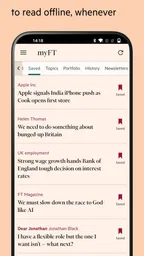
- Saved articles make it simple to return to important coverage.
- Personalised alerts can help you follow topics that matter to you.
- Audio versions let you listen to selected articles on the go.
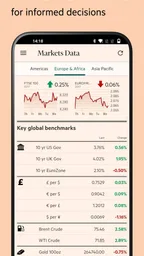
- The app includes international reporting across business and markets.
What could be better
- Most full articles require a paid subscription.
- Some content may be difficult for newcomers to financial terminology.
- Frequent alerts can become distracting without careful settings.
- Audio availability may vary between articles.
- The app needs an internet connection for most current coverage.





