



Fidelity Investments review
 Analysis by Appsdrops
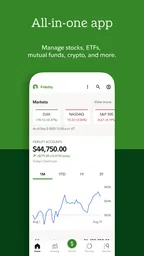
Managing money often means jumping between separate tasks: checking investments, setting savings goals, and figuring out what to do next. Fidelity Investments aims to bring those activities together in one place, with a focus on investing, saving, and planning. I find that all-in-one approach appealing because it gives a financial routine a clearer starting point instead of making every task feel like a separate project.
From a financial question to a first step
When I open a finance app, I want to know what it is meant to help me do before I get lost in menus. Fidelity’s central promise is straightforward: make it easier to invest, save, and plan. That gives the experience a practical direction, whether I’m checking on an existing financial routine or trying to work out what deserves attention first.
The app is free, and it is published by Fidelity Investments. It has been available since December 15, 2010, and its current version is 4.45. Those details suggest a long-running product rather than a newly launched experiment, though the app still needs to feel manageable in everyday use. Its audience is broad: the content rating is Everyone, and the app has more than 10 million installs.
That scale can make a financial app feel reassuring, but popularity alone does not tell me whether the workflow suits my habits. What matters is whether the app helps turn a vague intention—such as “I should get more organized”—into a useful next step. I approach Fidelity as a place to bring several money-related activities into view, rather than expecting one screen to solve every financial question automatically.
Getting oriented without overcomplicating the task
The first part of a good financial workflow is orientation. Before deciding what to do, I need a sense of what I’m managing and which task I came in to handle. An app built around investing, saving, and planning has a useful broad scope: it can speak to people who are focused on one of those areas today while leaving room for the others to matter later.
I like the idea of being able to begin with a specific intention. Perhaps I want to review my investments, think about savings, or spend time planning. Keeping those goals under one financial umbrella can reduce the mental effort of deciding which separate tool to open. It also makes the app’s purpose easy to explain: it is designed to support everyday financial decisions, not just one narrow action.
Still, finance is personal, and a clear starting point is not the same as a complete plan. I would treat the app as a practical workspace for engaging with money, not as a substitute for understanding my own priorities. That distinction matters: the better I know what I want to accomplish, the more useful an all-in-one finance app is likely to feel.
A practical sequence: invest, save, plan
The natural workflow suggested by Fidelity’s purpose starts with a question. What do I want to work on right now? If it is investing, I can focus my attention there. If saving is the priority, I can approach the app with that goal in mind. If I need a broader view of where I’m headed, planning becomes the more relevant starting point. This simple sequence keeps the experience tied to a real-life need instead of turning browsing into the goal.
From there, I would move from checking in to deciding on a next action. The useful part of a finance app is not simply that it gathers financial activity under one name; it is whether I can connect what I see to what I intend to do. Fidelity’s mix of investing, saving, and planning gives that process a sensible shape. A user can think about an immediate money task while keeping longer-term organization in view.
I also appreciate that this framing does not force every visit to be a major financial session. Some days, I may only want to make a quick check or spend a short time thinking about a goal. On other days, I may want to give planning more attention. A broad finance app can support both kinds of visits, provided I arrive with a clear purpose and avoid treating every prompt or screen as a reason to change course.
That is where a personal routine helps. I would decide what I want to review before opening the app, take time to understand the information in front of me, and then choose whether any follow-up is needed. It is a measured approach, which feels right for money. The goal is not to rush through financial decisions but to make them with enough context to feel intentional.
Keeping related tasks connected
The strongest part of an all-in-one concept is the handoff between tasks. Investing, saving, and planning are connected in real life, even when people tend to think about them separately. A person might begin by reviewing investments and then realize that a savings goal deserves attention too. Or a planning question may prompt a closer look at how current habits fit into a longer-term aim.
Fidelity’s broad remit gives users a reason to make those mental connections without changing to an entirely different finance product. That can make the experience feel more coherent: I can start with one concern and then consider how it relates to another. It is a useful design promise because financial organization is rarely a single isolated action.
There is also a handoff from the app to the user’s own judgment. The app can provide a place to engage with financial tasks, but I still have to decide what matters, what I understand, and what I am comfortable doing. I see that as a healthy boundary. A finance tool should support better attention and organization; I should remain responsible for the choices I make.
Another handoff happens over time. Financial routines are built through repeated attention, not one dramatic visit. A person may return to investing, saving, or planning as priorities shift. Fidelity’s long history as an app and broad adoption make it recognizable as an established option, while the usefulness of any ongoing routine will depend on whether its approach continues to match the user’s needs.
What the outcome feels like
When an app works well in this category, the result is less about a flashy finish and more about leaving with a clearer sense of what to focus on. I want to move from a general feeling that my finances need attention to a more specific intention: review, save, or plan. Fidelity’s central value is that it presents those activities as parts of one financial experience.
That can be especially helpful for someone who dislikes scattering money-related tasks across unrelated tools. Having a single app to turn to may make it easier to maintain a routine, and the broad scope gives the experience room to remain relevant as a person’s focus changes. It is a practical proposition rather than a promise of instant financial transformation.
The app’s reception is another part of the picture. Fidelity Investments holds an average rating of 4.3 from around 226,000 ratings, with roughly 58,000 written reviews. I would read that as a sign that many people have engaged with the app, not as a guarantee that every user will have the same experience. Finance apps are judged against individual expectations, habits, and goals, so the right fit is personal.
For me, the key outcome is having a structured place to approach money tasks. The app’s emphasis on investing, saving, and planning is easy to understand, and that clarity helps set expectations. If I open it knowing what I want to accomplish, the broad scope has a better chance of feeling useful rather than overwhelming.
Where the flow can lose momentum
An all-in-one finance app can also create friction simply because money itself is complicated. Bringing several topics together may be convenient, but it does not automatically make each decision easy. A user can still feel unsure about what to prioritize, and a wide-ranging product may take some time to feel familiar. I would not expect the app to remove the need for patience or careful thought.
There is a risk of arriving without a clear question and browsing without getting much done. When an app covers investing, saving, and planning, the range is useful only if I can keep my own goal in view. I find it helpful to approach a session with one main task, then decide whether another topic genuinely needs attention. That keeps the experience focused and makes it easier to tell whether I made progress.
Another possible point of friction is the difference between visibility and understanding. Seeing financial information is not the same as knowing what it means for me. I would take time to interpret what I’m looking at and avoid making a decision simply because an app makes an action available. That is sensible advice for any finance tool, especially one that covers multiple areas of personal money management.
Expectations matter, too. Fidelity is useful to consider as a financial app for investing, saving, and planning, but I would not approach it as a replacement for personal judgment. The strongest workflow is still a partnership: I bring my goals and questions, use the app as a place to work through relevant tasks, and make decisions thoughtfully. If I expect the app to choose priorities for me, the experience may feel less satisfying.
It is also worth remembering that a large audience does not make an app universally suited to every routine. Some people prefer a tightly focused tool, while others value having related financial activities gathered in one place. Fidelity’s broad approach will make the most sense to users who want to work across those themes and are comfortable keeping track of their own priorities.
Who may find it a good fit
I can see the appeal for someone who wants one recognizable place to engage with personal finance rather than treating investing, saving, and planning as disconnected chores. The all-in-one direction is clear, and the app has a long presence in the category. Its free price also makes it accessible to explore, while the Everyone content rating reflects a general audience rather than a narrowly restricted one.
Someone who already has a specific financial question may find it easier to get started than someone who opens the app without a goal. I would begin with one area, learn how it fits my routine, and then consider whether the other parts are useful. That gradual approach makes more sense to me than trying to reorganize every financial habit at once.
On the other hand, people who want a simple, single-purpose experience may prefer to think carefully about whether a broad finance app is the style they want. More scope can mean more possibilities to consider, and that is not automatically a benefit for everyone. The best fit depends on whether having investing, saving, and planning in one place feels clarifying or simply gives you more to navigate.
My take on Fidelity Investments
Fidelity Investments makes a clear case for an integrated approach to personal finance. Its focus on investing, saving, and planning gives users a natural way to move from a money question to a practical area of attention, and the app’s broad reach shows that it has become a familiar option for many people.
What I like most is the workflow it encourages: arrive with a goal, focus on the relevant task, and use related financial activities as context rather than distractions. The handoffs between those areas make sense because real financial priorities overlap. The main challenge is keeping the experience purposeful; a broad app cannot decide what matters most to me or replace careful judgment.
Overall, I see Fidelity as a worthwhile finance app for people who want to invest, save, and plan within one established product. It is not a shortcut around the work of understanding personal finances, but it can give that work a more organized starting point. If that all-in-one approach matches how you want to manage money, the app is an appealing place to build a steady routine.
What we like
- The app supports biometric sign-in for quicker account access.
- Customizable alerts can help you track account activity and market updates.
- You can deposit checks by taking a photo of each one.
- The app includes educational resources for investors at different experience levels.
- Customer support options are available directly within the app.
What could be better
- Some features may require a qualifying Fidelity account.
- Investment choices can feel overwhelming for first-time investors.
- Market data may be delayed in some sections of the app.
- Advanced research tools can take time to learn.
- App features and availability may vary by account type.





