



FamilySearch Tree review
 Analysis by Appsdrops
I can see the appeal of a family-history app most clearly when the research starts at home: one person remembers a great-grandparent’s name, someone else knows where the family lived, and a relative has an old photograph but not the date on it. FamilySearch Tree gives those clues a shared place to become part of a family tree, rather than leaving them scattered across conversations and personal notes. I’d recommend it to anyone who enjoys tracing relationships and is willing to check details carefully; it is less suitable if you only want a quick list of ancestors with no research involved.
Research that can begin around the kitchen table
FamilySearch Tree is a free Books & Reference app from FamilySearch International, designed for exploring ancestry and researching family connections. Its focus is more practical than a general reading or reference app: you work with people, relationships, and clues that help you understand where your family story might lead. The experience makes most sense when you treat it as an ongoing project, not a one-time lookup.
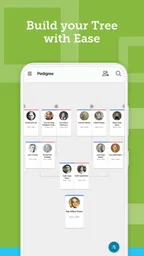
In an everyday household scenario, I might add a relative I know well, then ask a parent or grandparent to help fill in the names and relationships I’m less certain about. That turns a vague question—“Who was Grandma’s grandfather?”—into something you can investigate systematically. The useful part is not simply seeing a family tree take shape; it is having a reason to distinguish remembered information from details that still need checking.
That distinction matters. Family stories can be affectionate and memorable without being exact, especially when several relatives share names or dates have been passed along orally. I’d enter what I can support, mark uncertainty in my own notes outside the app if needed, and avoid treating a plausible match as proof. Genealogy is full of tempting connections, and a neat-looking branch can still be wrong.
Why a shared device needs clear boundaries
A phone passed around the family can make research feel collaborative, but it also creates a simple question: whose account and work are being used? I would decide that before inviting relatives to take turns. If one person is maintaining the tree, keeping the research under that person’s account gives the project a clear steward. If family members use their own accounts, they should understand that they are contributing from their own identity rather than casually borrowing someone else’s.
I would not assume that a shared device automatically means shared access or that every household member should use one login. The safer everyday habit is to agree on who is entering information and to avoid leaving an account open for others to use without permission. That is especially relevant when the tree includes living relatives: names and family relationships are personal information, even when the goal is historical research.
Before a group session, I’d also choose a small, concrete task. For instance, ask one relative to confirm the names in a single generation rather than letting several people make broad edits at once. This keeps the conversation manageable and makes it easier to notice where recollections differ. A shared screen is useful for discussion, but it does not replace careful agreement about what should be recorded.
Keeping relatives’ contributions coordinated
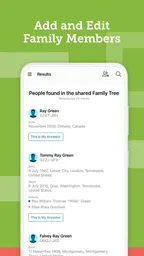
Family history often depends on people who know different pieces of the story. One cousin may recognize a location, while an older relative can explain which branch a person belongs to. The app is most valuable when those conversations lead to specific research questions: Is this the same person? Does this relationship fit what the family remembers? Which clue should we check next?
My practical tip is to separate gathering clues from deciding that a clue is correct. During a call or visit, write down the person’s wording and the context: who told you, which relative they meant, and whether they were certain. Then use that information to guide your research instead of silently converting a memory into a definitive fact. This small pause can prevent a mistaken name or relationship from becoming the starting point for more errors.
Coordination can also be easier if the family agrees on one person to review changes periodically. That does not require a formal family administrator; it is simply a sensible role for whoever is most comfortable checking relationships and resolving conflicting memories. If two relatives remember something differently, keep the disagreement open until there is a reason to settle it. For a family tree, accuracy is more useful than the appearance of completeness.
Compared with keeping a tree in a notebook or a generic document, a dedicated genealogy app is better suited to organizing relationships as a connected family history. A notebook may still be better for free-form stories, interview notes, or sketches of complicated relationships. I’d use those methods alongside the app rather than expecting a structured tree to capture every nuance of a family conversation.
Age, trust, and what I would explain first
The app is rated Everyone, and that broad age context makes it approachable for families who want to explore ancestry together. Still, an age rating does not remove the need for adult judgement about what to enter or share. If a child is helping, I would keep an adult involved, explain that family information should be handled thoughtfully, and let the child focus on questions and historical discoveries rather than managing account details.
For older relatives, the main challenge may be familiarity with a mobile research workflow rather than interest in family history. I would sit beside them, ask one question at a time, and let them tell the story in their own words before trying to fit it into a structured tree. That approach respects their knowledge and reduces pressure to remember every date immediately. The app can support the conversation, but the conversation is often where the most valuable clues begin.
Trust also means being careful with living people’s details. I would discuss with relatives what information they are comfortable contributing and avoid adding sensitive facts just because they came up in conversation. Family research can bring people together, but it can also touch on private or complicated history. A respectful pace is better than treating every discovery as something that should immediately be entered.
What the numbers say, and what they cannot decide
FamilySearch Tree has a 4.3 average from around 54,000 ratings, with roughly 6,200 written reviews, and it has passed 10 million installs. Those figures suggest that many people use it, but they cannot tell me whether a particular family’s records are easy to trace or whether the app suits someone who dislikes detailed research. I would judge it by whether it helps you organize questions and follow family connections without rushing to conclusions.
It is free, which makes it easy to try without paying to begin a family-history project. The current version is 5.5.0, and the app requires operating system version 11 or later. It was released on July 15, 2014, and its long presence in the category gives it a familiar role among genealogy tools, though I would still focus on the current workflow rather than assume every family will find the same experience.
Where I would choose another approach
This is not the right choice for everyone. If you want a polished family scrapbook with long personal narratives as the main feature, a writing or photo-organizing tool may fit better. If your priority is a private document you can edit freely without learning a dedicated tree structure, a spreadsheet or notebook could feel more direct. And if you are not prepared to verify names and relationships, a genealogy app can make uncertain information look more settled than it really is.
I would also avoid starting with an ambitious project to map every branch at once. Begin with the relatives you know, then work backward only when you have a useful clue. That keeps the research grounded and makes it easier to spot a mistaken connection early. A good first session might be no more than recording a few relationships and listing the questions you want to ask next.
For a household, the best use is usually a calm, shared investigation rather than a free-for-all on one phone. Pick a lead researcher, agree on how relatives will contribute, and treat uncertain memories as leads to investigate. That routine gives each family member a useful role without pretending the app itself can resolve disagreements or establish the truth of a story.
My household verdict
FamilySearch Tree is a strong fit for curious families who want to build a more organized picture of their ancestry together. I like its focus on relationships and the way it can turn a remembered name into a manageable research question. Its biggest limitation is not a lack of enthusiasm or family stories; it is the care required to keep those stories accurate, respectful, and clearly attributed.
I would recommend trying it if you have relatives willing to share what they know and you enjoy following clues over time. Start with a small branch, keep account use deliberate on shared devices, and make room for uncertainty when memories conflict. If you want instant answers or a casual archive with no research discipline, another tool may be more comfortable. For a family ready to collaborate thoughtfully, this app offers a useful home for the work.
What we like
- Searches historical records from a large collection of sources.
- Lets relatives collaborate on a shared family tree.
- Includes free access to many genealogy tools and records.
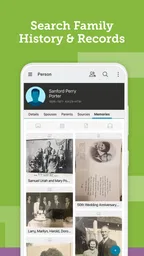
- Supports photos and stories to preserve family memories.
- Offers guidance for discovering and documenting ancestors.
What could be better
- Some records are restricted or require a visit to a partner facility.
- Family tree details can be edited by other users.
- Record coverage varies by location and historical period.
- Matching records may need careful review to avoid mistakes.
- Some features work best with a reliable internet connection.





