
Family Nest: Private Locator review
 Analysis by Appsdrops
I see the appeal of a family locator most clearly on an ordinary day when plans overlap: one adult is heading home, a teenager is coming back from an activity, and nobody wants to send a string of “Where are you?” messages. Family Nest: Private Locator is built for that kind of coordination, with shared location, check-ins and an SOS option. I like the practical focus, but location sharing only works well when everyone understands what is being shared and agrees to use it.
When one household needs a shared view
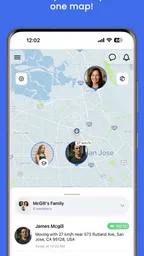
Family Nest is a free parenting app from Family Nest | GPS Live Locator. Its central purpose is to let family members see one another’s location in real time, with consent, rather than turn a phone into a hidden tracking device. That distinction matters: the app makes most sense as a mutual household tool, not as a way to monitor someone who has not agreed to participate.
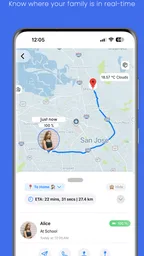
A realistic use is a parent and an older child coordinating the trip home after school. The child can check in when they leave, while the parent can look at the shared location instead of repeatedly calling. If a plan changes, a quick message or call is still the better way to explain what happened; a map can show movement, but it cannot tell you why someone stopped or changed route.
The same approach can help adults sharing errands or coordinating a pickup. One person can check whether the other is close before leaving the house, reducing unnecessary waiting. I would treat that as a convenience rather than a substitute for a confirmed meeting time, especially when a phone is left behind, its battery runs low, or the person carrying it is somewhere with poor signal.
For a shared household device, the key question is whose location the device represents. If several people use one phone or tablet, its position may not reliably tell the rest of the family which person is carrying it. I would avoid treating a shared device as an individual’s personal location unless the household has a clear routine for who has it and when.
Agree on the sharing boundary before setup
Because Family Nest is designed around consent, I would begin with a family conversation, not with the map. Decide who will join, what the location view is for, and when it is useful. A clear agreement such as “we use this for arrivals and pickups” is easier to live with than a vague expectation that everyone should always be visible.
That boundary is especially important when a child becomes more independent. A parent may want reassurance, while a teenager may reasonably want the app used for specific coordination rather than constant checking. The app can make location available, but it cannot establish trust on its own. I would explain the purpose openly and revisit the agreement if school, travel or family routines change.
Families should also keep account boundaries in mind. Each person should use the account and device arrangement intended for them, rather than casually sharing login details or assuming that one family member’s access is the same as another’s. I would check who can see the location before relying on the setup, and make sure children know which adults are part of the shared group.
For a parent setting up a child’s phone, it is worth doing the first check-in together. That gives the child a chance to understand what the location screen means and how to use the safety option, while the parent can confirm that the arrangement works as intended. I would not make a young child responsible for managing a complicated household setup alone.
Useful coordination, with limits to what a map can explain
The strongest everyday value here is reducing small coordination hassles. A check-in can provide a deliberate “I’m here” signal, while a location view can answer a narrower question: whether someone appears to be on the way. Those are different kinds of reassurance. I would use a check-in for an arrival that matters and the map for general timing, rather than expecting either one to replace a direct conversation.
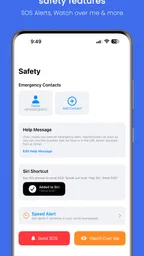
An SOS option is valuable as a route to seek help, but families should discuss what they expect it to mean before an emergency occurs. Who is likely to notice? What should the person do if they cannot use the app? The feature is not a guarantee that help will arrive, so I would pair it with the household’s normal emergency plan and local emergency services where needed.
One practical tip is to agree on a simple check-in routine instead of watching the map continuously. For example, a child could check in after reaching a destination, while a parent checks the location only if the expected arrival is delayed. This keeps the tool focused on coordination and avoids turning every small pause into a reason for concern.
There is also a trade-off in relying on live location: it can create false confidence. A displayed position is useful context, not proof that someone is safe, paying attention, or still carrying the phone. If a person is late or a situation feels unusual, a direct call or message is more informative than repeatedly refreshing a map.
Compared with the common alternatives, Family Nest sits between manual texting and broader device or platform location tools. Texting gives people control over each update but depends on someone remembering to send one. A built-in location-sharing service may be convenient for people already using the same phone ecosystem, while a family-focused app can make the shared purpose more explicit. The right choice depends on the family’s devices, preferences and comfort with sharing—not on which map is busiest with features.
Age, trust and the family’s comfort level
Family Nest is rated for Everyone, but that does not mean every child is ready to use location sharing in the same way. Age is only one part of the decision; maturity, independence, the reason for sharing and the child’s understanding matter too. I would use more explanation and closer parental involvement with younger children, and a more negotiated arrangement with older ones.
The app has an average rating of 4.5 from around 30,000 ratings, with about 1,200 written reviews, and more than a million installs. Those figures suggest that many people have tried it, but they do not tell me whether its approach will suit a particular household. A family that values explicit, voluntary coordination may find the idea appealing; someone who wants completely invisible monitoring should look elsewhere and reconsider whether that is appropriate at all.
Privacy is not just a setting to think about once. Families change, children grow, and a location-sharing arrangement that felt reasonable last year may need a new conversation. I would periodically ask whether everyone still understands who can see the location and whether the original purpose still applies. That simple habit is more useful than assuming consent remains meaningful forever without discussion.
There can be social friction, too. If one person sees the app as reassurance and another experiences it as pressure, the disagreement is not a technical problem the map can solve. In that situation, I would pause sharing and talk through expectations before treating the app as a family rule. The healthiest use is one everyone can explain and accept.
Cost, compatibility and practical expectations
The app is free to download, with in-app purchases ranging from $0.99 to $34.99 per item. I would check the purchase details in the app store before paying for anything and decide whether the free experience already fits the household’s needs. A locator is only useful if family members actually agree to use it, so I would not spend money before testing that basic willingness.
Version 3.9.4 supports Android 7.0 and later. That gives the app a broad starting point for Android households, although compatibility alone does not guarantee that every device will behave the same way. Before depending on it for a pickup or trip, I would try a routine check-in with each person’s actual phone and confirm that the family understands what to do if the app is unavailable.
Family Nest is not the right choice for someone who wants a private map without involving other people, or for a household that cannot agree on location sharing. It may also be unnecessary for families whose existing phone tools already provide a comfortable, mutually understood way to coordinate. In those cases, ordinary calls and messages can be clearer and involve less ongoing visibility.
My household verdict
I find Family Nest most convincing as a consent-based coordination aid for families who want fewer status messages and a clear way to check in. The combination of location sharing, check-ins and SOS gives it a practical role, especially around arrivals and pickups. Its value depends less on watching the map than on agreeing when to use it and what a location signal can—and cannot—tell you.
My recommendation is to set it up as a shared agreement, not a surveillance habit. Talk through access, try the check-in routine, and keep direct communication as the fallback when timing or safety really matters. If your household can maintain those boundaries, Family Nest is a reasonable parenting app to consider; if trust is already strained or sharing is unwanted, a different approach is likely better.
What we like
- Location sharing helps family members coordinate meetups.
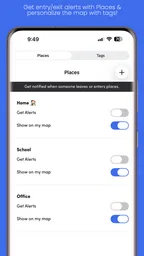
- Place alerts can notify you when someone arrives or leaves.
- A shared map makes it easier to check family members’ locations.
- The app can provide reassurance during family outings.
- Family members can stay connected without repeated check-in calls.
What could be better
- Location tracking depends on each member’s phone and permissions.
- Background location use may increase battery consumption.
- Everyone must agree to share their location for the app to help.
- Location data can raise privacy concerns for some families.
- Poor network coverage may delay location updates.





