




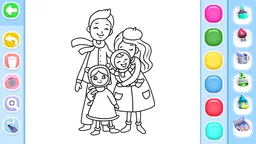



Family Love Coloring Book review
 Analysis by Appsdrops
I’d treat Family Love Coloring Book as a simple shared activity, not as a full parenting toolkit or a feature-packed art studio. It is a free coloring app from FunKidStudio, aimed at family-friendly use, and its appeal is easy to understand: a child can settle into a quiet coloring moment while a parent joins in or helps them choose what to do next. My main advice is to approach it with modest expectations. If you want a low-pressure way to pass a few minutes together, it may suit you; if you need detailed drawing tools or a broader set of family activities, another option will probably fit better.
Getting past the first-session friction
The first hurdle with a coloring app is often not the coloring itself but figuring out whether the experience matches a child’s age, patience, and expectations. Family Love Coloring Book is rated for Everyone, which makes it a reasonable candidate to try with the family, but that rating is not a promise that every child will find the interface self-explanatory. I’d sit beside a younger child for the first session and let them explore at their own pace rather than assuming they will know what each screen element does.
The app’s name sets a clear theme, but a theme alone does not tell you how much variety or control the coloring experience offers. I would begin by opening a page together, choosing a simple coloring goal, and seeing whether the child can make progress without constant adult intervention. That small test is more useful than planning a long activity in advance. If the child is frustrated by the way the app responds, keep the first attempt short and try again later rather than turning setup into a test they have to pass.
One practical point is to separate “the app is open” from “the activity is working for us.” A child may be interested in the family theme but still lose focus if choosing a page or coloring feels fiddly. I’d offer one clear choice at a time—such as asking what part they want to color first—instead of handing over the device and expecting them to navigate everything alone. That makes the first use feel collaborative, which is a better fit for an app centered on family love than treating it as a hands-off babysitter.
Family Love Coloring Book has an average rating of 3.6 from 628 ratings, so I would approach it as a modest, mixed-experience app rather than assume it will work perfectly for every household. That figure is a useful prompt to test it yourself, not a substitute for checking whether your child enjoys the actual interaction. A short supervised session can quickly answer the important question: does this app make coloring easier and more inviting for your family, or does it create more tapping and explaining than you want?
Check the basics before handing it over
The app is free to download, with in-app purchases ranging from $0.99 to $3.99 per item. If a child will use the device independently, I’d review the purchase controls available on that device before starting. That is a general precaution for any app with paid items, not a claim about a particular purchase screen or how this app presents its options. Agreeing in advance that an adult handles purchases avoids an awkward interruption in the middle of a coloring session.
It supports Android devices running version 7.0 or later. Before installing, check the device’s operating system rather than assuming an older phone or tablet will be compatible. If installation does not proceed, first confirm that the device meets that minimum and that the app store is functioning normally. A compatibility mismatch or a temporary store issue can look like an app problem even before the app has opened.
It is also worth making the device comfortable for a child before beginning: set a stable place for it, adjust the screen to a comfortable level, and decide whether the child will color alone or with an adult nearby. These small preparations matter because a shared activity can quickly become an argument about holding the device or choosing what to do. I find it helps to agree on a short, natural stopping point—finishing one section or taking a break when attention fades—rather than promise an open-ended session.
The app has reached more than one million installs, which suggests many people have tried it, but popularity does not tell me whether it will suit your child’s temperament or your preferred way of parenting. Some children enjoy exploring an app independently; others want an adult to narrate every step. Think about that difference before deciding whether this should be a solo activity, a quiet-time option with supervision, or a shared screen-time moment.
A calmer way to recover when the activity stalls
If a child taps around and seems unable to continue, I would avoid immediately reinstalling the app or assuming something is broken. First, pause and look at what is on screen together. Ask the child what they expected to happen, then try one deliberate action at a time. This simple reset often reveals whether the issue is confusion, impatience, or a genuine technical snag—and it keeps the adult from adding more rapid taps that make the situation harder to understand.
If the app stops responding, close it and reopen it, then check whether the device itself is responding normally. If other apps are also slow or frozen, the trouble may be with the device rather than Family Love Coloring Book. If only this app is affected, restarting it is a sensible first step. I would avoid deleting it as an early fix unless you are comfortable with the possibility that local progress or preferences could be lost; I would not assume that anything is backed up.
A useful family workflow is to let the child finish a small piece of the activity before switching apps or putting the device away. That gives them a natural sense of completion and reduces the chance that an interruption feels like losing their work. If the app has become unresponsive, explain that you are restarting the activity rather than promising that every action will be preserved. Being honest about that uncertainty prevents a technical hiccup from turning into a bigger disappointment.
For recurring problems, note what happened in plain terms: whether the app failed to open, stopped responding during use, or simply confused the child. Those are different problems and deserve different responses. Check for a device or app update through the app store when appropriate, and make sure the device has enough general capacity to run normally. I would not repeatedly change settings at random; a small, careful check is more likely to identify the cause than a string of guesses.
Version 9 is the current version, and the app was released on February 10, 2022. I mention those details mainly as context when checking compatibility or trying to describe a problem to someone who can help. They do not tell you whether a particular device will behave smoothly, so the best test is still a brief session on the device your child will actually use. For a family relying on an older tablet, I’d test before planning a long trip or a special activity around it.
When the problem is really the situation
Not every failed coloring session means the app has failed. A tired child may reject an activity they normally enjoy, and a busy room can make it difficult to focus on a small screen. If your child keeps switching away, asks for help every few seconds, or becomes upset about colors not looking the way they imagined, pause and consider whether they need a break or a different kind of activity. Coloring is most useful when it feels optional and relaxing, not when it becomes another instruction to follow.
There is also a difference between wanting digital coloring and wanting to draw. A child who likes crayons, paper, and making their own shapes may find a coloring app restrictive if it centers on filling existing pictures. Conversely, a child who enjoys a guided, contained task may appreciate the structure of a coloring activity. I would let the child’s response decide which side of that trade-off matters more, rather than assuming screen-based coloring is automatically easier or more engaging.
Parents should also think about the purpose of the session. If you need a quiet activity while waiting briefly, this app may be a reasonable choice to try. If you need a dependable, long-lasting offline plan for travel, check that it works in the conditions you expect before relying on it. I would not build a trip around any app that I had not tested on the device and network situation likely to be available. For longer waits, bringing paper and crayons as a backup is still the safer plan.
The game-like alternative is not always another app. A shared paper coloring book avoids device navigation and in-app purchase concerns, while a general drawing app may give an older child more freedom to create from a blank page. Family Love Coloring Book makes most sense when the child wants a coloring activity with a family-oriented theme and the adult values a quick, contained digital option. If artistic control, physical materials, or a wider range of activities matters more, those alternatives may be a better match.
Who will enjoy it, and who should pass
I can see this working well for a parent and child who want an uncomplicated shared screen activity: an adult can help get things started, and the child can spend a little time coloring without needing a complex creative suite. It may also suit families who want a free app to try before deciding whether digital coloring belongs in their routine. The Everyone age rating is reassuring as a broad content classification, but I would still supervise younger children and keep purchase boundaries clear.
I would be more cautious if your child becomes frustrated by touch controls, expects every app to behave like a full drawing canvas, or needs frequent new activities to stay interested. The app’s overall rating is 3.6, so I would not treat it as a guaranteed hit. A quick trial is the sensible approach: see whether your child can settle into the activity and whether you can comfortably guide them when they get stuck.
It is also not the right pick if you want a parenting app focused on schedules, advice, learning plans, or communication between caregivers. Despite its parenting category, its practical role is coloring, not organizing family life. That distinction matters when choosing from a category whose apps can serve very different needs. If you are looking for a tool to solve a specific parenting task, choose one designed for that task rather than expecting a coloring app to do more than provide a creative pastime.
My practical verdict for family use
Family Love Coloring Book is worth trying if a family-themed coloring activity sounds appealing and you are happy to supervise the first session. I like the low commitment of a free download, while the paid items mean I would set purchase expectations before a child uses it. FunKidStudio has kept the product focused on a simple kind of activity, which can be a benefit for a family looking for a brief creative pause rather than a large app with many modes to learn.
My most useful tip is to test it when you have time to sit beside your child, not during a moment when you need the device to entertain them without help. Check that the app opens on your device, try a short coloring session, and watch for the specific point where your child needs support. If they enjoy the activity, you can make it part of a quiet routine. If they spend the session struggling with navigation or asking for a different kind of creative freedom, switch to paper or a more open-ended drawing option without treating that as a failure.
Overall, I see it as a modest, family-friendly coloring choice with a clear use case and ordinary limitations. It is best for short, supervised moments when the goal is to color together or give a child a contained creative task. It is less compelling for families seeking advanced art tools, guaranteed independence, or a replacement for offline activities. I would try it, keep expectations realistic, and let your child’s actual response—not the theme or install count—decide whether it earns a place on your device.
What we like
- Offers a relaxing activity for children and adults.
- Simple coloring tools are easy for beginners to use.
- Family-themed pictures suit shared creative sessions.
- Coloring can be enjoyed at a flexible pace.
- Finished artwork can inspire personal creative projects.
What could be better
- Some pictures may feel too simple for experienced artists.
- Small details can be difficult to color on smaller screens.
- The app may not offer enough variety for long-term use.
- Digital coloring does not provide a printable art experience.
- Children may need guidance to choose suitable images.





