


Family GPS Locator・Kids Safety review
 Analysis by Appsdrops
When I think about a family location app, I look beyond the map pin: the useful question is whether it helps a parent make a calm, practical decision without turning everyday life into constant checking. Family GPS Locator・Kids Safety is built around that straightforward purpose. It is a free parenting app from Parental control & GPS tracker, with a focus on locating family members and supporting child safety. I’d consider it most useful for families who want a shared location tool, not a complete parenting or device-management system.
What the app is suited to today
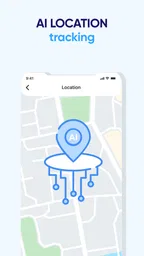
The app’s central idea is easy to understand: use a family GPS locator to check where a child or another family member is. That can be reassuring when a child is travelling to school, walking home from a friend’s house, or taking part in an activity while a parent is elsewhere. Instead of exchanging a string of messages just to establish someone’s whereabouts, a location app can make that check simpler.
In that sense, Family GPS Locator・Kids Safety fits the family location and child-safety niche rather than trying to present itself as a broad collection of parenting tools. The 4.5 average from around 12,000 ratings and over one million installs suggest that many people have found the basic proposition appealing. Those figures are useful context, but they do not tell me whether the app will suit a particular household: location services depend on the phones, settings, and habits of the people using them.
A realistic routine might be a parent checking the map after a child leaves an after-school activity, then putting the phone away once the child is safely on the way home. That is a better fit than repeatedly refreshing the location every few minutes. The app can support a check-in, but it should not replace an agreed plan about where a child is going, when they are expected back, and what to do if plans change.
Where it fits among family-safety options
Compared with texting, a locator can reduce the need to ask “Where are you?” when a quick glance is enough. Compared with a phone’s built-in location-sharing tools, a dedicated family app may feel more focused for households that want a child-oriented location experience. The trade-off is that a separate app asks family members to install and use another service, and everyone needs to understand how location sharing works before relying on it.
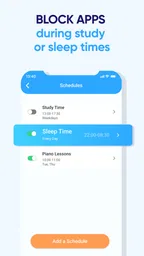
It is also important to separate a location tool from parental controls. The app’s description centres on GPS locating and family safety; that does not make it a substitute for tools that manage screen time, app access, or online activity. If your main concern is what a child can do on a device rather than where they are, a dedicated parental-control product may be a better first choice.
I would also avoid treating any phone-based location view as a guarantee of immediate or exact knowledge. A map is only useful when the relevant device is available and its location services can provide an update. If a child’s phone is left behind, switched off, or unable to report its position, the app cannot turn that into a reliable live check. Families should keep a backup plan, such as a meeting point or a call to a trusted adult.
How I would make location sharing less stressful
The most useful way to introduce a tracker is as a shared safety agreement, not a hidden monitoring routine. Before depending on it, I would sit down with the child, explain who can see the location and when the family expects to use it, and agree on what counts as a normal check. That conversation can prevent the map from becoming a source of suspicion or conflict.
A practical tip is to test the family’s routine before a busy day. Have each person open the app and confirm that they understand how to find the location view, then check what happens when a phone has a weak connection. This is not about demanding perfect performance; it is about learning whether the app is convenient enough for your household before a real journey makes the answer urgent.
Another useful habit is to treat the location as a prompt for communication rather than a verdict. If a child appears somewhere unexpected, I would first ask whether plans changed or the location is delayed instead of assuming wrongdoing. A map pin can provide context, but it cannot explain why someone is there. That distinction matters especially for older children, who need growing independence as well as sensible safety arrangements.
For younger children, the app may be most helpful when adults use it to coordinate pickups and reassure themselves during familiar journeys. For teenagers, the same tool can feel intrusive unless the family agrees on clear boundaries. A limited, purpose-led approach—checking during a commute or a planned outing rather than monitoring continuously—can make a location app easier to accept and more useful in practice.
Version history and what can be said confidently
The current version is 1.505, and the app was released on December 11, 2024. Those facts establish a concrete point in its product history: this is a relatively recent app with a current version number that has advanced beyond its initial release. They do not, by themselves, reveal which functions have changed or whether a particular update improved location accuracy, usability, or battery use.
That distinction matters to existing users. A version number can help identify the build installed on a phone, but it is not a useful changelog on its own. If you already use the app, I would judge its evolution by the things that affect your routine: whether family members can still find the location view quickly, whether the app behaves predictably on the devices you use, and whether its sharing setup remains clear after updates.
For someone deciding whether to try it, the release and version details are a reason to approach it as an actively versioned app, not proof of a particular feature set. Install it, set up a small and transparent trial with the family, and see whether the basic locating workflow fits. I would not make a safety plan depend on an assumed capability simply because the app’s version has changed.
Costs, compatibility, and the setup decision
The app is free to install, with in-app purchases ranging from $0.99 to $99.99 per item. That broad range means I would check the purchase details in the app store before committing to anything beyond basic installation. A family should be able to decide together whether any optional purchase is worthwhile; do not assume that every function you may want is included at no cost.
It is rated for Everyone and requires Android 7.0 or later. That makes it relevant to many Android users, though the age rating is about the app’s content classification, not a recommendation that children should use it without adult guidance. The family should still consider who can access location information and whether the arrangement suits the child’s age and maturity.
One non-obvious trade-off is that a location app works best when every relevant person is willing to participate. A parent may install it, but the household gains little if the child does not understand the purpose or does not keep the required phone available. Before setting it up, agree on who will use it, what situations justify checking, and what everyone should do if the location is not visible. That small conversation is more valuable than assuming installation alone creates a safety system.
Who should choose it—and who should look elsewhere
I would recommend giving Family GPS Locator a try if you want a focused way to check family locations and are comfortable making location sharing an open part of your household routine. It may be particularly convenient for parents coordinating school journeys, pickups, or activities across different schedules. Its free entry point makes a low-commitment trial possible, while the optional purchase range is worth reviewing before spending.
I would look elsewhere if your priority is detailed device supervision, web filtering, screen-time schedules, or a feature set beyond family locating. I would also skip a dedicated tracker if your family already uses a built-in sharing tool that everyone understands and finds reliable; adding another app could create duplication rather than solve a problem. And if your child does not have a compatible Android device, the listed Android requirement may make this particular version unsuitable for that phone.
The remaining question for any household is not simply whether the app can show a location, but whether using it improves communication without undermining trust. I would start with one everyday scenario—such as a regular trip home—and use the app as a backup to a clear plan. If it reduces unnecessary worry and everyone understands the boundaries, it is earning its place. If it encourages constant checking or causes arguments, a simpler check-in routine may be better.
My take after weighing the trade-offs
Family GPS Locator has a clear role: it gives families a dedicated place to check location information, and that can be genuinely helpful during ordinary travel and pickup routines. Its strongest case is practical reassurance, not a promise to solve every safety concern. I like the idea of using it sparingly and openly, with a conversation and a backup plan alongside it.
Before relying on it, I would confirm that the household’s phones meet the Android requirement, review any in-app purchase before approving it, and test the routine when there is no urgency. Watch how the current version fits your family rather than assuming the version number proves a particular improvement. For families who want a straightforward locator and can agree on respectful boundaries, it is worth considering; for those who need wider parental controls or already have a smoother sharing method, another option may serve them better.
What we like
- Location sharing helps families check where members are.
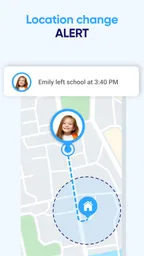
- Geofence alerts can notify you when someone enters or leaves a place.
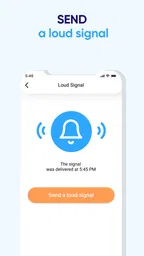
- An SOS feature can help children request assistance quickly.
- The interface is designed for everyday use by families.
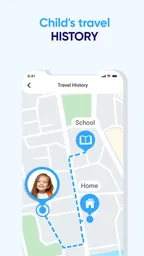
- Location history can help clarify recent trips.
What could be better
- Accurate tracking depends on a phone's location settings.
- Background location use may drain battery faster.
- GPS updates can be delayed by weak signal or connectivity.
- Family members must agree to share their location.
- Some features may require a paid plan.





