

FaithPath review
 Analysis by Appsdrops
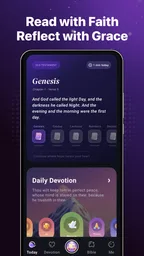
I look for faith apps that can fit into a real day, not just sound inspiring in a short description. FaithPath is a free Books & Reference app from SAILIBERTY TECH, aimed at people who want a simple place to read and reflect. My overall impression is that it makes most sense as a gentle prompt for a personal faith routine, rather than as a complete library, study course, or replacement for the resources you already trust.
Getting started without turning it into a project
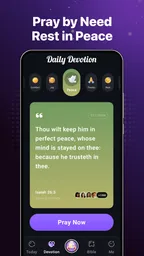
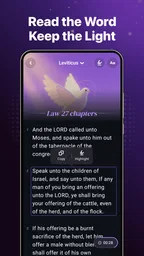
The first hurdle with any reading app is often deciding what to do once it opens. FaithPath’s focus suggests a straightforward rhythm: come to read, pause over what you have read, and carry a thought into the rest of your day. That is an appealing shape for a short morning check-in or a quiet moment before bed. I would approach it with a modest goal rather than expecting a full study plan from the outset.
One useful way to begin is to pair a reading session with an existing habit. For example, I might open the app after making coffee, spend a few minutes with the day’s reading, then jot a single question or takeaway elsewhere if I want to remember it. This keeps the routine manageable and avoids the common trap of installing a faith app, browsing around once, and never returning because the commitment feels too large.
If setup feels confusing, I would first check the basics rather than assume the app is broken: confirm that the installation has finished, reopen it, and make sure the device can access the app normally. On Android, FaithPath lists support for version 8.0 and up, so a device running an older system may be an obstacle. Those simple checks are worthwhile before spending time troubleshooting anything more complicated.
Where a reading routine can snag
FaithPath is best judged by whether its reading-and-reflection approach matches what you want. If you are expecting a deep reference work with extensive search, study notes, multiple translations, or a structured curriculum, you may find that a focused devotional-style app does not answer every question. I would keep a trusted Bible or reference source nearby for detailed study instead of treating this app as the only tool I need.
Another point of friction is expectation. “Read and reflect” can sound effortless, but reflection still takes attention. If I open an app while rushing between messages, I may skim without absorbing anything. A practical workaround is to choose a small, repeatable window and leave notifications or other distractions alone for a few minutes. The value comes less from doing a long session than from giving the reading enough space to mean something.
When a screen seems slow or content does not appear as expected, I would try closing and reopening the app, checking the device’s connection, and then trying again later. These are general first steps, not a claim about a specific FaithPath fault. If the issue continues, noting what you were doing and what the screen showed can make it easier to explain the problem through the app store’s support route.
A simple workflow for days that go off track
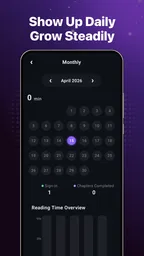
It helps to decide in advance what “keeping the habit” means on a busy day. I would use a short session as a fallback: read one passage or section, pause for one question, and stop there. That is more realistic than trying to catch up on several missed days at once. A faith routine should support reflection, not create a backlog that makes opening the app feel like another chore.
For a more thoughtful session, I would use a three-step approach: read without multitasking, identify one line or idea that stands out, and connect it to a concrete situation I expect to face. If I am worried about a difficult conversation, for instance, I can ask what the reading encourages me to remember before I speak. That turns a brief app visit into something useful without assuming that FaithPath itself has special journaling or planning tools.
If you lose your place or cannot remember what you last read, avoid guessing that the app has erased anything. First reopen it and look for the point where you left off; if that does not help, return to a familiar section and resume your routine there. I would also keep any personal notes I care about somewhere dependable until I know how the app handles them. This is a sensible habit for any new reading tool, not a statement about a particular FaithPath backup feature.
How it fits beside other faith resources
Compared with a general Bible app, FaithPath’s appeal is its narrower reading-and-reflection identity. A broad Bible app is usually the better choice when I need to search a particular verse, compare translations, or follow a detailed study workflow. A printed devotional may suit someone who wants to avoid phone distractions altogether. FaithPath is more compelling for the person who already uses a phone as part of daily life and wants a convenient nudge toward a reflective pause.
That distinction also helps set expectations about portability and attention. A phone is easy to keep close, but it is also where messages and other distractions appear. I would open FaithPath with a specific intention, rather than browsing it alongside social feeds. If digital distractions are a recurring problem, a paper book or a dedicated reading device may be a better fit, even if it is less convenient to carry.
The app is marked Everyone, which makes it broadly suitable from an age-rating perspective, though that rating does not tell a family whether its approach matches their beliefs or a child’s needs. I would preview the material together if choosing it for a younger reader, just as I would with any faith resource. The right fit depends on content and teaching style, not the age label alone.
When the app may not be the cause
It is easy to blame the app when a reading habit stalls, but sometimes the real issue is timing. A session scheduled for the most hectic part of the morning is likely to be skipped, no matter how appealing the content is. I would move it to a quieter transition—after breakfast, during a lunch break, or before bed—and keep the goal small enough that it survives an ordinary week.
Likewise, if the app does not answer a theological or historical question, that may be a mismatch of purpose rather than a malfunction. A reflection-oriented reading experience can prompt thought without supplying scholarly context. For questions that need careful interpretation, I would turn to a study Bible, a reliable reference book, or a faith leader. Using each resource for what it does best is more useful than expecting one app to cover every need.
FaithPath has an average rating of 4.9 from 416 ratings, with 128 written reviews, and it has reached over 50,000 installs. Those figures suggest that many people have chosen to try it, but I would still use them as context rather than proof that its style will suit me. Reading habits and faith preferences are personal; a high average cannot tell you whether the app’s particular approach is the one you want.
Who is likely to get the most from it?
I would recommend giving FaithPath a try if you want a free, low-pressure way to bring reading and reflection into a daily routine. It may be especially useful if you are building the habit from scratch, prefer a phone-based prompt, or want a brief pause rather than a demanding course. The key is to treat it as a companion to your own reflection, not as an authority that settles every question.
I would skip it, or use it only alongside another resource, if your main priority is advanced search, extensive reference material, a specific translation workflow, or a formal study program. Someone who dislikes reading on a phone may also be happier with print. Being clear about that distinction can prevent disappointment: FaithPath’s focused purpose is a strength for some readers and a limitation for others.
My practical verdict
FaithPath is a promising option for readers who want faith-oriented reading to feel approachable and repeatable. Its current version is 1.1.9, and it is free, so trying it does not require a paid commitment. The app is from SAILIBERTY TECH and was released on April 13, 2026; I would still make my decision based on whether its reading style fits my routine, rather than on release timing or popularity alone.
My practical advice is to give it a fair, small-scale test: use it at the same quiet moment for several days, keep each session brief, and notice whether the reading leaves you with something worth carrying into the day. If it does, it may earn a regular place on your phone. If you need deeper reference tools or find that the phone interrupts your attention, choose a more specialized or offline alternative instead. The best reason to keep FaithPath is not simply having another app installed, but finding that its focused reading rhythm genuinely helps you pause and reflect.
FaithPath works best, in my view, when approached as a practical starting point for a personal faith habit—useful, simple in purpose, and most valuable when paired with realistic expectations.
What we like
- Offers guided devotional content for building a regular faith practice
- Provides a convenient way to explore spiritual topics on a mobile device
- Can support personal reflection through structured faith-based activities
- Makes religious guidance accessible beyond scheduled services
- May help users stay engaged with their faith during daily routines
What could be better
- FaithPath may not align with every denomination or personal belief
- Some features may require an internet connection
- The available content may feel limited for experienced users
- Regular use can depend on having time for guided activities
- Religious content may not suit users seeking a secular wellness app





