
Eventleaf Guide review
 Analysis by Appsdrops
When I arrive at an event, I usually want two things: the information I need and a quick way to find it. Eventleaf is built around that attendee-side task. It gives people a place to view event information and documents on a phone or tablet, rather than asking them to rely entirely on printed material or search through messages. That focused purpose makes the app easiest to judge as one part of an event-day workflow: an organizer prepares the event, attendees open the app, and useful details need to be available when they matter.
From event details to a useful starting point
Eventleaf Guide is an events app from Jolly Technologies Inc, intended for people attending an event. Its central idea is straightforward: use a mobile device to access event information and documents. I like that this puts the attendee’s immediate needs at the center. The app is not presented as a general-purpose social network or a broad productivity suite; its value depends on helping me get oriented around an event.
The starting condition is familiar. I know I am attending something, but I may need to check information while away from a desk, perhaps before leaving home or once I have arrived. With an event-focused app, the practical question is not just whether it opens, but whether it helps me move from uncertainty to a clearer sense of what I need to know. Eventleaf’s stated role is to provide that access on a phone or tablet.
That scope also sets expectations. I would approach Eventleaf as a companion to an event, not as a substitute for the event itself or a guarantee that every detail will be handled inside one app. The organizers’ preparation and the material available for the event shape how useful the attendee experience can be. When those pieces are in place, having information and documents in a mobile setting can make the day feel easier to manage.
Opening the app and finding your bearings
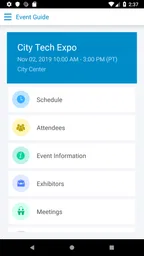
For an attendee, the workflow begins with getting to the relevant event information. The app’s purpose is to make that material viewable on a phone or tablet, which suits the moments when pulling out a larger device would be inconvenient. I can see the appeal for people who want to check event-related material while on the move, rather than carry printed documents or depend on remembering every detail in advance.
The next step is using the information to orient yourself. Event details are useful when they answer the questions that arise at the right moment: what is happening, what documents should I consult, and what should I keep in mind as I take part? The app’s role is to give attendees a mobile place to view those materials. That is a practical, restrained promise, and I prefer that to an inflated pitch suggesting one tool can solve every event-day problem.
In real use, the quality of this first stage depends on how clearly the event material is prepared and presented. A document can be available but still take effort to interpret; information can be present but not immediately answer the question I have. That is not a unique challenge for Eventleaf, but it is central to judging any event companion. The app can make content accessible, while the usefulness of that content still depends on the event’s setup.
Following the attendee workflow
Once I have opened the relevant information, the app’s value is measured by how well it supports the next decision. I might need to refer to a document, check a detail, and then move on with the event. Keeping those materials available through a phone or tablet is a sensible approach because attendees often need information in short bursts, not as part of a long session at a computer.
I also appreciate the simplicity of the intended journey. Eventleaf is for attendees who want to view event information and documents. That makes the app’s purpose easy to explain to someone who is deciding whether it belongs in their event-day routine. Rather than expecting users to learn an elaborate system first, the basic value is access: open the app, consult the event material, and use it to guide what comes next.
Still, an uncomplicated purpose does not make every moment frictionless. If I am unsure where a particular item belongs, or if event materials are not arranged in a way that matches how attendees think, I may need to spend extra time finding what I came for. The app is most helpful when its role is clear to both the organizer and the attendee, and when the material is ready to support the natural flow of the day.
Handoffs between organizers and attendees
Event apps sit in the middle of a handoff. Organizers provide the event context and its materials; attendees use a mobile device to access them. Eventleaf’s attendee-focused purpose makes that relationship especially important. The app can serve as the point where prepared information reaches the person who needs it, but the usefulness of the exchange depends on both sides doing their part.
From an attendee’s perspective, a smooth handoff means knowing where to look and being able to consult the material without unnecessary detours. From the organizer’s perspective, it means preparing information that is relevant and suitable for people who may be checking it during a busy day. These responsibilities are connected: an app can provide the channel, but the quality of the experience also depends on the clarity and organization of what comes through it.
This is why I would treat Eventleaf as one component of event communication rather than the whole communication plan. If attendees understand that it is where they can view event information and documents, it has a clear job. If they are left unsure whether an important detail is in the app or somewhere else, the handoff becomes less smooth. Good expectations make a focused tool easier to use.
What the mobile format adds
The phone-or-tablet format is a practical fit for event attendance. A mobile device is likely to be close at hand, and the ability to view information there can be more convenient than going back to a computer. That convenience matters most when an attendee needs to consult a document or event detail at a particular moment, then return attention to the event.
Eventleaf is free, and it is rated for Everyone. It launched on May 3, 2017, and its current version is 5.0.3, with Android support beginning at version 8.0. These details help set expectations for prospective users without changing the basic review: the app’s central function is access to event information and documents. It has more than ten thousand installs, while its average rating is 3.1 from twenty-five ratings and eight written reviews. That feedback is modest rather than overwhelmingly positive, so I would consider the app’s fit for a particular event more important than assuming every attendee will have the same experience.
Where the workflow can lose momentum
The most obvious weak point is the dependence on event-specific preparation. If the information an attendee needs is not available in the app, or if the material is difficult to make sense of, the mobile access alone cannot fill the gap. This is the main limitation of a focused event companion: it can help people reach prepared content, but it cannot make incomplete or unclear content useful by itself.
Another possible source of friction is expectation. Some attendees may assume an event app handles every part of participation, while Eventleaf’s stated purpose is specifically to let them view event information and documents. I would recommend approaching it with that straightforward role in mind. It can be useful as a reference point, but I would not assume that every event-related task automatically happens there.
The rating also suggests that experiences are mixed. A 3.1 average is not a strong endorsement, though the number of ratings is limited. I see that as a reason to keep expectations measured, not as proof that the app will disappoint. A person attending an event where the organizers have prepared relevant materials may find the core function worthwhile; someone expecting a more expansive tool may find the narrow focus less satisfying.
The result: a focused event companion
At the end of the workflow, Eventleaf aims to leave attendees with a more convenient way to consult event information and documents. Its appeal is practical rather than flashy. It gives event materials a place on a phone or tablet, which can make them easier to check as the day unfolds. For attendees who want a simple mobile reference, that is a clear and potentially useful role.
My overall view is that Eventleaf is best understood as a supporting tool whose success depends on the event around it. The concept is easy to grasp, and the attendee focus keeps its purpose from feeling vague. The trade-off is that the app’s usefulness hinges on the quality and organization of the information supplied for the event, as well as whether attendees know to use it for that purpose.
If you are attending an event and want a mobile way to view its information and documents, Eventleaf is worth considering. I would go in with realistic expectations: it is designed to support access to event materials, not to replace every other part of event communication. When that is the help you need, the app’s focused approach makes sense; when you expect a broader event-management experience, its limited attendee-facing purpose may feel less compelling.
What we like
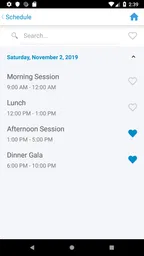
- Find event details and schedules in one convenient place
- Access maps to help locate sessions and event venues
- Keep track of saved sessions and personal plans
- View speaker profiles and event information
- Receive updates about changes to event details
What could be better
- Available features can vary by event
- Some event information may be missing or outdated
- A stable internet connection may be needed for updates
- The app is useful only for events supported by Eventleaf
- Notifications may be easy to miss if disabled





