
Evenflo review
 Analysis by Appsdrops
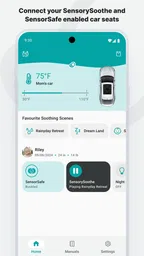
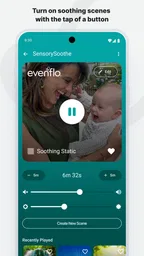
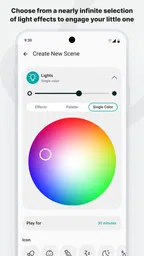
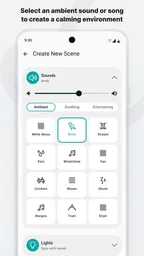
I’d think of Evenflo as a companion to a compatible car seat, not as a general parenting dashboard. Its appeal is that it brings the brand’s SENSORYSOOTHE and SensorSafe ideas into one app experience, with a focus on settling a child and supporting safer car-seat routines. If you already use Evenflo gear that works with those features, it may fit naturally into your day. If you want an app that organizes feeding, sleep, appointments, or milestones, this is the wrong tool.
Building a simple routine around the car seat
My suggested starting point is deliberately modest: install the app before a trip, explore what it offers, and make sure the relevant Evenflo product is ready to use. The app’s value depends on that connection to compatible hardware; it cannot turn an unrelated car seat into a smart one. Once everything is set up, the practical goal is to make the app part of a repeatable routine rather than something you have to learn while a child is already upset.
For a typical outing, I’d check the app before loading the child, then use the relevant soothing or safety features as intended for the equipment at hand. That order matters. A parent juggling bags, a restless toddler, and a departure time has little attention to spare for exploring menus. Getting familiar with the controls at home makes it easier to focus on the child and the seat when it counts.
Consider a familiar everyday situation: you’re leaving after a long visit, and your child is fussy just as you’re trying to get everyone buckled. A calm, practiced routine is more useful than hurriedly searching through an app. I’d decide in advance what role the app should play, keep the phone accessible but out of the way, and avoid treating the screen as a substitute for checking the child and the car seat directly.
Evenflo is a free parenting app from the car-seat maker Evenflo. It has an Everyone age rating, and its 4.5 average from around 1.3 thousand ratings suggests many users find it worthwhile. I would still judge it by whether it works with your particular setup and supports a routine you’ll actually use; a strong overall rating can’t answer that personal compatibility question.
What it does well in everyday use
The strongest idea here is focus. Instead of trying to cover every part of family life, the app is centered on sensory soothing and SensorSafe in the car-seat context. That narrower purpose can be an advantage: parents who want help with those specific tasks have less reason to wade through unrelated trackers or advice features.
That focus also sets a clear boundary. I wouldn’t expect this to replace a pediatrician’s guidance, a properly installed seat, or a caregiver’s attention. Smart features can support a routine, but they don’t take responsibility for supervising a child. I’d keep those basics separate in my mind: the app can be a useful companion, while safe installation and attentive care remain the work of the adult.
It is also not the same kind of product as a general white-noise or music app. Those alternatives can be useful if all you need is audio from a phone, and they may work with many kinds of seats. Evenflo makes more sense when its features are relevant to your Evenflo equipment; the trade-off is that the benefit is more specific and less universal.
Settings to check before relying on it
Before making the app part of a regular trip, I’d check the settings and setup that affect its connection to the relevant product. In particular, confirm that the app recognizes the equipment you intend to use and that any feature you expect to rely on is available in your setup. This is a practical compatibility check, not a reason to assume every Evenflo seat has the same capabilities.
I’d also check the phone’s basic sound and notification controls when trying the soothing side. A feature can appear to be unhelpful if the phone is muted, connected to another audio device, or configured in a way that routes sound somewhere unexpected. Testing at home gives you time to notice that sort of friction without a child waiting in the car.
For safety-related use, I’d review the app’s guidance and the seat’s own instructions together rather than relying on memory or a quick glance at the phone. That habit is especially useful when another caregiver takes over. A short handoff—what the app is for, what the seat is doing, and what still needs to be checked by the adult—can prevent confusion without assuming that everyone has explored the app themselves.
The app is listed for iOS 12 or later, so an older device may not be suitable even if the car-seat hardware is. I’d check the phone’s operating system before planning a setup around it. The current version is 5.1.1; keeping an app current is sensible, but I’d still test the actual workflow after an update instead of assuming that a familiar screen or connection behaves exactly as before.
Faster patterns that reduce fiddling
The most useful shortcut is a habit, not a secret button: prepare the phone and seat before the departure rush. I’d open the app, confirm the relevant connection, and then put the phone where it can be reached safely without becoming the focus of the trip. This small preflight can save more time than trying to operate settings while holding a child or packing the car.
A second helpful pattern is to keep the app’s role consistent. If you use its soothing functions, decide when they belong in your routine and avoid changing several things at once. For example, make the seat and child comfortable first, then try the app’s intended support. That way, if the child settles or remains upset, you have a clearer sense of whether the routine is helping instead of attributing every change to a different setting.
When several adults share care, I’d agree on one simple handoff routine. One person can show the other what they normally check and where they look in the app, rather than merely saying, “It’s all set.” This is particularly useful for grandparents or occasional caregivers who may be comfortable with the physical seat but unfamiliar with its connected features. Keep the explanation short and make the seat’s printed or in-app instructions the reference point.
There’s a useful trade-off in keeping expectations narrow. If a child responds well to the sensory support, the app may become a familiar part of leaving home. If the child dislikes it, or if it adds distraction, there’s no need to force it into every trip. I’d treat it as an option to test in calm circumstances, not a promised fix for crying or a replacement for figuring out why a child is uncomfortable.
Where the smart approach has limits
The app is most compelling for families whose equipment and routine match its purpose. It is less attractive if you use another brand’s seat, want one app to manage multiple areas of parenting, or prefer not to use a phone around the car. In those cases, a simple non-connected routine—or a general audio tool for soothing—may be easier and more appropriate.
Connected features introduce another layer to manage: phone readiness, app setup, and familiarity among caregivers. That may be a fair exchange for someone who values the added support, but it is still friction. I would not choose a car seat solely because an app sounds appealing, and I would never let app convenience outweigh choosing and using a seat properly for the child and vehicle.
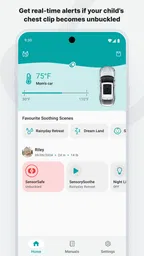
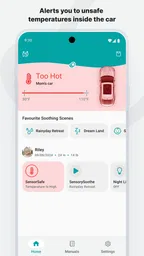
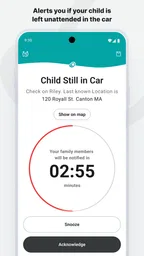
There is also a difference between an app’s safety-oriented purpose and a guarantee of safety. SensorSafe can be part of a more attentive routine, but the app does not remove the need to buckle correctly, follow the manufacturer’s instructions, or check on the child. Parents who expect a phone to handle those responsibilities automatically should look elsewhere for their expectations, not necessarily for another app.
Evenflo has over 50 thousand installs, which gives a prospective user a sense that it is used beyond a handful of early adopters. Still, popularity does not establish whether a particular combination of phone and seat will suit your household. I’d use the app store’s compatibility details and the product instructions to make that decision before building a routine around it.
Who I’d recommend it to
I’d recommend trying it if you own compatible Evenflo equipment, want its sensory-soothing or SensorSafe support, and are willing to spend a little time setting up a dependable routine. It may be especially useful for parents who share driving duties and want everyone to follow the same basic process. The app is free, so the main cost is attention: setup, learning, and making sure the phone doesn’t become a distraction.
I’d skip it if you’re looking for feeding logs, sleep tracking, developmental guidance, or a broad family organizer. I’d also be cautious if your phone is too old for the listed operating-system requirement or if you dislike connected features altogether. A straightforward manual check and familiar calming routine may suit you better than adding another screen to an already busy departure.
Evenflo first appeared on December 5, 2022, and its current version is 5.1.1. Those details are useful context, but they don’t change my main recommendation: start by confirming that the app’s features match the car seat you actually use, then test them at home and keep the routine simple. That is a more reliable way to decide than downloading it in the middle of a stressful outing.
A practical verdict for experienced caregivers
For me, Evenflo works best as a focused companion to compatible car-seat use, not as an all-purpose parenting app or a substitute for hands-on safety checks. Its sensible strength is bringing sensory soothing and SensorSafe into the same brand-specific experience. The real-world benefit depends on fit: the right equipment, a prepared phone, and caregivers who understand what the app does and what remains their responsibility.
If that describes your household, I’d give it a careful trial and keep only the parts that make departures smoother. If it adds steps, fails to match your equipment, or encourages you to look at the phone instead of the child, I’d leave it aside. That is the clearest way to get value from Evenflo: treat it as a useful option within a thoughtful car-seat routine, rather than expecting the app to do the parenting for you.
What we like
- Offers a wide range of car seats and baby gear for different stages.
- Many car seats include clear belt paths and installation indicators.
- Some models support extended rear-facing use.
- Replacement parts and manuals are available through the brand.
- The website provides product details and safety guidance.
What could be better
- Features vary considerably between models and product lines.
- Some car seats can be bulky in smaller vehicles.
- Installation may take time for first-time users.
- Availability of specific models can vary by retailer and region.
- Product warranty terms differ across items and locations.





