



Emoji Battery & Shimeji Pets review
 Analysis by Appsdrops
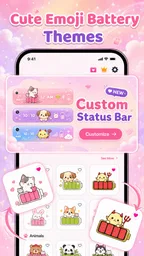
Emoji Battery & Shimeji Pets is a playful take on phone personalization, bringing cute Shimeji pets, an emoji battery icon, and a customizable status bar into one productivity app. Rather than changing how I get things done, it adds a bit of character to the parts of the screen I check throughout the day. If you like small visual touches that make a phone feel more personal, the idea is easy to appreciate.
Making a simple daily routine feel more personal
The app’s appeal starts with familiar habits: glancing at the battery, checking the status bar, and picking up the phone between tasks. Emoji Battery gives those routine moments a decorative twist. Its store summary highlights three elements—Shimeji pets on the screen, an emoji battery icon, and status bar customization—so the experience is centered on visual personalization rather than a large suite of work tools.
My baseline approach would be to start with the battery display, then explore the status bar options, and finally decide whether an on-screen pet suits the way I use my phone. That order keeps the setup focused. It also makes it easier to judge each element on its own: an emoji can make battery status more expressive, while a customizable status bar can help the phone’s everyday interface feel less generic.
The Shimeji pets are the most immediately charming part of the concept. They add a cute, companion-like presence to the screen, which can make routine phone checks a little more enjoyable. I see this as decoration, not a productivity system or a virtual pet game with elaborate goals. The value is in the personality they bring to the display and whether that light touch fits your taste.
For anyone searching for an emoji battery app or a way to personalize an Android status bar, the main attraction is that these ideas are brought together. You do not need to treat the app as a complicated project. A few deliberate choices can be enough to give the interface a distinctive look without turning customization into another task to manage.
Start with the parts you will notice most
A useful first pass is to choose one visual feature and live with it for a while. If the battery icon is what catches your eye, begin there. If you are more interested in a playful screen, try the Shimeji pets as the focal point. Keeping the initial setup simple makes it easier to tell whether a change is genuinely pleasant or merely novel for the first few minutes.
That small trial-and-adjust rhythm is especially useful for personalization apps. A look that seems fun while browsing settings may feel busy during a normal day, while a subtle choice can become a favorite because it fits naturally into existing habits. I would make one adjustment at a time and revisit it after using the phone as usual, rather than changing every available element at once.
Settings worth checking before settling in
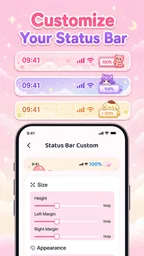
The customizable status bar is worth exploring with a little care. It is one of the areas you may see repeatedly, so the best choice is likely the one that stays clear and comfortable during everyday use. Personalization should make the screen feel more like yours, not make routine information harder to notice. A quick check after changing the appearance can help you decide whether the balance feels right.
The same principle applies to the emoji battery icon. Its job is to make a standard visual detail more expressive, so I would favor a design that remains easy to recognize at a glance. Cute styling can be fun, but practicality still matters when you are checking how much charge remains. The strongest setup is the one that combines personality with quick readability.
It is also sensible to explore the app gradually instead of assuming every option needs to be enabled. Emoji Battery’s central features are already easy to understand from its premise: pets, an emoji battery, and status bar customization. Choosing only the touches you actually enjoy keeps the result intentional. It can also make it easier to change direction later if your preferences shift.
A good customization routine is repeatable, not elaborate. I would settle on a small set of visual choices, use them through ordinary phone checks, and adjust only when there is a clear reason. That approach helps avoid endless tweaking and keeps the app in its intended role: a fun layer of phone personalization rather than another productivity chore.
Faster patterns for everyday use
Experienced users often get more satisfaction from a consistent setup than from repeatedly starting over. With Emoji Battery, that means deciding which element matters most, keeping the other choices complementary, and resisting the urge to change everything whenever a new combination catches your attention. A familiar arrangement becomes part of the phone’s look, while occasional adjustments remain purposeful.
Another useful habit is to connect customization with a natural moment, such as when you are already reviewing how your home screen looks. That makes the process feel easy to revisit without checking settings out of habit. If you like the current appearance, leave it alone. If something feels distracting or no longer suits you, make a focused change and see how it works in normal use.
For the Shimeji pets, a practical pattern is to treat them as a visual accent. Their charm is strongest when you enjoy seeing them without feeling that the screen has become cluttered. Users who love cute phone themes may want the pets to be a prominent part of the experience; people who prefer a restrained interface may find a simpler treatment more comfortable. The point is to choose what feels right for your own screen.
These habits are not hidden shortcuts or special modes; they are simply ways to make personalization efficient. Start with a clear preference, make a small adjustment, and keep the result if it improves the experience. That mindset is more reliable than chasing a perfect arrangement through constant experimentation.
What the app does well—and where expectations should stay grounded
Emoji Battery’s strongest point is its clear, lighthearted identity. It brings together a cute screen companion, an expressive battery display, and a customizable status bar, all under a straightforward personalization idea. The app is free to download, while in-app purchases range from $3.99 to $19.99 per item. That pricing detail is worth keeping in mind if you plan to explore paid options, but the central appeal remains easy to understand without turning the app into a larger productivity platform.
The product is aimed at people who enjoy changing the appearance of their phone. It is not the sort of app I would choose for task planning, note-taking, or organizing a workday. Its productivity connection is more about making a frequently used device feel pleasant and personal. For some users, that small improvement is enough; for others, decorative features may not justify adding another app to their routine.
That distinction matters when deciding whether to install it. If you want cute Shimeji pets and a more expressive battery icon, the concept is a close match. If you are looking for tools that actively organize projects or automate a workflow, the app’s described focus is elsewhere. Keeping expectations aligned with its purpose makes it easier to appreciate what it offers.
Its audience is broad: the content rating is Everyone, and the app is available for devices running Android 8.0 or later. ZAppsolution is the developer. The app has reached over one million installs, with a 4.6 average from around 38,000 ratings. Those figures suggest a sizable audience for this kind of playful phone customization, though personal taste remains the best guide to whether its look suits you.
Getting a polished result without overdoing it
The most satisfying setup is often the one that feels coherent. If you choose a lively emoji battery, you might keep other visual choices comparatively simple. If the Shimeji pets are the main attraction, let them provide the personality rather than changing every part of the interface at once. This is not a strict rule, just a practical way to keep the phone’s appearance comfortable and easy to read.
I would also give each change enough time to become familiar. A new theme can feel exciting on the first day, but daily use is a better test of whether it remains enjoyable. The battery display should be easy to check, the status bar should still feel clear, and the pets should add charm rather than distract from what you are doing. If those basics hold up, the setup is working.
There is a useful limit to how much refinement this kind of app needs. Personalization can be a pleasant finishing touch, but it does not have to become a hobby of constant adjustment. Once you have a combination you like, the simplest advanced habit is to leave it in place and enjoy the result. Revisit the settings only when your preferences or the way you use your phone genuinely change.
Who will enjoy Emoji Battery?
Emoji Battery & Shimeji Pets makes the most sense for people who enjoy cute, expressive phone interfaces and want a little more character in their everyday screen. It offers a straightforward mix of Shimeji pets, an emoji battery icon, and status bar customization. The experience is best judged as personalization first: a small visual upgrade for people who like their devices to reflect their taste.
It may be less compelling if your priority is a purely functional productivity tool or a minimal interface with no decorative extras. That is not a flaw so much as a matter of fit. The app has a specific, cheerful purpose, and it is easier to appreciate when you want precisely that kind of change rather than expecting a broader set of work features.
My final take
Emoji Battery is a simple idea with a clear audience. Its combination of cute Shimeji pets, an emoji battery icon, and a customizable status bar gives everyday phone checks a more personal feel. I like that the features can be approached gradually: choose the detail you care about, make a restrained adjustment, and keep the result if it makes your screen more enjoyable.
For Android users on version 8.0 or later who enjoy playful interface customization, it is worth considering. It is free to download, rated for Everyone, and has attracted over one million installs. Just keep its purpose in view: this is about adding personality to your phone, not building a full productivity workflow. If that is what you are after, the app’s cute, customizable approach could be a nice fit.
What we like
- Cute pet animations make battery status more fun to check.
- Emoji characters add a playful touch to the home screen.
- Shimeji pets can provide a lighthearted customization option.
- The app suits users who enjoy decorative phone widgets.
- Battery-themed visuals make the app's purpose easy to recognize.
What could be better
- Animated pets may distract from other screen content.
- Decorative features may use extra battery power.
- Some pets or customization options may require payment.
- The app may feel too playful for users who prefer a minimal look.
- Compatibility can vary across devices and Android versions.





