

ElevenReader: Read Books Aloud review
 Analysis by Appsdrops
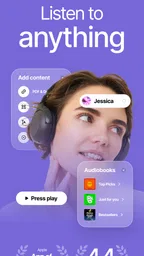
I like reading apps that fit neatly into an existing routine, but text-to-speech can be fiddly: a file may be awkward to open, the voice may sound wrong, or playback may stop when I want to do something else. ElevenReader is aimed at making written material easier to listen to, whether that means an eBook, a PDF, or another piece of text. Its appeal is practical rather than mysterious: it gives reading a spoken option when sitting down with a screen is inconvenient.
That makes it worth considering if you already have material you want to hear. It is less compelling if you expect a full bookstore, a carefully curated audiobook service, or a tool that will automatically make every document sound like a professionally narrated title. I would treat it as a flexible listening companion for reading, not a replacement for every kind of book app.
Getting past the first few snags
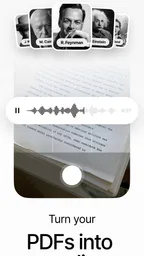
The first thing I would check is the source material. An eBook, PDF, and a short block of text do not behave like identical reading experiences: page layout, headings, columns, and other formatting can affect how naturally a voice moves through a document. If playback sounds jumbled, the problem may be how the text is arranged rather than the voice itself.
A useful early test is to try a short, familiar passage before committing to a long document. Listen for whether the app starts in the right place and handles paragraph breaks sensibly. This is a quicker way to judge a particular file than importing a lengthy book and discovering much later that its layout is difficult to follow.
For a PDF, I would choose a few ordinary paragraphs rather than a title page or a complex table. Those pages can contain scattered labels or formatting that are poor tests of continuous listening. If the sample is readable but a later section is not, compare the troublesome area with the page layout; a document with multiple columns or unusual spacing can be harder to interpret aloud.
Another common source of confusion is expecting the app to feel exactly like a dedicated audiobook player. Listening to text converted into speech is a different experience from hearing a recording made for a book. The narration may be useful and clear while still sounding less expressive than a human performance, especially in dialogue or fiction with many distinct characters.
My best setup advice is to test the file, the voice, and the listening situation separately. Start with one short passage in a quiet room, then try it while doing a simple task. If the voice is difficult to understand, changing the environment or the source text may help more than repeatedly restarting playback.
Make the first session a small experiment
Before settling into a long session, check that the selected material is the material you meant to open and that playback begins at an appropriate point. If a document has front matter, contents pages, or repeated headers, listen briefly to see whether those get in the way. This small check can prevent a frustrating start and helps you decide whether that particular file is suitable for audio.
I would also make a deliberate choice about when to listen. Text-to-speech is handy while preparing a meal, tidying up, or taking a break from a screen, but it is not automatically safe or convenient in every setting. For anything that demands attention, keep the material paused; listening should not become a reason to divide focus when the task or surroundings call for it.
Recovering a reading session without starting over
When playback stops or the app seems to lose its place, I would first reopen the same material and check where listening resumes before changing several settings at once. If the starting point is unclear, move to a short passage you can recognize and continue from there. A simple recovery routine is easier to troubleshoot than making multiple changes without knowing which one helped.
If a file is repeatedly difficult, try a different copy or format when you have one available. That is particularly useful for PDFs: a clean, text-oriented document is generally a better listening candidate than a scan or a page designed around dense visual layout. The point is not that every PDF will fail, but that the document itself can determine how comfortable spoken playback feels.
For longer reading, I find it helpful to treat listening as a sequence of manageable sessions rather than assuming I will finish a whole book in one go. At the end of a session, note the section or page you reached in whatever way works for you. That is a practical fallback if you reopen a document and are unsure where to continue, and it avoids making a perfect automatic resume function essential to your routine.
If the voice becomes hard to follow, pause and identify the cause before abandoning the file. Background noise, a dense paragraph, an unfamiliar name, or an awkward transition can each make spoken text feel less clear. Try a quieter moment or a simpler passage first. If only one section is troublesome, it may be more efficient to read that part visually and return to listening afterward.
When the trouble comes from the source or setting
Not every awkward session is an app problem. A PDF can contain text that is difficult to extract, and a passage written for visual reference may rely on diagrams, footnotes, or tables that make little sense when read continuously. In those cases, the spoken version may be incomplete or uncomfortable even if the app is working as expected.
That distinction matters when deciding whether to keep troubleshooting. If the same document is difficult in a short test and the page itself is cluttered, try a cleaner source rather than repeatedly adjusting playback. If other material is easier to listen to, that points toward a document-specific limitation. For a book whose meaning depends on illustrations, page design, or frequent visual cross-references, reading on screen may simply be the better choice.
Likewise, a voice that feels too mechanical for a novel is not necessarily a malfunction. Spoken text can be excellent for reviewing an article or following straightforward prose, yet still lack the timing and character work that make a professionally narrated audiobook enjoyable. I would choose the format based on the material: text-to-speech for access and convenience, a recorded audiobook when performance is central to the experience.
Who will get the most from it
I can see ElevenReader helping students revisit written material, readers who want a break from staring at a screen, and anyone who prefers to hear prose while doing a low-attention task. It can also be useful for checking how a paragraph flows when spoken. Listening reveals long sentences and clumsy transitions in a different way from silent reading, so a writer may find it helpful as a simple review step.
A realistic routine might be listening to a few pages of a study document during a quiet walk, then returning to the screen to mark details that need closer attention. The audio can make a first pass more convenient, while visual reading remains better for equations, citations, diagrams, or precise note-taking. I would not rely on audio alone for material where missing a small symbol or reference could change the meaning.
It is also a reasonable option for someone who wants one place to listen to different kinds of written material instead of maintaining a separate workflow for every document. The trade-off is that a flexible reader is not necessarily as specialized as a dedicated audiobook library or an eBook app built around browsing and visual page controls.
ElevenReader is a free Books & Reference app from Eleven Labs Inc, with optional in-app purchases ranging from twenty cents to three hundred thirty dollars per item. It is rated for Everyone, and the app has a 4.6 average from around seventy-two thousand ratings, with more than one million installs. Those figures suggest that it has found a substantial audience, but they do not change the practical question: does it handle the kind of text you actually want to hear?
How it compares with familiar alternatives
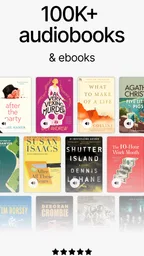
Compared with a traditional audiobook service, ElevenReader’s strongest difference is the emphasis on listening to written material such as documents and eBooks, rather than choosing only from a catalogue of recorded performances. If you already own or work with text you want to hear, that flexibility may be more useful than browsing for a professionally narrated edition. If you want actors, expressive pacing, and polished character voices, a recorded audiobook is likely to be the more satisfying choice.
Compared with a basic text-to-speech option built into a device, a dedicated app can feel more focused on listening to reading material. Still, I would not switch purely for the label. If your current accessibility or reading tools already handle your documents comfortably, staying with them may be simpler. The sensible test is to try the same short passage in both approaches and see which gives you a clearer, less disruptive routine.
The practical trade-off is that versatility brings variation: the experience depends not only on the app but also on the source text and what you expect the voice to do. That makes a quick sample especially valuable. Someone who listens mainly to clean prose may find the workflow natural, while someone who needs precise handling of technical layouts should check their own documents before building a study routine around it.
My practical verdict
ElevenReader is worth trying if you want written material to accompany you as audio and are comfortable judging each document on its own. I would start with a short passage, pay attention to headings and formatting, and use it first for straightforward prose rather than a visually complicated reference file. That gives you a realistic sense of its value without turning setup into a project.
The app is not the right choice for every reader. Skip it if your main goal is a library of professionally performed audiobooks, if you need to study visual details continuously, or if your existing text-to-speech setup already does the job. It may also disappoint if you expect a synthetic voice to deliver the emotional nuance of a narrator.
For people who want a convenient way to hear eBooks, PDFs, and other text, though, it fills a useful role. The current version is 1.7.34 and requires Android 7.0 or later. I would recommend giving it a modest, practical trial with the exact material you plan to use. Its real strength is making ordinary reading easier to fit into moments when looking at a screen is inconvenient, provided the source is suitable and spoken text is the experience you want.
What we like
- Natural-sounding AI voices make listening more engaging.
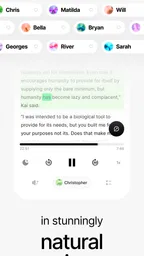
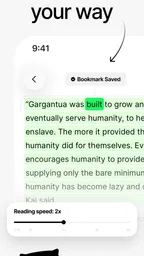
- Text highlighting helps listeners follow along while reading.
- Voice and playback controls make it easy to tailor listening sessions.
- The app supports a range of text and ebook formats.
- Listening can make long reading sessions easier to fit into a busy day.
What could be better
- AI voice quality can vary between books and speakers.
- Some voices or features may require a paid subscription.
- Pronunciation errors can distract from the story.
- Listening requires a reliable audio connection for some content.
- The app may not preserve formatting from every imported document.





