
ElevenLabs: AI Voice Generator review
 Analysis by Appsdrops
I see ElevenLabs: AI Voice Generator as a focused tool for turning written material into spoken audio, rather than a replacement for a full recording studio. That distinction matters. If you make videos, explainers, or other content and need narration without setting up a microphone for every draft, it can make the work easier. If you mainly want a music player, an audio editor, or a way to record your own voice, it is not aimed at that job.
In the Music & Audio category, the app comes from Eleven Labs Inc and is free to install. Its central appeal is simple: give text a voice, then judge whether the result suits the piece you are making. I would treat it as a practical production aid, not a magic button. The writing still needs to sound natural when spoken, and the generated voice still needs to fit the audience and context.
Where the voice workflow earns its place
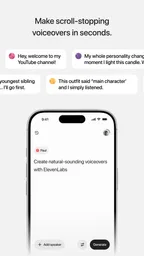
The most useful way to approach an AI voice generator is to start with a specific deliverable. For instance, I might have a short tutorial script that is ready to publish but no quiet time to record it. A generated narration can help me move from draft to a listenable version without arranging a recording session. That is especially handy when I need to test pacing, catch clumsy sentences, or prepare a voice track for a video workflow.
One practical insight is to write for the ear, not just the page. A sentence that looks polished can become tiring when spoken aloud, especially if it contains several clauses or a long list. I would split those passages, replace visual references such as “as shown above” with wording that makes sense in audio, and read the script once myself before generating it. The tool can voice the words; it cannot rescue confusing writing.
Another useful workflow is to use generated speech as an editing pass before committing to a final narration. Listening to a draft exposes awkward transitions that are easy to miss while reading silently. If a sentence sounds unnatural, I can revise the text and generate it again rather than trying to patch the problem later in an audio editor. For a creator who publishes regularly, that feedback loop can be more valuable than simply avoiding microphone setup.
I would also keep the script in small, meaningful sections. A short introduction, a few clearly separated points, and a concise closing are easier to review than one uninterrupted block. This makes it simpler to identify where the delivery loses momentum and to revise only the troublesome passage. It is a basic production habit, but it helps prevent the common mistake of treating generated narration as finished just because it plays smoothly.
There is a trade-off here: an AI voice is convenient, but convenience does not automatically make it the right voice for every project. Personal stories, intimate interviews, comedy built around a creator’s character, and work where a recognizable human presence is part of the appeal may benefit more from a real recording. I would use synthetic narration for clarity and speed, not assume that it carries the same personal connection as someone speaking in their own voice.
Useful for drafts, explainers, and repeatable content
For a small creator, the strongest case is repeatable narration: instructional clips, product walkthroughs, short educational pieces, or updates where the words matter more than the speaker’s identity. If I were preparing a quick explainer after work, I could polish the script on my phone, listen for rough phrasing, and use the spoken version as a working track. That is a realistic use, not a promise that every result will be ready to publish without review.
The app is also relevant when a project needs a consistent narration style across several pieces. Consistency can help a series feel organized, but it is worth checking each script in context rather than assuming the same delivery suits every subject. A calm informational passage and an energetic promotional line have different needs. I would decide what tone the audience should hear first, then assess whether the generated voice supports it.
Compared with recording directly into a phone’s basic recorder, ElevenLabs is useful when I want text converted into narration rather than merely captured as sound. Compared with a traditional voice-over session, it can reduce setup friction for drafts and routine content, though it cannot provide the spontaneous emphasis or personal nuance of a particular human speaker. Compared with a general audio editor, it addresses a different step: generating a spoken performance from text, not giving me a complete mixing and editing workspace.
What I would check before relying on it
My first quality check would be names, abbreviations, numbers, and specialized terms. Those are common trouble spots for text-to-speech because a written form may not make the intended pronunciation obvious. I would listen carefully to any passage containing a person’s name, a brand, a technical phrase, or a sequence of figures, and rewrite the text in a clearer spoken form if the result sounds wrong. A quick review is still necessary even when the rest of the narration sounds convincing.
My second check would be pacing across the whole piece. A voice can sound acceptable sentence by sentence while the finished narration feels too dense or monotonous. I would leave natural breathing room in the script through shorter sentences and clear transitions, then listen from beginning to end rather than sampling only the opening. That is particularly important for educational content, where listeners need time to absorb an idea before the next one arrives.
There is also a practical distinction between getting a draft made and completing a production. A voice generator may solve the narration bottleneck, but a finished video can still need timing, music, sound effects, captions, and visual editing elsewhere. If someone expects one app to handle every part of a creator workflow, this is likely to feel narrow. I would choose it for the voice step and keep the rest of the production in tools suited to those tasks.
The app is free to download, while in-app purchases range from $5.99 to $219.00 per item. That spread makes it sensible to begin with a small, concrete test rather than committing money before I know how often I will use it. I would try a short script similar to my real work, evaluate the listening quality, and only then decide whether paid options make sense for my own volume and needs. The right value depends on whether it saves enough time in a workflow I actually repeat.
Who should use it—and who may prefer another approach
I would recommend ElevenLabs: AI Voice Generator to video makers, educators, independent creators, and people who routinely need spoken versions of written material. It is particularly appealing if recording conditions are inconvenient or if you want to hear a script before publishing it. The app has a 4.7 average from around 288,000 ratings, and it has passed 10 million installs, which suggests broad interest; those figures do not remove the need to decide whether its voice workflow suits your own content.
It is less compelling if you only need to record a personal message, because your phone’s recorder is simpler and preserves your own voice. It is also not the best fit if your main task is editing multitrack audio, shaping a detailed sound mix, or building a polished soundtrack. And if your audience follows you specifically for your real voice, synthetic narration may weaken the connection you have worked to build. In those cases, a human recording or a dedicated audio editor is the more sensible choice.
The age rating is Everyone, and the app’s current version is 1.3.10, with Android 7.0 as the minimum operating system requirement. Those details make it straightforward for many Android users to consider, but I would still judge the app by the actual task: whether it helps produce narration that sounds clear and appropriate, with an editing process I can comfortably repeat.
ElevenLabs: AI Voice Generator was released on June 24, 2025, and its core promise remains most useful when kept modest: it can help turn prepared text into a voice track and speed up a creator’s early production steps. My advice is to test it with a short, realistic script, listen for pronunciation and pacing, and compare the result with the human voice your audience expects. If convenience and repeatable narration matter more than personal vocal character, ElevenLabs: AI Voice Generator is worth trying. If that human connection is the point of the content, I would reach for a microphone instead.
What we like
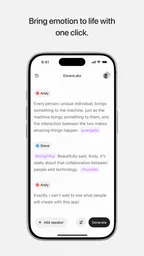
- Produces natural-sounding speech with expressive delivery.
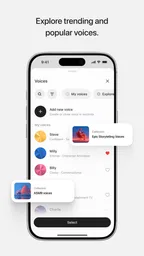
- Offers a wide selection of AI voices and accents.
- Lets users preview voice settings before generating audio.
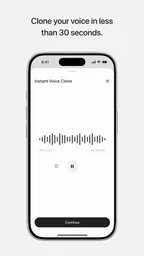
- Supports voice cloning for personalized narration.
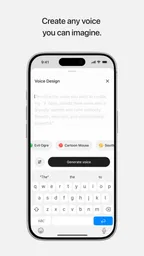
- Includes tools for creating spoken content from text.
What could be better
- Voice cloning may require verification or a paid plan.
- Generated audio can mispronounce names and unusual words.
- Free usage limits may restrict longer projects.
- Some advanced features require a subscription.
- Generated voices may not always convey the intended emotion.





