
ebtEDGE NEW! review
 Analysis by Appsdrops
Benefits apps earn their place when they make a routine task quicker, but they can feel stressful when a screen stalls at the wrong moment. ebtEDGE is a finance app from Fidelity Information Services LLC for people managing SNAP, childcare, or WIC benefits through a participating state program. I’d think of it as a state-benefits companion, not a general banking app: its usefulness depends on whether it supports the program and account you need.
The key practical point is that this kind of app is most valuable when you can check your account before you reach a checkout. A connection can shape that experience: opening the app, signing in, or trying to view current benefit information may depend on the service being reachable. I would not treat it as a substitute for a backup plan, such as knowing how to contact your state’s benefits office or keeping your card details accessible through the methods your program provides.
When a connection matters most
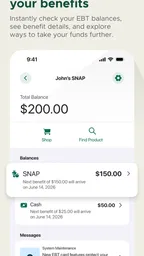
In ordinary use, the moments that matter are often brief: checking a balance before shopping, reviewing an account while planning a household budget, or trying to sort out a transaction. Those tasks are only useful if the app can load the information you need when you ask for it. I would check the account before leaving home rather than waiting until the checkout line, where a weak signal, a busy store, or a sign-in interruption can turn a simple check into an awkward delay.
That timing advice is especially relevant for SNAP and WIC users who plan purchases around available benefits. A quick check before shopping can help you make a more realistic list and avoid relying on a remembered balance. For childcare benefits, the right workflow may be different, so I would first confirm that the state program and account type you use are supported. The app’s broad purpose does not mean every state handles every benefit in the same way.
A useful habit is to separate account planning from the payment moment. If you know you will need to verify something, do it while you have a dependable connection and enough time to deal with an account prompt. If the app is slow later, you can avoid repeatedly refreshing it in public and make a decision using information you already checked. That is a modest change, but it reduces the pressure of troubleshooting in front of a cashier.
The app is listed as free, so there is no purchase decision to weigh before trying it. Still, free does not mean universally useful: eligibility and supported services are tied to state benefits, so the first question is whether your own program uses ebtEDGE. If it does not, your state’s designated option is the better choice, even if this app appears to cover a similar type of assistance.
Using it in the places benefits decisions happen
People rarely manage benefits from a quiet desk every time. You may be on a bus, in a grocery aisle, outside a childcare provider, or handling a household errand between other commitments. In those settings, a phone app can be more convenient than trying to find a computer, but it also makes reliable access more important. I would use it as a way to check information when the moment is convenient, not assume it will always be ready at the exact moment I need it.
For example, imagine planning a grocery trip after work. Before leaving, you check the account and adjust your list to match what is available. At the store, you notice that one item is out of stock and consider a substitute. If you already have a current picture of your benefits, you can make that choice without needing to pull up the app in a crowded aisle. The app’s value here is not merely being on a phone; it is helping you move the decision to a calmer moment.
There is also a useful distinction between convenience and authority. An app can help you view or manage benefit information, but state rules and program procedures remain the source of truth for eligibility, card use, and account issues. If something looks inconsistent, I would avoid making a major household decision based on one screen alone. Recheck when your connection is stable, then use the official contact route for your state if the discrepancy persists.
Compared with calling a benefits office for every routine check, an app can be a faster first stop when the task is simple and the account loads properly. Compared with a general banking app, it is more relevant to public benefits but less broadly useful for managing money outside those programs. And compared with relying on paper notes or memory, it can provide a more direct way to consult account information—provided your state supports it and you can connect.
What to do when access falters
A failed load does not automatically mean there is a problem with your benefits. The cause could be a temporary connection issue, a sign-in hurdle, or a service interruption. I would start with the simple checks: make sure the phone has a working connection, try again after a short pause, and avoid repeatedly submitting the same action if the screen is unclear. If you are unsure whether an action completed, verify the account state before trying again rather than guessing.
For a more persistent problem, distinguish an app-access issue from an account or card issue. If the app itself will not open or reach the service, trying again later or switching to a more stable connection may help. If you can access the app but the account information appears wrong, that is a different problem and is better handled through the support process for your state program. Keeping those cases separate can save time and prevent a technical glitch from being mistaken for a benefits decision.
I would also avoid making account changes while distracted or rushing through a poor connection. Read prompts carefully, especially when the next step could affect access or account security. If a session ends unexpectedly, sign in again through the normal app flow rather than following a message from an unknown source. This is sensible caution for any benefits account, where access matters and the information is personal.
The app is rated for Everyone and has a 4.2 average from around 3,100 ratings, with about 1,600 written reviews. That gives a prospective user some public feedback to consider, but ratings cannot tell you whether a specific state’s setup will fit your situation. I would weigh your own program’s compatibility and the reliability of your usual mobile connection more heavily than a broad average.
Keeping mobile use practical and data-conscious
Because checking benefits can involve personal account information, I would avoid signing in over an untrusted public network when a safer connection is available. A secure home connection or your regular mobile service is a more comfortable choice for account tasks. I would also lock the phone and avoid leaving an open session visible if someone else might use the device. These are practical habits, not a claim about any particular privacy setting in the app.
To keep data use under control, make account checks purposeful. Rather than opening the app repeatedly out of habit, decide what you need to confirm and check once when you have a stable connection. If you are planning a longer shopping trip, do the check beforehand and keep the relevant information in mind. This is particularly helpful if your mobile plan is limited or you often shop in places where reception is inconsistent.
One trade-off is that convenience can encourage last-minute checking. That is precisely when connectivity is least predictable: indoor stores may have weak reception, and a busy environment makes it harder to troubleshoot. I would treat the app as a planning tool first and an in-the-moment reference second. If your routine regularly takes you somewhere with poor service, identify a reliable time and place to check before errands rather than assuming the signal will cooperate.
Another practical step is to keep the app updated when convenient. The current version is 5.0.1, and the app is marked as working on operating system version 7.0 or later. Updates can matter for app compatibility and routine maintenance, though they do not guarantee that a particular connection or state service will always be available. If the app behaves differently after an update, first check the basics—connection and sign-in—before concluding that your account itself has changed.
Who should choose it, and who should look elsewhere
I’d recommend ebtEDGE to someone whose state program uses it and who wants a phone-based way to handle benefit-related account tasks. It is most appealing if you already use your phone to plan errands and can usually get online before you need account information. The app has more than 500,000 installs, which suggests it is used by a substantial number of people, but broad adoption does not replace the need to confirm that your own program is supported.
It is a weaker fit if you need a benefits app that works in places where you cannot get a connection, or if your state directs users to a different service. It may also be less useful to someone who prefers handling every account question by phone or through a local office. That preference is reasonable: an app can make routine checks convenient, but it is not automatically the best route for complicated eligibility questions, disputed information, or urgent account access problems.
Before relying on it for an important errand, I would install it, confirm that your state and benefit type are available, and make sure you can sign in while you have time to resolve any setup friction. Then try a simple account check at home. That small test gives you a better idea of whether it fits your routine than discovering a sign-in issue at the store.
Overall, this is a focused finance app whose strength is bringing state benefit management onto a phone, with convenience that depends on program compatibility and connectivity. The sensible approach is to use it for planned checks, keep a fallback route for account problems, and avoid depending on a last-second connection. If your state supports it, it can be a helpful part of managing benefits; if not, the state’s intended service is the right tool.
What we like
- View benefit balances and transaction history in one place
- Check whether a benefit deposit has arrived
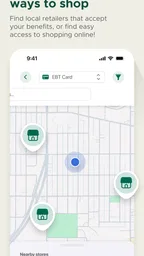
- Find nearby locations that accept your benefits
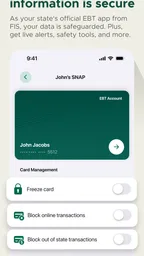
- Manage card settings from a mobile device
- Get a clear record of recent card activity
What could be better
- Available features depend on your state and benefit program
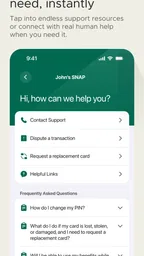
- Some account tasks may still require contacting customer service
- Forgotten login details can delay access to account information
- A phone or internet connection is needed for mobile access
- Transaction details may not appear immediately





