





DramaVibe - Dramas & Reels review
 Analysis by Appsdrops
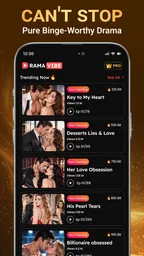
When I want a quick story rather than a full-length show, short-form drama can fit neatly into a spare moment. DramaVibe is built around that use: it brings mini-series, reels, and episodes designed to take about a minute into one video-focused app. My first impression is that its appeal depends less on elaborate controls and more on whether this compact format suits the way you like to watch.
Quick viewing, with a different pace from regular streaming
As a video player and editor app from Level Prestige, DramaVibe is aimed at viewers who want serialized entertainment in small portions. That puts it in a different lane from a conventional streaming service, where choosing a film or committing to a long episode is usually the point. Here, the short format makes it easier to sample a story while waiting for a ride, taking a break, or winding down without setting aside a full evening.
The key trade-off is that short episodes make it easy to start watching, but they may also make a story feel stop-and-start if you prefer longer scenes and room for character development. I’d approach it as a convenient source of brief dramatic viewing, not as a replacement for a library of films or full television seasons. If you like cliffhangers and quick narrative turns, the format may be a draw; if you want to settle into one uninterrupted story, a standard streaming app is likely the better fit.
DramaVibe is free to install, and its average rating is 3.8 from around 950 ratings. That gives a prospective viewer a useful general signal, though ratings can’t tell you whether the particular dramas or reels match your taste. It has over 500,000 installs, which suggests a meaningful audience for this kind of short-form viewing, but I’d still judge it by how its content fits your habits rather than treating popularity as a guarantee.
How to make short episodes work for you
A practical way to use an app built around brief episodes is to decide what kind of viewing you want before opening it. If you have only a few minutes, sampling a reel or one short installment makes sense. If you have a longer break, you can use that time to follow a story across several installments. This small distinction helps avoid the familiar short-video trap of opening an app for one quick look and losing track of how long you have been watching.
For example, on a commute with unpredictable stops, a minute-scale episode is easier to pause between interruptions than a long scene-heavy show. I’d still avoid starting a dramatic moment just before needing to get off: short episodes can end at a point that makes it tempting to continue. The format is most useful when you treat each viewing window as a small, intentional session rather than expecting a complete story arc in one sitting.
Another useful approach is to sample before committing. Short-form drama can vary widely in tone and pacing, and a brief taste gives you a quick sense of whether the storytelling style works for you. If the first few moments feel too compressed or melodramatic, there is little reason to force it; the app’s central appeal is convenience, so it should feel easy to move on when the format doesn’t click.
What happens during heavier viewing sessions
Brief episodes can make a viewing session surprisingly continuous. A single installment may be short, but following a serial story means moving from one compact segment to another. That changes the performance question: the important experience is not just whether one clip starts, but whether the app remains comfortable to use when you keep browsing and watching through a longer break.
I would be cautious about assuming that a short episode automatically means low resource use. Video playback still relies on the device and connection, and a series of short clips can amount to a substantial session. If you’re on a limited mobile connection or trying to preserve battery, it’s sensible to keep the session brief and use a connection that suits your data plan. Those are general video-watching considerations rather than special settings I can attribute to DramaVibe.
It also helps to separate perceived speed from storytelling pace. The episodes are designed to be brief, but that alone doesn’t establish how quickly the app opens, loads a particular video, or moves between screens on every phone. In practice, I’d judge the experience by whether browsing and playback feel smooth on your own device and connection. A slow connection can make any video app feel less responsive, while a modern device may handle the same session more comfortably.
Reliability and the realities of interrupted viewing
Short episodes are naturally suited to viewing in fragments, but that doesn’t mean every interruption will be seamless. If a call, message, or change of connection breaks a session, the useful test is whether you can return to the app and pick up watching without frustration. I wouldn’t count on a particular resume or progress-saving behavior unless you have tried it yourself, so it’s worth checking how the app handles interruptions during your first few sessions.
For everyday use, I’d start with a short test rather than planning a long watch around it. Open a drama when you have a little time, pause or leave the app once, and see whether returning feels straightforward on your device. This is a simple way to evaluate reliability without relying on assumptions about background playback, download options, or account features. It also shows whether the short-episode format works for your routine.
DramaVibe is rated for Teen audiences. That is a helpful broad age cue for families, but it isn’t a substitute for deciding whether a specific drama is appropriate for a particular viewer. I’d encourage parents and younger users to make that judgement together, especially when browsing a range of dramatic stories and reels.
Device fit, version, and spending decisions
The current version is 1.0.7, and the minimum operating system is Android 10. That makes the OS requirement an important first check: if your device runs an older version, it may not be a suitable choice. Even when a phone meets the minimum, available storage, network quality, and general device condition can affect video use, so a brief trial on your actual phone is more informative than assuming every compatible device will feel identical.
Although the app is free, it includes in-app purchases ranging from $1.99 to $249.99 per item. That is a wide spread, so I’d look carefully at any purchase screen and make sure I understand what an item offers before spending. You can begin with the free app and decide whether the viewing experience is valuable to you; there’s no reason to treat an optional purchase as necessary just because it is presented during a session.
One non-obvious trade-off with short-form entertainment is that it can feel inexpensive in time while encouraging repeated continuation. I’d set a personal stopping point before opening the app if I’m trying to keep a break short. For parents, it’s also worth reviewing purchase controls on the device, since a free download with optional purchases can still lead to spending if a user taps through without considering the cost.
Who is likely to enjoy it—and who may prefer another app?
I’d recommend DramaVibe to someone who actively enjoys compact serial stories and wants entertainment that can fit into small gaps in the day. It may also suit viewers who like trying a variety of brief dramatic moments rather than choosing a long film. The most useful scenario is a short, predictable break when you want something more story-led than casual scrolling but don’t have time for a full episode.
I’d skip it if your main goal is a broad catalogue of established films, longer television episodes, or a player for managing and editing your own video files. Those needs point toward other tools in the video category. Likewise, if you dislike rapid pacing or prefer stories that unfold slowly, the minute-scale format may feel compressed instead of convenient.
Compared with general short-video platforms, DramaVibe’s focus is more specifically on mini-series and dramatic viewing. Compared with mainstream streaming apps, it leans toward smaller installments rather than long-form programming. That distinction is the deciding factor: choose it for brief, serialized drama, and choose a conventional service when you want a longer, more settled viewing session or a wider mix of formats.
My performance verdict
My overall view is that DramaVibe makes the most sense as a focused option for people who already know they enjoy short dramatic episodes. The format offers an easy entry into a story during a small break, but quick installments can also invite longer sessions and may not satisfy viewers who want a complete, unhurried narrative. Its free starting point is appealing, while the broad range of optional purchases makes it wise to check costs before buying.
On speed and stability, I’d keep expectations grounded: the episode format is brief, but that does not by itself promise fast loading or dependable playback on every device. Check that your phone meets the Android 10 requirement, try a short session on your usual connection, and see how it recovers when you leave and return. If that everyday test feels smooth and the dramas hold your interest, the app could earn a place in your downtime. If not, a standard streaming app or a general video platform will better match your needs.
What we like
- Short episodes make it easy to watch during breaks.
- A vertical video layout feels natural on a phone.
- Personalized recommendations can help surface new stories.
- Romance and drama fans have plenty of genres to explore.
- Episode previews make it easier to choose a series.
What could be better
- Many shows may require in-app purchases to keep watching.
- Frequent cliffhangers can make stories feel stretched out.
- A steady internet connection is needed for streaming.
- The catalog may vary by region and change over time.
- Some viewers may find the dramatic acting overly intense.





