



Discotech Nightlife review
 Analysis by Appsdrops
I’d reach for Discotech Nightlife when a night out is still taking shape and I want to compare club plans, ticket options, guest lists, and VIP tables in one place. It is an events app focused on nightlife rather than a general calendar, which makes it most useful when the venue and the way you get in matter as much as the event itself. My main reservation is that a convenient menu of options is not the same thing as a guarantee: I would still check the event details and make sure everyone in my group understands the entry terms before setting off.
A nightlife planner, not a general events calendar
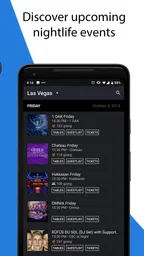
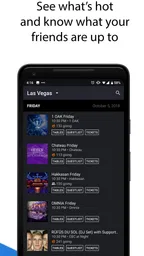
The app’s purpose is easy to grasp. Instead of browsing events of every kind, I can use Discotech Nightlife to look for club nights and festivals, then consider routes such as discounted tickets, guest-list access, or a VIP table. That focused approach can save time when I already know I want a night out and am weighing how to attend. It is less compelling if I’m looking for concerts, community events, or a broad city guide.
Discotech, Inc. develops the app, which sits in the events category. It is free to install and rated for Everyone, so there is no purchase barrier to trying it. The app has a 4.9 average from around 2.1 thousand ratings, with over 100 thousand installs. Those figures suggest a solid reception, but they cannot tell me whether a particular venue, city, or event will suit my plans; the useful test is whether the listings available to me are relevant.
In practical terms, I’d treat it as a decision-making aid rather than a complete night-out concierge. It can help surface different ways of getting into a nightlife event, but I would still coordinate transport, timing, and the group’s budget separately. That distinction matters: a guest-list option may sound like the simplest choice, while a ticket may be more predictable for a group that wants to arrive together. The best route depends on the event’s own terms, not just the label attached to an option.
Choosing between tickets, guest lists, and tables
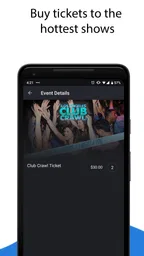
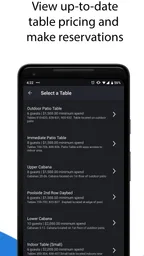
A helpful way to use the app is to decide first what your group values most. If keeping the cost down is the priority, compare discounted tickets with any guest-list option rather than assuming one is automatically cheaper or easier. If everyone wants a clear plan before leaving home, a ticket may feel more straightforward. If the group is specifically looking for a table experience, the VIP option is relevant, though it calls for more discussion about budget and expectations.
One small but useful planning habit is to settle the group’s preferred entry route before people start making separate arrangements. A friend buying a ticket while another assumes the group is on a guest list can turn a simple evening into a coordination problem. I’d use the app to compare choices, then share the exact event and option with the group so everyone is working from the same plan.
Another sensible step is to read the event-specific conditions before committing. Nightlife access can depend on details such as arrival timing or entry requirements, and those terms can matter more than the headline offer. I wouldn’t assume that a guest-list place means guaranteed entry, or that a discounted ticket has no restrictions. The app is most useful when I treat each listing as something to evaluate, not as a promise that every part of the evening is settled.
Where it fits into an ordinary night out
Imagine a few friends deciding on Friday afternoon that they want to go out, but they have not agreed on a venue or spending limit. I’d browse the available club and festival choices, narrow the group’s preferences, and compare the available entry routes for the event that seems promising. Then I’d confirm the choice with everyone before anyone spends money or makes the trip. That workflow is more practical than sending a string of unrelated search results in a chat, because it keeps the options tied to the same nightlife plan.
For someone visiting a city, the same focused approach can help turn a vague “let’s find a club” into a more concrete choice. Still, I would not rely on the app alone for local context. A listing can help identify an event and entry option, but personal considerations—how far the venue is, whether the group is comfortable with the plan, and what time everyone can arrive—remain part of the decision. I’d pair the app’s event discovery with a separate check of the journey and the group’s logistics.
Discotech is also more useful for people who enjoy planning ahead than for someone who wants to make a spontaneous choice at the door. The ability to compare options only pays off if I take a moment to understand them. If I’m already outside a venue and simply want the fastest answer, asking the venue or checking its own event information may be more direct.
What the current version tells existing users
The current version is 8.4.1, and the app first appeared on April 24, 2014. That long span gives the product an established history, while the current version number identifies the build users can look for now. Neither fact, on its own, proves that a particular feature has recently changed or that every older device behaves the same way. I’d avoid reading a version number as a changelog: it tells me where the app stands, not the precise story of how it got there.
For existing users, the practical takeaway is to judge the current experience by the tasks they actually need: finding a relevant event, comparing entry choices, and understanding the terms before committing. If an update is available, I’d install it through the app store and then check that the event information I need is still accessible. I would not assume that a newer build automatically changes ticket rules or a venue’s entry policy; those are event-level matters, not something a version number can settle.
The minimum operating-system requirement is version 7.0. That makes compatibility worth checking before planning around the app, especially on an older device. If the app cannot be installed or used comfortably on your phone, you may need to make arrangements through another source rather than discovering the problem when your group is ready to leave.
Its free price makes it low-risk to try, but “free” describes the app, not every event option shown within it. I’d keep those separate when budgeting: browse without assuming that tickets or tables cost nothing, and verify the price and conditions attached to the specific plan. This is particularly important when several friends are deciding together, since one person’s idea of an affordable night may not match everyone else’s.
Where the app can feel limiting
The focused nightlife scope is both its strength and its boundary. If the listings match the kind of club or festival plan I want, the app’s attention to entry options is useful. If I want a broad directory of arts, family, or daytime events, I would use a general event-discovery service instead. Likewise, a venue’s own channels may be the better place to confirm last-minute changes or details that are specific to that night.
There is also a real trade-off between comparing options and adding another step to planning. A group can spend too long weighing a discount against a guest list and lose sight of the simple question: which option fits the whole party? I’d set a spending range and an arrival plan first, then compare only the choices that meet those constraints. That keeps the app from becoming a source of indecision.
And no listing can remove the need for judgment. People should check what an offer actually requires, make sure the group can follow the same plan, and avoid treating an appealing label as a guarantee. For a large celebration, a VIP table may involve more coordination than a couple of tickets; for a casual evening, it may be unnecessary. I would skip the table route unless the group genuinely wants that kind of outing and is comfortable with the commitment involved.
Who I’d recommend it to—and what to watch
I’d recommend Discotech Nightlife to people who regularly go to clubs or festivals and want a focused place to explore different entry routes. It is especially apt for friend groups comparing ticket and guest-list possibilities, or for planners who want to settle the broad shape of a night before heading out. The app’s strong average rating is encouraging, but the best reason to try it is simpler: its nightlife-specific focus matches those planning needs.
I’d skip it if nightlife is only an occasional afterthought, if I need a general events calendar, or if my main requirement is immediate confirmation from a particular venue. In those cases, a broad event app or the venue’s own information may be more direct. I would also avoid making it the sole basis of a group’s plans until I had checked the exact event terms and everyone’s preferred option.
What I’d watch for as an existing or new user is whether the events available in my area are useful, whether the choices make their conditions clear, and whether the current version works well on my device. Those are more meaningful signs of value than a version number by itself. If the app helps me turn a loose idea into a shared, realistic plan—and I still verify the details that affect entry—it earns a place in my nightlife toolkit. If it leaves my group unsure about costs or arrival expectations, I’d pause and check the event or venue directly before committing.
What we like
- Browse nightlife events and venues in one place
- Discover parties based on your location
- View event details before making plans
- Find options for different music preferences
- Useful for planning nights out while traveling
What could be better
- Event availability may vary by city
- Some listings may have limited details
- Ticket prices can add up quickly
- Popular events may sell out early
- Location access may be needed for nearby listings





