




DeepSeek - AI Assistant review
 Analysis by Appsdrops
I would approach DeepSeek as a practical place to start when I have a question, a rough draft, or a small task I want to think through with an AI assistant. It is a free productivity app from DeepSeek, and its straightforward appeal is that I can describe what I need in ordinary language rather than learn a complicated tool first. That makes it approachable, but it still works best when I treat its answers as a helpful starting point, not unquestionable fact.
What to expect from the assistant
My first impression is that DeepSeek - AI Assistant is most useful when I have a clear outcome in mind: explain a confusing paragraph, suggest a structure for a message, or turn a scattered idea into an ordered list. I can begin with a plain-language request and refine it in follow-up messages. That conversational approach is a better fit for everyday problem-solving than a traditional productivity app built around fixed forms and menus.
The app sits in the productivity category, though it is not a calendar, project board, or note archive. I would use it alongside those tools rather than expect it to replace them. For example, it can help me decide how to phrase a reminder or outline a plan, while I still need to put the final task in the place where I track my schedule.
DeepSeek has an average rating of 3.7 from around 359,000 ratings, with roughly 7,300 written reviews and over 100 million installs. Those figures suggest that many people have tried it, but they do not tell me whether its answers will suit my own needs. The more useful test is to try a low-stakes task and see whether the responses are clear, relevant, and easy to correct.
The app is rated Teen, so I would not treat it as a child-focused learning environment. Its current version is 2.8.0, and the listed minimum operating system is Android 7.0. It was released on January 8, 2025. That gives a first-time user a concrete sense of the app’s platform requirements and place in the market without changing the basic advice: keep sensitive or consequential decisions under your own judgment.
Who is likely to find it useful
I think it suits students who want to unpack a difficult concept, people who draft a lot of everyday writing, and anyone who benefits from turning a vague question into a set of next steps. It can also be handy when I am between tasks and need a quick explanation without opening a full research workflow. The strongest use case is assistance with thinking and wording, not automatic management of a whole day.
If you want a tool that stores every project in a carefully organized workspace, or one that handles your calendar and reminders directly, a dedicated app is likely a better choice. DeepSeek’s value is the back-and-forth: I can ask, inspect the response, and narrow the request. That is useful, but it means I remain responsible for transferring the result into my own notes or task system.
Getting started without overthinking setup
After installing it, I would keep the first session simple. Open a conversation and ask for help with something ordinary and low risk, such as rewriting a short note so it sounds warmer or explaining a term in plain language. This is a more reassuring first step than beginning with a complicated assignment or a decision that could have serious consequences.
For a useful first prompt, include the situation, the audience, and the format you want. Instead of asking, “Help me write this,” I might say, “Make this message to my neighbor polite and brief, and keep the request clear.” That small amount of context usually gives the assistant a better target. If the response is too formal or too long, I can ask for a shorter, more casual version rather than start over.
I would also decide early what not to share. A prompt can often be made useful without including private names, account details, addresses, or confidential work information. Replacing identifying details with neutral descriptions lets me get help with tone or structure while keeping the request less personal. That is a sensible habit for any AI assistant, especially when I am still learning how it fits into my routine.
The first useful result: turn a rough idea into a plan
A realistic first success might happen on a busy weekday evening. Suppose I know I need to prepare for a meeting, answer two messages, and pick up a few groceries, but the list in my head feels jumbled. I can ask DeepSeek to sort those items into a short checklist and suggest a sensible order. I would then check that it has not assumed a deadline or priority I never mentioned before copying the list into my usual planner.
This workflow shows both the reward and the boundary. The assistant can reduce the effort of getting started, particularly when my notes are messy or my request is half-formed. It cannot know which errand is urgent unless I say so, and its tidy-looking plan is not proof that the priorities are right. Give it the constraints that matter, then review the result before acting.
A less obvious technique is to ask for alternatives rather than one polished answer. If I am writing a delicate message, I can request a direct version and a softer version, then compare them and edit the one that sounds like me. This is often more useful than asking the assistant to “make it perfect,” because the real choice is usually about tone, not grammar alone.
How to get better answers through follow-up
I would treat the first reply as a draft of the collaboration, not the final word. If an explanation is too technical, say which part lost you and ask for a simpler example. If a plan is too ambitious, explain the time or resources you actually have. The useful detail often comes from that correction: the assistant has a narrower target, and I can judge whether the revised answer fits.
Another practical approach is to request a format that makes checking easier. For a comparison, ask for a few clear criteria; for a procedure, ask for numbered steps; for a draft, ask it to preserve the main point while changing the tone. A structured response is easier to scan and challenge than a long paragraph. Still, I would verify important facts elsewhere, especially for health, legal, financial, or safety-related questions.
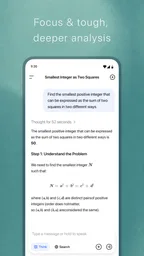
For studying, I would use the conversation to expose gaps rather than simply collect a finished answer. I might ask for a concept to be explained, then request a short practice question and attempt it myself. That turns the assistant into a prompt for active learning instead of a shortcut that leaves me with polished notes I cannot explain. The distinction matters: an answer can sound convincing even when I have not understood it.
Common confusion and real limitations
One common misunderstanding is to assume that confident wording means dependable accuracy. I do not. A fluent response can still miss context, make an incorrect claim, or overlook an exception. For casual drafting, that may be easy to fix; for a consequential decision, I would use a trusted source or qualified professional and treat the app as a way to prepare questions, not as the authority.
Another point of friction is that broad prompts tend to invite broad answers. If I ask for “a good plan,” I may get a generic list because I have not explained what “good” means for me. Adding a deadline, a limit, or a preferred style is usually more effective than repeating the same vague request. When it misunderstands, I would correct the specific assumption rather than assume that a longer prompt is automatically better.
The conversational format also has a trade-off compared with search engines and conventional office tools. Search is often preferable when I need to inspect original sources or compare current information. A word processor is better when I need precise control over a final document, and a task manager is better for reminders and ongoing tracking. DeepSeek is most compelling in the middle: helping me reason, organize, and draft before I move the result into those tools.
I would not use it as a substitute for my own voice. A draft can be clean yet feel oddly impersonal, especially when the message depends on a relationship or a delicate nuance. My best results come from giving it the rough content, asking for a specific adjustment, and then restoring phrases I would naturally use. That keeps the convenience without sending a message that sounds unlike me.
Moving from a first try to a useful habit
Once I have had one good result, I would choose a repeatable, modest job for the assistant: clarifying notes after a meeting, making a first outline, or finding a simpler way to explain a topic. Reusing a familiar workflow helps me learn how much context to provide and which kinds of answers I still need to check. It also prevents the app from becoming another place where I collect suggestions but never act on them.
DeepSeek is free, which makes trying that routine low commitment. I would still measure its value by whether it saves effort or helps me think more clearly, not by how often I open it. If I spend more time correcting generic responses than I would have spent doing the task myself, the app is not helping in that situation. Switching to a focused writing, research, or planning tool can be the sensible move.
My recommendation is for curious first-time users who want a conversational assistant for everyday explanations, early drafts, and small planning jobs. Start with a simple request, add the audience and constraints, and check the answer before relying on it. If you want a dependable source of record, automatic task tracking, or an answer you never need to verify, this is not the right fit. Used as a flexible helper rather than a decision-maker, DeepSeek - AI Assistant can make the first step of a task feel noticeably easier.
What we like
- The free tier makes it easy to try without a subscription.
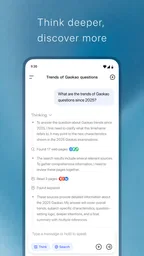
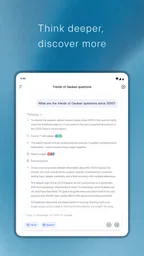
- Web search can help provide current information.
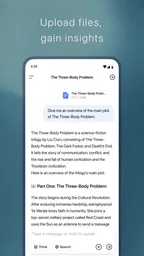
- It supports file uploads for document-based questions.
- Chat history makes it easy to revisit earlier exchanges.
- Available on both Android and iOS.
What could be better
- Some features may vary by region or app version.
- Answers can sound confident even when they are incorrect.
- Sensitive information may not be suitable to share in chats.
- Web search results can require checking against original sources.
- Heavy traffic may slow responses or limit access.





