



Deep Clean Elite review
 Analysis by Appsdrops
I look at phone-cleaning apps with a practical question in mind: will this help me make sensible space-management decisions, or will it simply encourage me to tap a big cleanup button? Deep Clean Elite is a free Android productivity app from PDI Turbo, and its focus is keeping a phone tidy. That is a useful goal, but a cleaner is only helpful when it makes clear what it wants to remove and lets you stay in control.
My overall take is cautious but interested. The app has a current version of 1.2.1 and has attracted over a million installs, with an average rating of 4.1 from around 13,000 ratings. Those figures suggest that plenty of Android users have tried it, but they do not tell me whether its cleanup suggestions will suit any particular phone. I would treat it as a tool to inspect, not as a reason to delete files automatically.
What Deep Clean Elite is useful for today
At its best, a cleaning app gives you a clearer starting point when your phone feels cluttered. Rather than searching through folders at random, you can use a dedicated cleaner to approach storage maintenance as a deliberate task. Deep Clean Elite is aimed at that kind of routine: helping Android users look for ways to clear space without turning the job into an ongoing project.
That distinction matters. A phone can feel disorganized even when it does not need an aggressive cleanup, and removing files is not automatically an improvement. I would open the app when I had a concrete reason to review storage, such as preparing for a long trip, making room for new downloads, or dealing with a low-space warning. I would not use it just because a cleaner promises a tidier device.
For a useful first session, I would inspect what the app presents before confirming any cleanup. If a suggestion concerns a file I recognize, I can make an informed choice; if I do not understand what it is, I should pause and check through the phone’s own file tools. The safest cleanup is the one where you know what will be removed before you approve it.
That makes the app potentially appealing to people who prefer a guided cleanup entry point over browsing Android storage menus. It is also suited to someone who wants a simple maintenance habit rather than a detailed inventory workflow. The trade-off is that a dedicated cleaner should not replace the built-in settings and file manager when you need precise control.
A realistic cleanup routine
Imagine you are about to download maps, videos, or other files for a weekend away, and Android warns that space is tight. I would use Deep Clean Elite as a prompt to review the phone, then check any proposed removals against what I still need. Old downloads are often easier to part with than files whose purpose is unclear, so I would start with items I can identify rather than treating every suggested deletion as disposable.
A useful habit is to separate “make room now” from “clean everything.” Decide how much space you need for the immediate task, remove only items you are comfortable losing, and then check the phone’s available storage again. This keeps a time-sensitive cleanup from becoming an unnecessary sweep through files you might later miss.
I would also avoid cleaning immediately before an important activity if I could not review the results calmly. Before a trip or a workday, the goal is reliable access to the files you need, not an immaculate storage screen. A few minutes spent checking names and locations can be more valuable than a faster cleanup.
Where it sits among Android alternatives
The usual alternative is not necessarily another cleaner. Android’s own storage controls and a file manager can be better when you want to locate a specific folder, decide exactly what to keep, or understand where space is going. Those tools can take more manual effort, but that effort is worthwhile when you are dealing with personal documents, downloads you have not sorted, or anything you cannot easily replace.
A dedicated app like this makes more sense when you want a focused place to begin and do not want to navigate several settings screens. I see that as a convenience advantage, not proof that a third-party cleaner can safely decide what matters. If you already know how to manage storage through Android, the app may add little to your routine. If you are less comfortable with the system menus, it may feel more approachable, provided you still review its actions.
For photos and videos, I would be especially careful. A file may look like clutter while still being the only copy of a memory or a useful record. Before deleting anything valuable, make sure it is backed up somewhere you trust. A cleanup tool is not a substitute for a backup plan, and no amount of reclaimed space is worth losing an irreplaceable file.
What the release details tell me—and what they do not
The app was released on January 16, 2026, and its current version is 1.2.1. That gives new users a clear point of reference for the current release, but it does not by itself show what changed between versions or how those changes affect people who already use the app. I would not assume a particular feature was added or improved without a change record to support that conclusion.
For existing users, the practical question is whether the current version fits the way they already manage storage. If an update is available, I would read its in-app or app-store notes before changing a familiar routine, then review cleanup suggestions as usual. Version numbers can help identify what is installed, but they are not a guarantee that a cleaner will understand every file correctly.
Deep Clean Elite is marked for Everyone and requires Android 7.0 or later. That makes its stated compatibility relevant to people using older Android devices, but the operating system requirement alone cannot tell you how smoothly it will work on a particular handset. I would check that the app installs on the device and then judge its behavior during a small, low-risk cleanup before relying on it for a major space-saving task.
Its 4.1 average across roughly 13,000 ratings and about 1,200 written reviews offers a broad signal of user response, not a guarantee of a good fit. I would look for comments that describe the same kind of phone and cleanup needs I have, rather than relying on the average alone. The app is free, so trying it does not require a purchase, but time and attention still matter: review what it proposes and avoid granting trust automatically.
Limits I would keep in mind
My biggest reservation is the general risk that comes with any tool whose purpose is to remove things. A cleaner can make a process feel simple, but simplicity can conceal important distinctions between disposable clutter and files a person meant to keep. I would not approve a batch of changes without understanding what it includes, especially if I had not backed up important content.
There is also a limit to what a cleaner can solve. If a phone feels slow because of an unrelated problem, deleting files may not address the cause. Likewise, if your storage is consistently consumed by content you actively use, a one-time cleanup may only postpone the same issue. In those situations, reviewing large downloads, moving files you want to retain, or changing how you store media may be more useful than repeating cleanups.
I would skip this app if I already prefer to manage every folder myself, or if I am uncomfortable letting a separate utility inspect storage. I would also choose Android’s built-in tools when I need a careful, item-by-item decision or want to troubleshoot a particular folder. Deep Clean Elite is a poor fit for anyone expecting a magic fix for every performance complaint or who plans to confirm deletion prompts without reading them.
To get more value from it, I would use a repeatable workflow: identify the reason for cleaning, inspect the proposed items, protect anything personal or hard to replace, and check the result afterward. If the same type of content keeps filling the phone, I would address that source instead of treating cleanup as a permanent solution. This approach is slower than blindly accepting every suggestion, but it is much safer and more informative.
What I would watch before making it a habit
When evaluating future use, I would pay attention to whether the current release makes cleanup choices easy to understand, whether I can review them before acting, and whether the app remains useful for my actual storage problem. Those are practical measures of fit, not assumptions about features or future updates. If the app’s suggestions save me time while leaving the final decision in my hands, it earns a place in my routine; if I still need to redo the work in a file manager, the built-in route is probably enough.
I would also watch how my own needs change. Someone who routinely downloads large files may benefit from periodic reviews, while a person whose storage is mostly important photos may be better served by organizing and backing up those files first. A cleaner is most useful when it supports a specific habit, not when it becomes a reason to remove content simply to make a device appear cleaner.
Deep Clean Elite is therefore best approached as a convenient starting point for Android storage maintenance, rather than an authority over what belongs on your phone. PDI Turbo’s app is free, broadly accessible on supported Android versions, and has a substantial audience, but the sensible choice still depends on how much control you want. I would give it a try if I wanted a guided way to review clutter, while keeping Android’s own storage tools close at hand for decisions that need more precision.
My recommendation: consider Deep Clean Elite if you want a focused helper for occasional cleanup and are willing to inspect its suggestions. If your priority is exact file-by-file control—or you are already comfortable managing storage yourself—I would stick with Android’s built-in options. That balance lets the app be useful without handing over decisions that should remain yours.
What we like
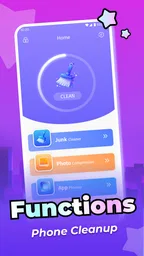
- The interface makes it easy to find the main cleaning tools.
- Quick scans provide a simple overview of storage use.
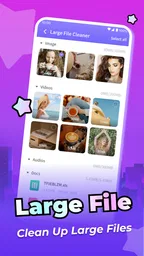
- Large files can be identified for manual review.
- Duplicate items may be easier to spot and remove.
- The app offers a straightforward option for freeing device space.
What could be better
- Cleaning results can vary by device and operating system.
- Some files may need careful review before deletion.
- Background scans can use battery and processing power.
- Useful features may require a paid subscription.
- Cleaner apps cannot improve performance on every device.





