Day Counter. Count Up & Down review
 Analysis by Appsdrops
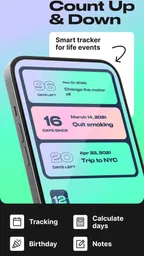
I like a day counter best when it makes time feel useful without turning it into another demanding system to manage. Day Counter. Count Up & Down is built around that simple idea: it can mark the time until an event or count how long it has been since one, while also covering birthdays, habits, and goals. I found that focus appealing for personal milestones that are easy to lose track of but don’t need a full calendar or project planner.
A quiet tool for keeping time in view
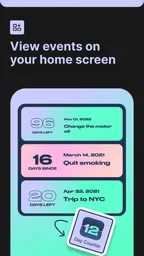
This is an events app from BITSENS, and its approach is narrower than a conventional calendar. Rather than centering schedules, meetings, and invitations, it gives meaningful dates their own counters. That makes it useful for a birthday, a trip you are looking forward to, a personal streak, or the number of days since you started a new routine. The point is not to plan every hour; it is to make one stretch of time easy to notice.
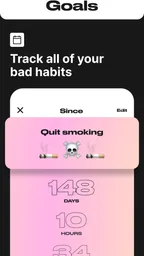
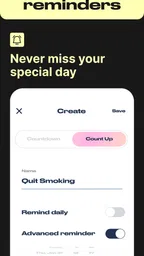
The distinction between counting down and counting up is more practical than it may first sound. A countdown turns a future date into something tangible: you can see that a break, celebration, or deadline is approaching. A count-up makes elapsed time visible, which can suit an anniversary, a habit you are trying to maintain, or a personal change you want to acknowledge. I would use the first for anticipation and the second for reflection, rather than trying to make either one replace a calendar reminder.
That restraint is also the app’s main trade-off. If you want shared planning, detailed task lists, or a schedule that coordinates several people, a calendar or dedicated planner is a better fit. Day Counter is more appealing when you want a handful—or many—of personal time markers without the overhead of organizing them as appointments. Its unlimited countdowns and count-ups make that collection flexible, but they do not turn it into a complete event-management system.
Who will get the most from it
I can see this being useful for someone who likes small, visible reminders of progress: a learner tracking days into a course, a person building a habit, or a family keeping birthdays and upcoming occasions in one place. It can also suit anyone who finds a single calendar crowded with recurring commitments and personal milestones. Keeping those milestones in a dedicated counter can make them feel easier to scan without mixing them into work meetings.
It is less suitable if your idea of tracking a goal involves detailed notes, flexible task steps, collaboration, or analysis. A counter can tell you how time is passing; it cannot by itself explain why a habit slipped or what you should do next. For that, I would pair a day counter with a journal, habit tracker, or task app rather than expect one small utility to cover every part of the routine.
Trust starts with what you can actually check
For a personal date-tracking app, trust matters because the dates may reveal more than a plain number: a birthday, a health-related milestone, or a private goal can be sensitive. I would not treat a simple interface or a familiar category as proof of how information is handled. Before adding dates I would rather inspect the app’s current permission prompts, privacy information, and any account or data controls it presents, then decide what I am comfortable storing.
That is a sensible check for any app, not a reason to assume a particular risk here. I would avoid entering extra details that a counter does not need. For example, a short label can be enough to identify a personal milestone; there is little value in attaching an intimate explanation if all I want is to see the elapsed days. This is a practical way to keep the usefulness of a counter while limiting how much context sits alongside a date.
Day Counter is free to download, and it is rated for Everyone. The app has a 4.2 average from around 1.4 thousand ratings, with about 185 written reviews, and it has passed 100 thousand installs. Those figures suggest that it has found an audience, but they do not tell me how it handles personal information or whether its controls suit my preferences. I would use the app’s own visible choices and current privacy details for that decision, rather than treating popularity as a privacy guarantee.
Check the choices before building a routine
When I try a date-based app, I prefer to test it with a low-stakes event first. That gives me a chance to see how I create and identify a counter before adding birthdays or milestones I would consider private. I would also look for any available way to edit or remove an entry and review the app’s permissions in the device settings. These are useful habits because a date can remain relevant for years, while the reason I originally saved it may change.
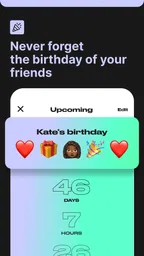
I would be especially deliberate about birthdays. They are convenient to track, but they are also personal details, and a counter is only helpful if I can tell which date belongs to which person without adding more information than necessary. A compact label, such as a first name or family role, may be enough for my own use. If a household needs to share and update a common birthday list, though, I would choose a tool with clearly suitable shared access instead of assuming an individual counter will provide it.
Likewise, I would treat a habit counter as a record rather than a judge. A count-up can make a streak feel encouraging, but a missed day may reset the emotional meaning of the number even when it does not erase the progress behind it. For goals where consistency matters more than an unbroken streak, I would pair the counter with a forgiving note-taking method or choose a tracker designed to record pauses and patterns. That small distinction can make the app more motivating rather than stressful.
Everyday workflows that make the counters useful
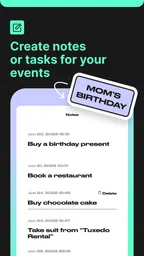
One realistic use is preparing for a family birthday without turning it into a full planning project. I would create a countdown far enough ahead to notice the date, then rely on a calendar or reminder for the actual tasks—buying a gift, arranging a visit, or sending a message. The counter keeps the occasion in view; the calendar handles actions that must happen at a particular time. Separating those jobs avoids the common mistake of assuming that seeing a date approach is the same as being reminded to do something about it.
For a new habit, I would start a count-up on the day I begin and check it at a moment that already belongs to the routine, perhaps at the end of the week. That makes the number a prompt for reflection rather than a notification I have to obey. If the habit is important for health or daily functioning, I would not rely on an elapsed-days display as my only record. The counter can make a milestone visible, while a more structured tracker can capture what I actually did and when.
A less obvious use is tracking time since a positive change, such as beginning a course or setting aside time for a creative project. In that case, the count-up is not a competition and does not need a target date. I would label it in a way that reminds me what the number represents, then review it alongside a short note about what has changed. Without that context, a counter can become a number I glance at and immediately forget.
The reverse workflow works for a trip or a planned personal milestone. A countdown can build anticipation, but I would keep operational details—departure time, booking information, packing tasks—in the calendar or relevant planning app. This division is one of the app’s strengths when used intentionally: it can keep a meaningful date prominent without forcing every related detail into the same place. It is also a limitation for anyone hoping to manage the entire event from one screen.
What the app’s simplicity does—and does not—replace
Compared with a calendar, a day counter is better at answering a narrow question: how long until this date, or how long has it been? A calendar is better at placing events in a schedule and handling the surrounding commitments. Compared with a habit app, Day Counter can make elapsed time straightforward to see, but a specialist habit tool may be more appropriate for logging frequency, setting reminders, or understanding patterns. I would choose based on the question I want answered, not on which app has the longest feature list.
Unlimited counters are useful if I want to keep several kinds of milestones together, but more entries can make any tracking space less meaningful. I would avoid adding every date that crosses my mind. A small set of clearly named counters is easier to scan and more likely to stay useful. I would also review old entries occasionally: a past goal that no longer matters can clutter the collection, while a completed event may be better removed or kept only if seeing its elapsed time still has value.
The app is listed at version 1.43.0 and requires Android 7.0 or later. That makes the compatibility question fairly simple for an Android user: check the device’s operating-system version before installing. It is free, with in-app purchases ranging from $2.99 to $19.99 per item, so I would look at the purchase choices in the app store and decide whether any paid option is relevant before spending. I would not assume that a paid item is necessary for the basic use I have described.
A measured recommendation
My overall view is that Day Counter. Count Up & Down makes sense when I want time itself to be the reminder. Its focus on both future dates and elapsed days gives birthdays, habits, and goals a clear place without asking me to rebuild my schedule around them. I would recommend it to someone who enjoys simple personal tracking and wants to keep milestones visible, especially if a standard calendar feels too busy for that purpose.
I would skip it as my main tool if I needed collaboration, detailed event planning, dependable task follow-through, or rich habit analysis. I would also take a moment to review the current privacy information, permissions, and available data controls before adding sensitive dates, and keep labels minimal. With those boundaries, the app can be a useful companion rather than a storehouse for unnecessary personal detail.
For me, its best role is modest: one clear number that helps a date matter. Used that way, it can make a birthday easier to anticipate, a goal easier to revisit, or a stretch of progress easier to recognize. It is not a substitute for the tools that organize what happens next, but it does a more focused job of keeping track of how far time has moved.
What we like
- Track days elapsed since an event or remaining until a future date.
- Use separate counters for birthdays trips deadlines and personal milestones.
- Set repeating counters for annual events.
- Add photos and notes to make each countdown easier to recognize.
- The simple setup makes creating a new counter quick.
What could be better
- The usefulness depends on entering accurate dates yourself.
- Many counters can make the main list harder to scan.
- Past events may need manual updates to stay relevant.
- Countdowns do not replace reminders for time-sensitive tasks.
- Frequent date changes can make long-term tracking less reliable.





