




Dave: Credit, Cash & Money App review
 Analysis by Appsdrops
I think Dave is easiest to understand when you treat it as a short-term cash-flow tool, not as a replacement for a bank account or a plan for ongoing borrowing. It is a finance app from Dave Operating LLC, and its central appeal is the possibility of getting a small advance without a credit check, interest, or late fees. That may help when an ordinary bill lands before payday, but it still calls for a clear repayment plan. My advice to a first-time user is to install it with one specific need in mind, check the terms shown in the app, and borrow only if the timing genuinely works for your budget.
What to expect from Dave
Dave’s basic promise is straightforward: eligible users may be able to access up to $500 in cash without a credit check, interest, or late fees. “Up to” matters. I would not install it assuming that the maximum will be available immediately; the amount offered and the steps required can depend on your account and circumstances. Think of the headline amount as a ceiling, not a guaranteed first advance.
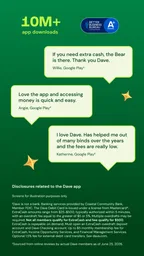
The app is free to download, is rated for Everyone, and focuses on personal finance rather than general-purpose banking alone. Its 4.7 average across roughly 643,000 ratings suggests that many people find it useful, while a substantial volume of reviews also makes it worth reading recent user feedback if you want to understand how experiences vary. Dave has reached over 10 million installs, so it is a well-established option, not an obscure lending app.
When I compare Dave with the usual alternatives, the key distinction is how quickly it may bridge a gap versus how much control you have over the cost and timing. A credit card can be convenient if you already have available credit and can pay the balance on time, but carrying a balance may bring interest. A bank overdraft can cover a payment automatically, yet its terms and charges depend on the bank. Dave’s no-interest, no-late-fee positioning is appealing, but an advance is still money that must be accounted for later. For a predictable expense you can delay, changing the bill date or using savings may be the cleaner choice.
I would also keep expectations grounded: Dave is most relevant to a temporary mismatch between incoming money and an essential expense. It is less suitable for a recurring shortfall, a large purchase, or a situation where the next paycheck is already committed. The useful question is not just whether an advance is available, but whether taking it leaves enough room for the next round of essentials.
Starting with a clear purpose
Before opening the app, I would name the exact bill or purchase the money is meant to cover and check when it is due. That simple preparation makes the first session less confusing: you are evaluating a specific option rather than treating the available amount as extra spending money. If the expense can wait without a penalty, waiting may be better than borrowing.
Dave’s current version is 4.15.0, and it was released on April 24, 2017. Those details are useful when checking that you have the intended app and a compatible device: the stated minimum operating-system version is 9. The app’s title can also be easy to overlook in a crowded search result, so check that the publisher shown is Dave Operating LLC before installing. The app-store download itself costs nothing.
Getting through the first setup
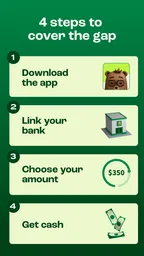
Once installed, follow the in-app setup and read each request before moving on. Finance apps need information to assess an account and present relevant options, so I would use accurate details and avoid rushing through screens simply to reach the cash feature. If a screen asks you to connect or verify something, pause long enough to understand what is being requested and why. That habit is especially useful when an app will be involved in money movement.
I would not assume that installation alone makes an advance available. The practical first milestone is seeing what Dave actually offers your account and understanding the conditions attached to that offer. Review the amount, any timing details, and the repayment information displayed before confirming anything. If the terms do not fit your next pay cycle, back out and consider another route rather than accepting because the process is already underway.
One small but important workflow tip is to separate “checking eligibility” from “committing to borrow.” A first-time user can explore the app and understand the choices without deciding that an advance is automatically the right answer. Keep a note of the bill amount and the date you expect money to come in; comparing those with the in-app details is more reliable than making a decision from memory.
Making the first advance count
A realistic first use might be a necessary grocery run or a utility bill that falls a few days before income arrives. In that situation, I would start by calculating the smallest amount that solves the immediate problem, not by choosing the largest amount shown. Then I would check that the expected repayment leaves enough for rent, food, transport, and other bills. The smaller, targeted approach reduces the chance of fixing today’s issue by creating a harder one later.
After the advance is confirmed, treat the repayment date as part of the original decision, not as a detail to remember eventually. Put it alongside your other upcoming obligations and avoid spending money that is already spoken for. This is the most useful habit I can recommend for a cash-advance app: decide how repayment fits before you use the funds, rather than trying to improvise when the date arrives.
There is also a practical way to judge whether Dave helped. Look at the problem it solved and the effect on the next pay period. If it prevented a more costly consequence and you could meet the repayment without skipping another essential, it may have served its purpose. If you need another advance to cover the gap created by the first, that is a sign to step back and address the underlying budget timing instead of making borrowing routine.
Where first-time users can get confused
The most common misunderstanding is to read “up to” as a promise of a fixed amount. It is not. The amount presented to one person may differ from what another sees, and a user should make decisions based on the offer on their own screen. Likewise, “no interest” and “no late fees” do not mean the cash is free in every practical sense: repayment still affects your available money, and you should read the app’s terms rather than relying on a slogan.
Another source of confusion is assuming that a cash advance works like a credit card. It does not give you an open-ended pool for purchases; it is a short-term way to address a cash gap, with a repayment obligation attached. If you need a longer repayment horizon, a planned loan with clearly understood instalments may be more appropriate. If you can cover an expense with a card and clear the balance in full, that could be simpler for you. The right comparison depends on your own terms and cash-flow schedule.
People sometimes focus only on the amount received and overlook the budget around it. I would check whether other automatic payments are due near the same time, and whether the money expected for repayment is already needed elsewhere. This is not an advanced trick inside the app; it is a simple way to prevent a useful emergency tool from colliding with rent or another essential bill.
If an option is unclear, do not guess. Read the in-app explanation and review the confirmation screen before accepting. That pause matters more than speed. For a service involving personal finances, I value knowing what I am agreeing to over completing the process a minute sooner.
Who will benefit, and who should look elsewhere
Dave may suit someone who has a one-off timing problem, needs a modest amount, and can confidently plan for repayment. It is also a reasonable app to consider if a credit check is a concern and the user wants to examine a cash-advance option before turning to a higher-cost alternative. The app’s broad reach and strong average rating make it worth considering, but ratings cannot tell you whether a particular offer fits your circumstances.
I would skip it if your income is too uncertain to make a repayment plan, if you are trying to finance a nonessential purchase, or if you already rely on advances every pay cycle. In those cases, a spending review, a conversation with a bill provider about timing, or qualified financial guidance may address the root issue better. Dave is not a substitute for emergency savings, and it cannot make an ongoing budget gap disappear.
It may also be the wrong choice for someone who prefers not to manage financial activity through an app or is uncomfortable with the setup process. That is a valid reason to use a different approach. A direct conversation with a bank or service provider, a card already in your wallet, or simply postponing a purchase may be more comfortable, depending on the need. Convenience only counts if the arrangement makes sense to you.
My next-step advice
My recommendation is to approach Dave as a backup tool with a job to do, not as spare income. Install it only if you have a concrete short-term need, complete setup carefully, and inspect the offer and repayment details before making a decision. If the amount and timing work, use the smallest sum that resolves the immediate problem and plan around repayment from the start.
For anyone still weighing it up, the most useful next step is to compare three things: the cost of doing nothing, the terms of any alternative you already have, and the effect an advance would have on your next budget. If Dave’s offer is the clearest and manageable option, it could provide a practical bridge. If you cannot comfortably see how the money will be repaid, do not take it just because it is available.
Overall, I see Dave as a focused option for a short cash-flow pinch, with a genuinely attractive no-interest and no-late-fee proposition and a real need for careful personal budgeting. I would recommend it to a first-time user who wants to explore a small advance, reads the terms, and has a definite repayment plan. I would not recommend treating it as a recurring fix. Used selectively, it can help with a difficult week; used without a plan, it can make the following week harder.
What we like
- Check potential loan offers without a hard credit inquiry.
- Compare repayment terms before accepting an offer.
- Manage credit card payments from one place.
- Get alerts about upcoming bills and payment dates.
- Access credit-building tools alongside cash options.
What could be better
- Loan availability and terms depend on your eligibility.
- Some features may require a paid membership.
- Not every listed lender operates in every state.
- Late payments can lead to fees and credit damage.
- Sharing financial data may raise privacy concerns.





