

DanceHit: AI Dance Generator review
 Analysis by Appsdrops
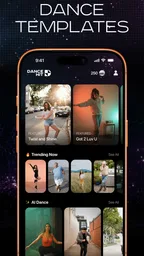
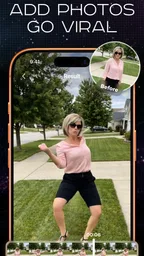
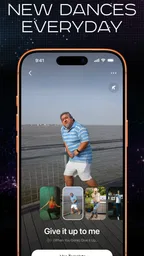
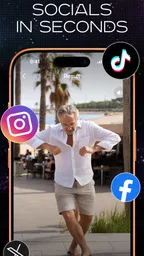
I’d describe DanceHit: AI Dance Generator as a playful photo app built for one specific kind of payoff: turning a still image into a short dance-themed surprise you can share. That focus makes it easy to understand, but it also sets expectations. I wouldn’t approach it as a full video editor or a general-purpose photo studio; its appeal is the quick transformation from an ordinary portrait to something designed to catch attention on social media.
In everyday use, the idea suits moments when a familiar face or a pet photo could use a bit of silliness. A family picture, a cute animal portrait, or a baby photo can become a more animated-looking social post without asking you to plan a shoot. The fun is in choosing an image and seeing it recast in a dance context. For me, that makes the app best suited to light entertainment rather than polished, carefully directed video work.
What the app is built to do today
DanceHit is a photography app from ScaleUp, though its main attraction is what it does with a picture after you select it. The emphasis is on dance-style videos made from photos, including images of pets and babies. That is a narrower purpose than the broad editing tools people may expect from a typical photo app, and the narrowness is useful: you can decide quickly whether the concept fits what you want to make.
The current release is version 1.1.2, and the app was released on July 23, 2026. Those details describe its present stage, not a promise about what will arrive next. I’d treat it as a focused, relatively early product rather than assume it already offers the depth or mature workflow of a long-established video editor. The release facts are a starting point for judging the app, not evidence of a particular feature roadmap.
That distinction matters if you already have a collection of editing tools. DanceHit is not the obvious choice when you want to trim footage, assemble multiple scenes, add detailed captions, or control a soundtrack and timeline. Its concept starts with a still image and aims for a shareable dance result. If that is the creative shortcut you’re looking for, the focus is a strength; if you want control over every part of a video, a conventional editor is likely a better fit.
A quick, low-pressure creative use
Imagine finding a funny photo of your dog while messaging family. Instead of sending the same image again, you could use it as the starting point for a dance-themed clip and share the result as a joke. The same idea works for a baby picture or a portrait of a friend who enjoys playful posts. In those situations, the point is not to create a realistic performance; it is to make a familiar image feel unexpectedly lively.
I’d be selective about the source photo. A clear, well-lit image with the subject easy to distinguish is a sensible starting choice for any photo-based transformation. A busy background, a face partly hidden by hair or a hat, or several people crowded into one frame can make the result harder to read. This is practical image-selection advice, not a guarantee that every picture will work equally well. If the first attempt looks awkward, I’d try a simpler photo before deciding the app itself is the problem.
Another useful approach is to make the intended audience part of the decision. A playful pet clip may suit a private family chat, while a baby image deserves more thought before it is posted publicly. The app’s age rating is Everyone, but that is a content classification for the app, not advice about where or how to share personal photos. I’d still make the same careful choices about a child’s image that I would with any social post.
How it compares with familiar alternatives
Compared with a regular photo editor, DanceHit is about changing the presentation of one image rather than refining the image itself. A standard editor is the better tool if you want to correct color, crop precisely, remove distractions, or build a consistent look across a set of photos. DanceHit’s appeal is more immediate and more comedic: it offers a way to turn a photo into a dance-oriented piece of social content instead of spending time on detailed retouching.
Compared with a general video-editing app, the trade-off is creative control. A timeline editor gives you room to arrange clips, adjust pacing, and shape a finished video, but that flexibility takes more effort. DanceHit is appealing when you have a single photo and want a quick novelty. If you need a branded post, a carefully timed story, or a sequence that tells a longer story, I’d make the video in a tool designed for editing rather than expect this app’s central idea to cover every production task.
It also differs from simply adding a dance sound to an existing video. That route begins with moving footage, while DanceHit is aimed at starting from a still photo. If you already filmed the person or animal moving, an editor that works directly with video may preserve that real motion and give you more control. If all you have is a portrait and the goal is a playful transformation, the photo-first approach is the more relevant one.
What the release stage means for current users
For someone installing it now, version 1.1.2 is the clearest indication of the app’s current state. I would not infer from a version number alone that earlier users have gained a particular tool, a redesigned interface, or a faster process. The confirmed release information establishes which version is current, but it does not describe a changelog. That keeps the assessment grounded: users can judge the app they have, while any future improvements remain expectations rather than facts.
If you already use DanceHit, the practical question is whether it continues to suit the kind of social post you make. A focused app can be valuable even without a long feature list if it reliably serves a small creative need. I’d keep a few suitable source photos ready, compare different images rather than repeatedly reworking one difficult picture, and save the result only when it feels right for its intended audience. That workflow helps you get more from the concept without assuming hidden controls or options.
New users can try it without paying upfront: DanceHit is free to install, and it has an average rating of 4.6 from around 41,000 ratings. Those figures suggest it has attracted a sizeable audience, but they cannot tell you whether its particular dance effect matches your taste or works well with your photos. I’d treat the rating as a reason to consider trying it, not as a substitute for checking whether this narrow style of creation is what you actually want.
Costs, audience, and practical limits
The app is free, with in-app purchases priced from $11.99 to $39.99 per item. That makes it sensible to explore the free experience before deciding whether any paid option is worthwhile. I would not spend simply because a transformation looks amusing once; first consider how often you expect to use it and whether the available result fits the way you share content. The price range is broad enough that the purchase decision deserves a pause rather than an automatic tap.
Its content rating is Everyone, so the app is positioned for a broad audience. Still, the kind of pictures people choose matters. Before using a personal portrait, especially one belonging to someone else, I’d make sure they would be comfortable with a playful edit being shared. For a child’s photo, I’d be particularly deliberate about keeping the result within the audience I intended. That caution is not a claim about the app’s policies; it is simply good judgment around personal images.
DanceHit requires OS version 12 or later. That is worth checking before making room for a new app, particularly if you use an older device. It has 100,000-plus installs, another sign that people are trying the idea, but installs do not guarantee that every device, photo, or personal workflow will produce a satisfying result. The best test is still a suitable image and a clear idea of where you want to share the finished creation.
Where it may frustrate, and what I’d watch next
The main limitation is inherent in the concept: a dance-themed transformation is a novelty, not a replacement for real footage or detailed editing. Some photos are naturally better candidates than others, and a playful result may not suit a serious post. If you need consistent visual quality, exact timing, or the ability to correct a finished clip in detail, I’d choose a more comprehensive editor. If you want a quick laugh from a portrait, those limits may be a reasonable trade-off.
I’d also keep expectations modest about product evolution. The current version and release date establish where the app stands, but they do not prove that a particular improvement is planned. For existing users, the useful things to watch are whether later releases make the photo-to-video workflow clearer, broaden the kinds of images that work well, or add meaningful control without making a simple joke take longer to create. Those are sensible measures of progress, not claims about what ScaleUp has announced.
With 456 reviews alongside its much larger rating count, there is some written feedback for people who want to compare experiences, though I would read it for recurring practical observations rather than treat any single opinion as universal. Look for comments about the kind of photo used and the result people wanted; that context is more helpful than a blanket claim that the app is perfect or useless. A mismatch between a user’s expectations and the app’s focused purpose can explain a lot.
Who I’d recommend it to
I’d recommend DanceHit to someone who enjoys making light, shareable content from photos and wants a dedicated dance-oriented idea rather than a full editing suite. It is especially easy to imagine using it for a pet portrait, a family joke, or a casual social post when the goal is surprise rather than polish. Its free entry point makes trying that concept straightforward, while the optional purchases mean I’d decide on value only after seeing whether the experience fits my habits.
I’d skip it if your priority is professional-looking video, careful control over motion and timing, or a reliable way to edit a sequence of existing clips. I’d also pass if you rarely share playful content and would rather improve ordinary photos. For those needs, a conventional photo editor or a timeline-based video app is a more practical everyday tool.
My overall view is that DanceHit: AI Dance Generator has a clear, entertaining purpose, and that clarity is its strongest point. It does not need to be an all-in-one creator app to be useful; it needs to make the photo-based dance idea enjoyable enough to share. I’d try it with a clean, uncomplicated image, keep the intended audience in mind, and judge it on whether the finished result makes you smile. If you want a quick novelty, it is worth a look; if you want precise editing, choose a tool built for that job.
What we like
- Turns a still photo into a dance clip with minimal effort.
- AI-generated motion adds playful movement to portraits.
- A quick way to create shareable dance videos.
- The novelty makes it fun for casual creative experiments.
- No dance skills are needed to try the effect.
What could be better
- Results can look unnatural when the source photo is unclear.
- A single image may limit pose and movement variety.
- Generated clips may not match the beat precisely.
- Some features may require payment or a subscription.
- Uploading personal photos may raise privacy concerns.





