
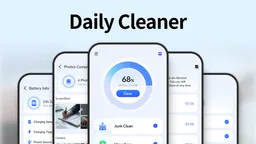
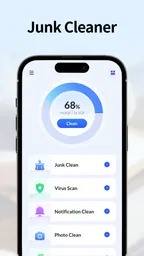
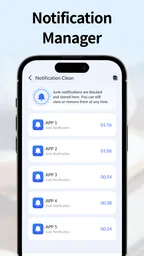
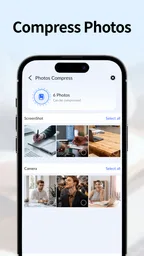
Daily Cleaner: Antivirus, Junk review
 Analysis by Appsdrops
When my phone feels cluttered, I want to know what I can safely remove—not just see a dramatic warning and a button marked “clean.” That is the standard I bring to Daily Cleaner: Antivirus, Junk, a free utility from Music Media Studio. It is aimed at routine phone upkeep, with a virus-removal focus, but the practical question is whether it helps me make a better decision about a device that already has its own storage and security tools.
Starting with a phone that feels crowded
The app sits in the Tools category, and its purpose is easy to understand: help with daily cleaning and security checks. That makes it most relevant when storage is tight, the phone feels untidy, or you want a dedicated place to begin a basic maintenance routine. It is not a substitute for deciding which photos, downloads, and apps you actually want to keep.
I would start by treating a cleaner as an assistant, not an authority. Before deleting anything, I’d check the phone’s built-in storage screen and note which categories are taking space. That gives me a useful baseline: if media is the real problem, a cleaner cannot make the difficult choice of which memories to keep. If temporary clutter is the issue, a cleaning tool may be a more convenient starting point.
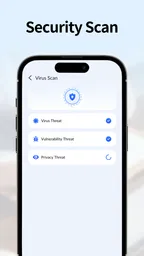
The app’s name puts antivirus and junk cleanup in the same frame, which can make the task seem broader than a simple storage sweep. I’d keep those jobs mentally separate. Removing unnecessary files is about reclaiming space; virus protection is about identifying a security concern. A clean-looking storage screen does not prove that a phone is safe, and a security scan does not automatically solve a storage shortage.
There is a modest amount of public feedback to consider before trying it: Daily Cleaner has a 3.9 average from around 2,900 ratings, alongside 212 written reviews. That is enough to suggest that people have used it, but I would not treat an average score as a guarantee that its results will suit my device or my tolerance for prompts. I’d judge it by whether its recommendations are understandable and whether I can review them before taking action.
A deliberate first pass
My preferred first run with any cleaning app is conservative. I would open it when I have a few minutes, rather than while rushing to take a photo or install an update. Then I’d look for a clear explanation of what it wants to clean and pause before approving anything I don’t recognize. That small change in timing matters: a tool that is useful during a planned tidy-up can be frustrating when the phone is already warning that storage is nearly full.
A practical example is preparing for a trip. Before leaving, I might want room for offline maps, tickets, and photos. I’d first review large videos and old downloads using the phone’s own file or storage controls, because those are easy to identify and often account for meaningful space. I’d then use Daily Cleaner as a second pass for the routine cleanup it offers, checking each proposed action instead of assuming that every item described as junk is worthless.
Moving from scan to decision
The important part of a cleaner’s workflow is not the scan itself; it is the handoff from a broad result to a specific action. Any tool can point toward things that may be removable. The useful question is whether I can tell what a suggested item is, why it is being flagged, and what could stop working or disappear if I remove it. If the explanation is vague, I would leave that item alone and use a more transparent method.
This is especially important for app data. Cached material can be recreated, but stored downloads, drafts, or offline content may be more valuable than the label “temporary” suggests. I would not clear an entire category simply to make a number look better. Instead, I’d check the apps I rely on—messaging, navigation, music, and work tools—and decide whether their saved content is disposable before approving a cleanup.
There is also a useful order of operations. First remove files I can identify myself, such as an old installer or a duplicate video. Next check the phone’s own storage controls for app-by-app information. Only after that would I use a cleaner’s suggested sweep, because then I have context for judging whether it is finding a separate problem or repeating work I already did. This avoids the common trap of tapping a large cleanup button without knowing what changed.
For a virus-related concern, I would treat the app as one step in a wider response rather than a reason to relax immediately. If something seems wrong, I’d also review recently installed apps, update the phone through its normal system settings, and avoid opening suspicious files or messages. A cleaner’s security-oriented purpose may be reassuring, but responsible troubleshooting still depends on the clues and controls available on the device itself.
Where the handoffs can feel awkward
Maintenance apps often have to move between their own recommendations and Android’s system-level controls. That handoff can interrupt a simple routine: I may need to leave the cleaner, inspect a setting elsewhere, then return and decide whether to continue. I see that as a reasonable trade-off when the extra check protects personal files, but it can make the experience feel less direct than clearing storage from the phone’s built-in settings.
That comparison is the main one I’d make before installing. Android’s built-in storage tools are usually the sensible first choice for someone who only wants to see what is consuming space and remove items manually. A dedicated cleaner is more appealing if you prefer a focused maintenance starting point and are willing to inspect its suggestions. For security, I would compare its role with the protections already on the phone rather than assuming that installing a second tool automatically means stronger protection.
The app is free, which lowers the commitment for trying its approach. Still, “free” does not remove the cost of attention: if a utility interrupts you often or makes routine actions feel urgent, it may not be worth keeping. I would use it during a controlled cleanup, notice how it presents its findings, and decide afterward whether it saves effort compared with the system tools I already have.
Age suitability is broad: it is rated for Everyone. That makes the basic purpose accessible, but I would still guide a younger or less technical user through deletion decisions. Anyone can misunderstand a broad cleanup suggestion, and an age rating does not replace a careful look at what will be removed. The safest habit is to make the user—not the app—the final decision-maker.
What I would keep, and what I would skip
Daily Cleaner is a reasonable option for someone who wants a dedicated place to begin routine phone maintenance and is comfortable checking recommendations before acting. Its reach is notable, with over one million installs, but popularity alone cannot tell me whether its workflow is a better fit than Android’s built-in tools. I’d focus on whether it makes a cleanup clearer and more manageable on my own phone.
I would skip it if I already have a simple, reliable routine for reviewing storage and have no interest in another utility. I would also avoid relying on it as my only answer to a serious security incident. In those cases, system settings, careful app-by-app investigation, and trusted security guidance are more appropriate than expecting a general cleaner to resolve every concern.
There are a few practical habits that make a trial more useful. Run a cleanup when you can review the result rather than while distracted; make a note of what you chose to remove; and check whether the phone’s storage view changes in a way that matches your expectations. If a suggestion is unclear, skip it. If the same items keep reappearing, consider whether they are regenerated by apps you use rather than evidence that your phone needs constant cleaning.
Those checks also help answer a common concern: does using a cleaner mean I can stop managing storage myself? I wouldn’t think so. Photos, videos, offline media, and app downloads are personal choices, and a general-purpose tool cannot know which ones matter to you. The app can be a prompt to review the device, but the lasting result comes from deciding what to keep and changing habits that create clutter in the first place.
The current release is version 1.0.4, and the stated minimum operating-system requirement is Android 7.0. That makes compatibility a straightforward thing to check before installing, especially on an older device. The app was released on February 25, 2026, so I’d also consider that it is a relatively new product when weighing how much long-term experience I expect from its maintenance approach.
The outcome I’d expect
My ideal result is not an impressive cleanup figure; it is a phone that has enough room for the task I care about, with no important files removed by mistake. For the travel example, that means checking that the maps and tickets are available and that I still have room for photos. A cleaner is useful only if its contribution fits into that practical goal rather than encouraging deletion for its own sake.
Overall, I’d recommend Daily Cleaner: Antivirus, Junk as a cautious trial for people who want a dedicated maintenance workflow and are willing to inspect what it proposes. Music Media Studio has positioned it around everyday cleaning and virus removal, but I would keep built-in storage controls in the loop and treat security claims as one part of a broader routine. If it helps you find a clear next step without pressuring you into blind cleanup, it may earn a place on your phone; if you prefer direct control and already know what is taking space, the system tools may be all you need.
What we like
- The interface makes common cleanup tools easy to find.
- Quick scans offer a convenient way to check device storage.
- The app can help identify files that may be safe to remove.
- Useful for users who prefer a dedicated device maintenance app.
- Cleanup reminders can encourage regular storage checks.
What could be better
- Some detected files may need careful review before deletion.
- Cleanup results can vary depending on device use and settings.
- Frequent alerts may interrupt the user experience.
- Antivirus features should not replace a trusted security suite.
- Some tools may require in-app purchases or subscriptions.





