
Credit One Bank Mobile review
 Analysis by Appsdrops
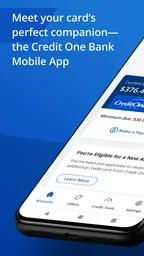
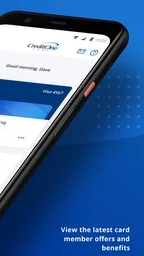
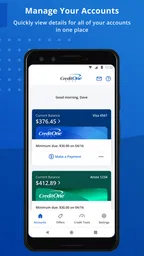
The first time I use a bank app, I want to answer a few simple questions quickly: Am I looking at the right account, can I get in without a hassle, and what should I do if something does not load? Credit One Bank Mobile is focused on managing a Credit One Bank credit card account, rather than serving as a general-purpose money hub. That narrow purpose makes it a sensible option for cardholders who want account access on a phone, but it also means it is not a substitute for a budgeting app or an app that brings accounts from several banks together.
Where a cardholder can get stuck
A focused banking app can be straightforward once you are signed in, yet the first visit often brings the most friction. Before downloading, I would make sure I am choosing the Credit One Bank app from the right publisher, Credit One Bank, N.A. That matters because finance apps handle sensitive account access, and a similar name or an unofficial listing is not worth the risk.
If login details do not work, I would resist repeatedly guessing. Check that the username and password are the ones used for the Credit One Bank account, watch for accidental spaces or capitalization differences, and use the app’s own account-access recovery route if needed. If the account itself is not yet ready for online access, installing the app alone will not solve that step; I would complete the bank’s account setup process first.
Another common source of confusion is expecting the app to behave like a full banking dashboard. Its purpose is to manage a Credit One Bank card account. If you are looking for a combined view of checking, savings, cards from other issuers, and household spending, this is the wrong starting point. I find it useful to decide that before setup: the app is most valuable when the card account is the thing I need to check or manage.
The app has a 4.7 average from around 894,000 ratings, and it has been installed over 10 million times. Those figures suggest that many people use it, but they cannot tell me whether a particular login issue is caused by my phone, account details, or a temporary service problem. I treat popularity as context, not as a guarantee that every session will be smooth.
Setup checks that save time
I would begin with the basics: confirm the device meets the app’s minimum operating-system requirement, install the current release through the app store, and use a stable connection during sign-in. The listed minimum is version 10 for the operating system, while the app’s current version is 26.10.0. Keeping the app updated is a practical first step if a screen behaves unexpectedly, since an older installation may not match the service’s current experience.
When entering credentials, I would check whether the phone has filled in an old password automatically. Password managers are convenient, but a saved entry can quietly become the problem after a password change. If sign-in fails, I would verify the saved entry before changing the password again. That small check can prevent a cycle of resets and confusing lockouts.
For a first setup, I would also avoid switching between networks halfway through sign-in. If a login screen stalls on public Wi-Fi, a trusted home or cellular connection can help determine whether the connection is the issue. This is a general troubleshooting test, not a promise that changing networks will fix every failure. I would never share a password or verification detail with someone who contacts me unexpectedly while I am trying to resolve access.
The app is free and rated for Everyone, which makes the basic download approachable. Free access does not mean every part of credit card ownership is without cost; the card’s own terms govern that. I would keep those terms separate from the app itself and use the app as an account-management tool, not as a way to infer fees, eligibility, or credit decisions.
A practical recovery workflow
If the app opens but does not show what I expect, I would work from the simplest checks upward. First, confirm I am signed into the intended account. Next, check the connection and try again after the screen has had a moment to load. If the problem persists, close and reopen the app, then check the app store for an update. This sequence avoids jumping straight to deleting the app or repeatedly changing account credentials.
For a login problem, I would separate the issue into two questions: can I access the account through the bank’s normal account-recovery process, and does the app itself still fail after access is restored? If the account-access step fails too, the issue is more likely to need account support than further phone troubleshooting. If account access works elsewhere but the app does not, reinstalling may be a later option, but I would first make sure I know my sign-in details and can complete any required verification again.
For a delayed or incomplete account view, I would avoid making a second payment or repeating an important action just because the screen has not refreshed. Check the account again after reconnecting or reopening the app, and use the bank’s established support route if the status remains unclear. In finance, uncertainty is a reason to verify—not to assume an action failed and submit it twice.
One useful habit is to check the account at a calm moment before relying on the app for something time-sensitive. That gives me a chance to confirm I can sign in and understand where the information I need appears. If I wait until I am standing at a checkout or trying to handle a deadline, ordinary connection or password friction feels much worse. For cardholders who prefer phone access, a brief early test is more useful than discovering a sign-in problem under pressure.
When the app may not be the cause
Not every screen issue points to a software defect. A weak connection, an outdated app, a phone that has not installed recent system updates, or incorrect saved credentials can all create a similar experience. I would change one factor at a time where possible: reconnect, reopen, update, and then retry. If several changes are made at once, it becomes harder to tell what actually helped.
There is also a boundary between mobile access and account decisions. If a cardholder has a question about a charge, account status, or another matter that requires the bank to review the account, an app screen cannot replace direct clarification from the bank. I would use the app for convenient access and use official support channels for questions that need an explanation or a specific action from the institution.
Privacy is another reason to be deliberate. I would avoid signing in on a device I do not control, keep the phone’s screen lock enabled, and be cautious when viewing financial details in a public place. These are sensible habits for any financial app, especially one tied to a credit account. The app’s Everyone age rating describes its content classification; it does not make account credentials suitable to share with other people.
Compared with a multi-bank finance app, Credit One Bank Mobile has a more limited role: it centers on one issuer’s card relationship rather than pulling together a household’s finances. That can be an advantage if I want a direct route to this account without extra dashboards, but a disadvantage if I need a broad spending picture. A bank’s website or customer-support channel may be better for a task that needs a larger screen, detailed explanation, or help from a person; the phone app is better suited to routine account access while away from a computer.
Who will find it useful
I would recommend it to someone who already has a Credit One Bank card and wants a mobile way to manage that account. A realistic everyday use is checking the account while planning a purchase, then returning later to review the account after the transaction has had time to appear. The benefit is not that the app changes how credit works; it is that the account is easier to reach without opening a laptop.
It is also a reasonable choice for people who prefer handling basic account tasks on a phone and are comfortable using a dedicated issuer app. Credit One Bank Mobile is a free finance app, released on September 19, 2016, and its current version is 26.10.0. Its long-standing presence and broad adoption provide some reassurance that it is an established product, while the 215,000 reviews show that users have shared substantial feedback over time. I would still judge it by whether it fits my own account and device needs.
I would skip it if I do not hold a Credit One Bank card, want one app to track several institutions, or mainly need detailed budgeting and financial planning. In those situations, a broader finance tool is a better match, and the bank’s other account channels may be more appropriate for complex support. This app is not trying to be everything; its usefulness depends on having the relevant card account.
My practical verdict
My view is that Credit One Bank Mobile makes sense as a dedicated access point for a Credit One Bank card, provided I approach setup with the right expectations. I would confirm the publisher, use current software, check saved credentials carefully, and test sign-in before I need the app urgently. Those steps address the most avoidable sources of frustration without assuming that every problem is a fault in the app.
The trade-off is clear: a focused issuer app can be convenient for its own account, but it will not replace a cross-bank dashboard or a conversation with the bank when an account question needs investigation. For an existing cardholder who wants routine mobile access, I would give it a try. For someone seeking a complete view of personal finances, I would choose a broader tool and keep this app only if managing a Credit One Bank account is part of the picture.
What we like
- Biometric login can make account access quicker.
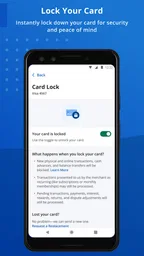
- Card controls help manage security from a phone.
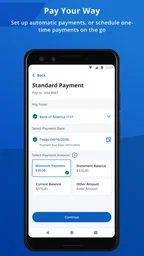
- Payment reminders can help avoid missed due dates.
- Transaction details make recent spending easier to review.
- The app provides access to account information while traveling.
What could be better
- Some account features may depend on the card you hold.
- Banking services require a reliable internet connection.
- Mobile access may be limited during maintenance.
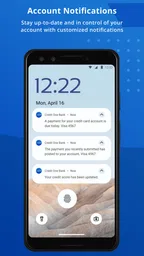
- App alerts can require notification permissions.
- Resolving complex account issues may require contacting support.





