

Contraction Timer & Counter 9m review
 Analysis by Appsdrops
When contractions begin, the useful question is often not just “How long did that last?” but “Is there a pattern I can explain clearly?” Contraction Timer & Counter 9m is a focused parenting app for recording labor contractions, and I’d judge it by how easily it supports that task when someone is uncomfortable, distracted, or handing the phone to a partner. It is not a substitute for medical advice; its value is helping you keep track of what you observe.
Choose a timer for the job you actually need
Before installing a contraction timer, I’d consider who will operate it, whether you want a dedicated tool or a broader pregnancy app, and how much information you need to record. During early labor, a basic stopwatch or notes app can seem sufficient. As contractions become more demanding, though, repeatedly starting and stopping a timer while also remembering details is an easy way to lose a clear record.
This app keeps its purpose narrow: it is meant to track contractions. That focus can be helpful when you want the phone to serve one immediate job rather than present a large collection of parenting or pregnancy content. The trade-off is just as important: if you want an all-in-one resource with broader pregnancy planning, education, or care tools, a dedicated timer may feel limited.
I’d also decide in advance whether one person will do all the timing or whether a birth partner might take over. That small choice matters more than it sounds. When the person in labor needs to concentrate on breathing or changing position, having someone else manage the phone can make the record more consistent and keep the app from becoming another task for them.
A focused tool rather than a pregnancy dashboard
Contraction Timer & Counter 9m is a free parenting app from Neiman. It is rated for Everyone, so its listed audience is broad, and it has been available since August 14, 2018. Its current version is 2.1, with Android support starting at version 6.0. Those details make it a practical option to consider on an older compatible Android device, while the app’s central appeal is its specific labor-timing purpose.
The app has a 4.8 average from around 91,000 ratings, and it has passed 5 million installs. Those figures suggest that many people have found a contraction timer useful, but they do not guarantee that its workflow will suit every person or every labor experience. I’d treat popularity as reassurance that the idea is familiar, not as a substitute for checking whether a simple timer is what you need.
Where this app makes the most sense
The strongest case for a dedicated contraction timer is reducing mental bookkeeping. Rather than trying to remember when one contraction began while another is already starting, you can use the phone to maintain a record. That is especially useful for a partner who is supporting the person in labor: they can focus on recording the timing instead of asking repeated questions or relying on memory.
A realistic use case is an evening at home when contractions are irregular and it is not yet clear whether they are settling into a pattern. One person can operate the timer while the other rests, moves around, or focuses on getting comfortable. The record can help both people describe what they have noticed when they contact their care team. It should not be used to decide on its own whether labor is progressing normally or whether it is time to seek help.
One practical tip is to agree on a simple handoff before timing becomes stressful. If a partner is logging contractions, they can say plainly when they start and stop recording, so both people understand what the entries represent. If the person in labor later wants to take over, a brief handoff avoids confusion about whether an event was missed or timed by someone else. This is a workflow suggestion, not a special app feature.
Another useful habit is to keep the phone in a predictable place and avoid turning every contraction into a conversation about the app. A timer is only helpful if using it does not interrupt comfort or concentration. The supporter can handle the recording quietly, then review the pattern together when there is a calm moment. That keeps the record in a supporting role rather than making the screen the center of the room.
I would also resist treating a timer’s record as a diagnosis. Timing can organize observations, but it cannot assess pain, other symptoms, personal medical history, or the advice already given by a clinician. If there is uncertainty about what to do, the right next step is to contact the person’s maternity care team or follow their instructions, not wait for an app to provide certainty.
What a dedicated timer does—and does not—replace
Compared with using a general notes app, a purpose-built contraction timer is appealing because the task is clear: record contractions rather than build a custom note-taking routine while under pressure. A stopwatch can measure an interval, but the user still has to decide how to organize multiple events. A dedicated app is the more natural choice if your main goal is keeping contraction timing together.
On the other hand, a broader pregnancy or parenting app may fit better if you want one place for many kinds of information. That choice can reduce app switching during pregnancy, but it may put more material around the immediate timing task than you want. I would not assume that a broad app is automatically better, or that a focused timer is automatically more capable; the better fit depends on whether you value a single-purpose tool or a wider set of resources.
There is also a good case for using no app at all. If your care team has recommended a particular method, or if someone finds phone interaction distracting, follow that guidance instead. A paper record or another familiar approach may be easier for that person. The important point is a clear, usable record—not loyalty to a particular format.
Small trade-offs to consider before relying on it
The simplicity that makes a dedicated timer approachable can also be a limitation. If you expect detailed medical guidance, extensive pregnancy information, or a complete personal health record, this is not the right tool to stand in for those needs. Its role is narrower: timing contractions. Keeping that boundary in mind helps prevent disappointment and avoids giving an app more authority than it should have.
Another friction point is that timing still depends on someone remembering to use the phone. If the person supporting labor is occupied, or the person in labor does not want a screen involved, entries may be interrupted. For that reason, I’d consider who is realistically available to operate it and whether the household has a fallback plan. A timer cannot make an incomplete record complete by itself.
The app is free to download, with in-app purchases listed at $0.99 per item. I’d keep that in mind if you prefer an experience with no optional paid items at all. The presence of in-app purchases does not mean you need to buy something to benefit from a contraction timer, but it is sensible to review any purchase prompts carefully rather than assume every part of an app is included at no cost.
For someone choosing between this and a generic stopwatch, the switching cost is mostly learning a new routine: open the dedicated tool, record contractions there, and remember to keep the phone available. If you already have a reliable method that feels natural, changing systems during labor may add needless friction. If you are preparing ahead, however, trying the app before it is urgently needed gives you time to decide whether its approach feels comfortable.
For Android users, the minimum operating-system requirement is 6.0. I’d check the device’s compatibility in the app store before making plans around it, particularly if the phone is older. The listed current version is 2.1, so the version detail is useful when comparing what is installed on a device, but it is not a reason to expect a particular feature or performance outcome beyond what the app presents.
My recommendation: useful when timing is the main need
I’d recommend Contraction Timer & Counter 9m to someone who wants a focused way to keep track of labor contractions and has a partner or supporter who can help operate the phone. Its narrow purpose is its main strength: it can make a stressful, repetitive task easier to organize without asking the user to turn a general note-taking tool into a timing system.
I would skip it if you are looking for comprehensive pregnancy guidance, if your clinician has asked you to use a different approach, or if logging events on a phone would make labor feel more demanding. A wider pregnancy app may be more suitable for someone who wants several kinds of resources in one place; a familiar manual method may be better for someone who values simplicity over digital tracking.
My practical advice is to decide who will do the timing, check that the phone is compatible, and get comfortable with the workflow before labor begins. During labor, use the record to communicate observations—not to make medical decisions in isolation. On those terms, this is a sensible, focused option for people who want help keeping contraction timing organized, while remaining clear about what an app can and cannot do.
What we like
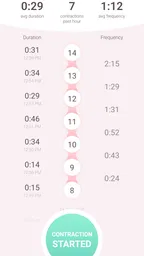
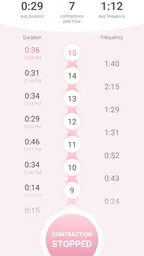
- Tracks contraction duration and intervals automatically.
- Includes a counter for monitoring contraction frequency.
- Simple interface makes timing easy during labor.
- Can help identify patterns as contractions progress.
- Useful for keeping a record to discuss with care providers.
What could be better
- Manual timing may be difficult during intense contractions.
- The app cannot determine whether labor has begun.
- Recorded timings may need to be shared manually.
- Phone battery or access issues can interrupt tracking.
- It should not replace advice from a medical professional.





