




Concora Credit review
 Analysis by Appsdrops
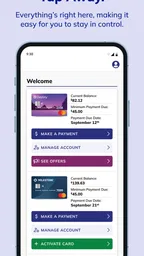
When I need to check a credit account, I want a clear route to the information and a quick way to handle the small tasks that come up between statements. Concora Credit is a finance app built for managing Concora Credit account(s), so its appeal is focused rather than broad: it is intended for people who already have an account to manage, not anyone looking for a general-purpose banking hub. My overall view is that it makes most sense as a practical companion to the account itself, with expectations set around straightforward account management rather than a full financial planning toolkit.
What it is like to use
Concora Credit is developed by Concora Credit and is free to download. It has an average rating of 3.5 from around 3,800 ratings, alongside roughly 1,800 written reviews, and has passed one million installs. Those figures suggest a sizeable audience, but they do not tell me whether the app will feel right for every account holder. I would treat user feedback as a prompt to check whether its current workflow suits my needs, not as a guarantee of a particular experience.
The app’s central purpose is account management. That sounds modest, but it can be useful: a dedicated account app is easier to approach than searching through a general bank app for a particular credit account, especially if I only need to check on that account and move on. The trade-off is equally clear. It should not be mistaken for a budgeting service, a multi-bank dashboard, or a way to manage unrelated financial products.
The app is marked for Everyone, and its current version is 3.0.21. It was released on June 21, 2023. I would use those details as context, not as evidence that every screen is polished or that every device will behave identically. For a finance app, what matters day to day is whether the account information I need is easy to reach and whether I can complete my task without unnecessary detours.
Speed expectations: useful when the task is small
I would judge the app’s speed by the time it takes to get from opening it to the specific account detail or action I came for. The job is naturally narrower than using a full-service bank app: I am not expecting to move between investments, savings goals, card controls and several accounts from different providers. That focus can make a dedicated account tool feel simpler, but it does not prove that every screen loads instantly. Connection quality, device condition and account access can all affect a finance app’s responsiveness.
A sensible everyday workflow is to open the app when I have a particular question, such as whether I need to review account activity, rather than leaving it open as a constant financial monitor. For example, after noticing a purchase on a receipt, I could use a quiet moment to check the account and compare what I see with my own records. That gives the app a clear job and reduces the temptation to treat a quick glance as a complete review of my finances.
My practical tip is to decide what you need before opening the app. If I am checking one account-specific detail, I can stay focused and avoid bouncing between screens without a purpose. I would also avoid making a financial decision based only on a remembered figure from a previous visit: check the current account view at the time the decision matters. That is useful advice for any credit account, but especially for a single-purpose app that is not designed to replace broader financial tracking.
Heavy-use moments: where expectations need to stay realistic
There are moments when a simple account app faces more pressure than an occasional check. I might want to review activity after several purchases, confirm what I have already recorded in my household budget, or revisit the account before planning the next week’s spending. In those situations, the app can serve as one reference point, but I would not assume that it provides all the context I need for cash-flow planning or for accounts held elsewhere.
For a more careful review, I would pair the app with a personal budget or another record that covers my full financial picture. The app’s account-specific role is a strength when I need a focused check; it becomes a limitation when I want to compare obligations across multiple lenders or see all spending in one place. That distinction matters because a clean view of one account is not the same thing as a complete picture of my finances.
If an account screen appears slow during a busy moment, I would first check whether the connection is stable and try again before treating the delay as a permanent fault. I would not repeatedly submit an action just because the screen has not changed immediately; with financial tasks, duplicating a request out of impatience can create confusion. Instead, I would pause, look for confirmation in the app, and use the appropriate account support route if I cannot establish what happened. That careful recovery habit is more useful than assuming that every delay means a task failed.
Reliability: a companion, not the only record
For routine use, I would want a finance app to make it easy to return to an account and understand what I am looking at. A dedicated tool can help by keeping the purpose narrow, but reliability is not only about whether an app opens. It also means checking that the information shown is current enough for the decision at hand and being able to recover calmly if a screen or connection does not respond as expected.
I would keep important account communications and personal records available through their usual channels rather than relying on any one app as my sole archive. That is not a criticism unique to Concora Credit; it is a sensible boundary for financial software. If I am reconciling a payment or reviewing a concern, I would compare the app’s account view with the relevant records and follow the account’s official support process when something does not line up.
The average rating of 3.5 indicates mixed experiences rather than universal approval. I would not read that as proof of a particular bug or a promise of smooth performance. Instead, it is a reason to approach the app with practical expectations: test the basic account tasks I care about, keep my device and connection in good shape, and avoid depending on an app alone for urgent financial decisions.
Device constraints and choosing the right tool
The minimum operating-system requirement is 7.1. That makes compatibility worth checking before installing, particularly if I use an older device or have kept its software unchanged for a long time. A supported minimum does not guarantee that every older phone will feel responsive, since storage, background activity and network conditions also affect how an app behaves. If the device is already struggling with ordinary tasks, I would not expect a finance app to solve that underlying problem.
As for resource demands, I would avoid making claims about battery use, storage size or memory consumption without testing the app on the actual device. In ordinary use, I would simply watch for obvious signs of strain, such as unusually slow navigation or the app closing unexpectedly, and compare that with how other apps perform. If the same issue affects several apps, the phone is a more likely place to start troubleshooting than this one account tool.
Compared with a general banking app, Concora Credit is more appropriate when the account itself is the reason for opening the app. Compared with a budgeting app, it is not the natural choice for seeing spending across several institutions or planning a whole household budget. If I manage multiple credit products from different providers, a broader financial dashboard may save time, although I would still use each provider’s own account channel when I need account-specific information or support.
Who should use it, and who may prefer another option
I would recommend trying Concora Credit if you have a Concora Credit account and want a dedicated place to manage it from your phone. The strongest use case is deliberately ordinary: checking in on the account as part of a weekly money routine, then switching to your budget or other records for the wider picture. That division of labor keeps the app useful without expecting it to do jobs it was not built for.
I would skip it if you are looking for a general finance organizer, a way to manage accounts from multiple providers, or a tool that replaces personal budgeting. It is also not a substitute for contacting the appropriate support channel when you need help with a serious account issue. In those cases, a broader budgeting app, your main bank’s app, or direct account support may be the better fit, depending on what you are trying to accomplish.
Before relying on it for a regular routine, I would install it on the device I actually use, make sure the operating system meets the requirement, and try the basic account workflow at a convenient time. Then I would decide whether it makes the account easier to manage than my existing approach. This small trial is more useful than choosing solely by install count or rating because it tests the part that matters: whether the app fits your own account and habits.
My performance verdict
My verdict is measured but positive for the right person. Concora Credit has a clear, account-focused purpose, and that can make it a handy place to handle routine checks without turning every money task into a trip through a broad banking interface. Its usefulness depends on having the relevant account and wanting a focused companion, rather than expecting a complete financial control center.
I would approach its performance as something to assess in ordinary use, not something to assume from a rating or a version number. Keep the app’s role narrow, use a stable connection for account tasks, and verify important decisions against current account information and your own records. If that sounds like the way you want to manage a Concora Credit account, it is worth trying; if you need cross-provider tracking or full budgeting, choose a tool designed for that wider job and treat this app as account-specific support.
What we like
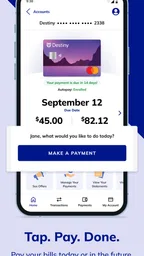
- View your Concora Credit account details from your phone.
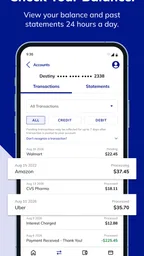
- Check recent transactions without using a desktop browser.
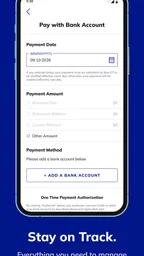
- Review payment information while away from home.
- Use account access to keep track of your credit activity.
- Mobile access can make routine account checks more convenient.
What could be better
- The app is useful only to existing Concora Credit customers.
- Some account tasks may still require the website or customer support.
- You need an internet connection to access current account details.
- Login problems can prevent access to important account information.
- Credit account features are limited compared with general banking apps.





