




Collect - Settlement Finder review
 Analysis by Appsdrops
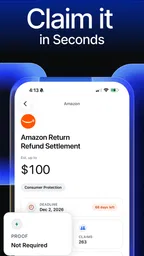
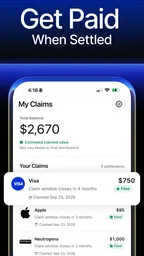
I can see the appeal of Collect - Settlement Finder most clearly in a household where one person is more likely than another to notice a settlement notice, remember a purchase, or follow through on a claim. It is a finance app from Ferrix Labs, built around finding and filing class-action claims rather than tracking a budget or moving money. That distinction matters: I would treat it as a tool for checking possible eligibility, not as a source of guaranteed income or a replacement for reading the terms of a claim.
For a shared household, its best use is as a prompt to investigate together. One person can flag a claim that might relate to a product or service the household used, then the person whose details are relevant can decide whether to continue. That small boundary keeps a potentially useful search from turning into a muddled attempt to file on someone else’s behalf. I would not assume that a shared phone means shared eligibility or shared consent.
Useful when one household member starts the search
The practical question is not simply whether a claim exists; it is whether the person filing can honestly meet its conditions and provide the information requested. A household may share a purchase, subscription, or device, but claims can depend on individual circumstances. I’d use the app to identify something worth checking, then make the affected person the decision-maker for the filing itself.
A realistic example: while sorting old receipts, one person remembers that the family bought a product that might be covered by a class action. They can bring the possibility to the household’s attention, but the person who made the purchase—or otherwise has the relevant account or records—should review the claim requirements. If nobody can establish the connection, it is better to move on than to guess at answers.
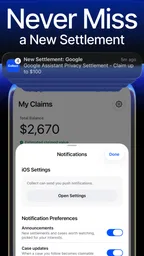
This makes the app more useful as a claim-discovery and follow-through aid than as a household finance hub. It is not the place I would go to reconcile monthly spending, split bills, or compare investment options. Those tasks call for budgeting or banking tools. Collect has a narrower purpose, and that focus can help a person who would otherwise never look into settlement claims.
Keep the account and the evidence with the right person
On a shared device, I’d make a clear rule before anyone starts: the person whose eligibility is being considered should review the details and handle any personal information or submission. That is a sensible boundary even when family members are helping one another. A relative can remind someone to check a claim or help locate a receipt without taking over their account or making decisions for them.
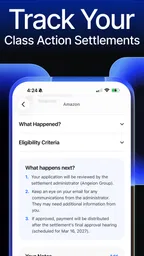
It is also worth separating “this sounds familiar” from “I qualify.” A household may have used a named product, but the claim could have limits tied to timing, location, purchase records, or other conditions. I would read each claim’s own requirements carefully and use documents already available, rather than relying on memory or selecting answers just to get through a form.
One non-obvious way to make the process less messy is to keep a simple note of what prompted the search: the product or service, who used or bought it, and where the supporting record might be. That can prevent two family members from repeating the same investigation or confusing one person’s experience with another’s. It is a household workflow, not a feature I would assume the app provides.
Another useful habit is to pause before submitting if the relevant records belong to someone else. Ask them to review the claim themselves, and let them decide whether the time and information requested are worth it. This is especially important when an older relative, partner, or adult child is sharing the phone but not the account or the underlying purchase history.
Coordination helps, but it should not blur consent
Collect’s purpose makes coordination valuable: one person may spot a possible settlement while another is the one who can verify the purchase. I’d share the lead, not assume authority to file. If the person with the relevant information wants help, they can stay present and check every response before anything is sent. That approach also makes it easier to catch a mistaken product match or an incomplete recollection.
For a family that already has a routine for paperwork, the app can fit into a short review session. Gather likely receipts or account records first, check the claim’s eligibility language, and decide whether continuing is worthwhile. If the evidence is unclear, stop and revisit it rather than treating a quick form as proof that a claim is valid. The convenience of filing in an app should not substitute for careful reading.
I would also avoid treating a claim as a shared household asset before it is resolved. The person who qualifies and files should understand what they are submitting and where any potential payment would go. Family members can help with reminders and research, but should agree in advance how they will handle the result if several people have separate, potentially relevant experiences.
Age suitability is not the same as financial trust
The app is rated Everyone, so its stated content age rating is broad. That does not mean every child should handle a claim form or make decisions about household records. A parent or guardian should guide younger users, particularly where personal details, purchase history, or account access are involved. The key issue here is less the category label and more whether the person filing understands the questions and has authority to provide the information.
I’d apply the same care with a shared family tablet. Keep each person’s account use distinct, avoid entering another person’s details casually, and review the claim together if someone needs assistance. I would not infer that the app includes family profiles, parental controls, or a way to manage household members; the safe approach is to coordinate outside the app and let each claimant remain responsible for their own answers.
Trust also means setting realistic expectations. A settlement claim is not a guaranteed payout, and finding a possible match does not mean that an application will be accepted. I would never plan a bill payment around money that may or may not arrive. Instead, I’d treat any potential recovery as uncertain and check the claim’s terms and progress through the appropriate channel.
What I would check before relying on it
Collect is free to install, with in-app purchases listed from $12.99 to $34.99 per item. I’d review any purchase prompt carefully and decide whether a paid item is necessary for my own use before proceeding. The basic appeal is the possibility of finding relevant claims, but that does not automatically make an optional purchase worthwhile; compare what it offers with the time you expect to spend and the claim’s conditions.
The app has a 4.7 average from around 19,000 ratings, and it has passed 100,000 installs. Those figures suggest that many people have tried it, but they cannot tell me whether a particular household member qualifies for a particular settlement. I’d use the reputation as one piece of context, not as a substitute for examining a claim or deciding whether to share personal information.
Version 3.5.1 is the current version, and the app supports Android 9 or later. Its release date is January 19, 2026. I’d check that a shared Android device meets the minimum system requirement before expecting to install it, and I’d keep the app updated through the app store. The age rating is Everyone, but household supervision and account boundaries remain a matter of common sense rather than something to presume the rating handles.
Compared with the usual alternatives, this is more focused than a general finance app and more convenient than independently searching the web for every possible class action. The trade-off is that a focused claim-finding tool still cannot determine your household’s facts for you. A general search may be preferable when you want to verify a claim through its official materials, while budgeting software is the better choice for ongoing money management. I’d use Collect to surface a lead, then carefully inspect the actual eligibility rules before acting.
Who I’d recommend it to—and who should skip it
I’d recommend trying it to an adult who wants a dedicated place to look for possible class-action claims and is comfortable checking eligibility rather than assuming every match applies. It may suit a household organizer who can flag opportunities for other members without taking control of their accounts. Ferrix Labs develops it, and its finance focus is unusually specific: the point is claim settlement discovery and filing, not everyday banking.
I’d skip it if you expect dependable income, want a tool to manage household spending, or are not willing to read claim requirements and verify your own history. It is also a poor fit for anyone who plans to submit on behalf of relatives without their involvement. The app can make the search feel more approachable, but the responsibility for truthful, accurate answers still belongs with the person making the claim.
A sensible household tool, with careful limits
My household verdict is that Collect can be worth a look when one person is willing to do the initial discovery and the person potentially eligible is ready to review the details. Its strongest practical value is reducing the effort of finding a claim worth investigating; its main limitation is that it cannot remove the need for personal records, sound judgment, and consent. I’d use it as a starting point, not as a promise of recovery.
If you try it, keep the process simple: identify who the claim concerns, gather the relevant records, read the eligibility conditions, and let that person decide whether to continue. That routine makes the app more useful in a shared home while protecting account boundaries. For a household that values careful coordination and realistic expectations, it is a focused finance app with a clear role; for everyone else, a budgeting tool or direct claim research may be the better choice.
What we like
- Searches for nearby settlement sites using your location.
- Offers a focused tool for people interested in local history.
- Can make it easier to plan heritage visits.
- Provides a convenient alternative to searching multiple sources.
- Useful for discovering lesser-known historical places.
What could be better
- Location access may be needed for nearby searches.
- Coverage may be limited in some regions.
- Site details may not be equally comprehensive everywhere.
- Historical records may require independent verification.
- Some locations may be difficult to access or privately owned.





