



Cloaked: Protect your privacy review
 Analysis by Appsdrops
I think privacy tools are easiest to judge by asking what they help me do differently, not by how reassuring their promises sound. Cloaked is a productivity app from developer cloaked, built around protecting online privacy. That makes it relevant to everyday tasks such as signing up for a service, shopping, or managing accounts—not just to people who consider themselves security experts. My overall impression is that it’s worth exploring if you want privacy to be a more deliberate part of those routines, while still taking time to understand the choices the app actually presents to you.
Trust starts with the choices you can see
Trust is a practical question for a privacy app: what can I inspect, what can I control, and do I understand the consequences of my choices? I would approach Cloaked with that mindset rather than treating the word “privacy” as proof that every concern is handled automatically. Before relying on any tool for sensitive accounts, I’d read its in-app explanations, review its account controls, and check the app store’s current privacy information.
That cautious approach matters because privacy is not one single setting. A person may care about keeping personal details away from unfamiliar services, reducing exposure during sign-ups, or simply making online accounts easier to manage. Those are related aims, but they are not interchangeable. I’d first identify the particular problem I want Cloaked to help with, then see whether its visible options fit that need.
The app’s scale suggests it has attracted meaningful interest: it has more than 500,000 installs, an average rating of 4.5, and around 24,000 ratings. Those figures are useful context, not a guarantee that it will suit my habits or answer every trust question. A high average can tell me that many users have found value, but my own decision would still depend on whether the controls make sense for the way I use online services.
Cloaked is free to download and is rated for Everyone. In-app purchases range from $4.49 to $143.99 per item, so I’d check what is included at no cost and what a paid option would add before building a routine around it. That is especially sensible for a privacy product: I want to know what I can try first, what might require payment, and whether the difference matters for my particular use case.
Look for practical control, not just reassuring language
When I assess an app in this space, I look for clear explanations at the moment a choice matters. Can I tell what information I’m being asked to provide? Is there an understandable way to review or change my account choices? Are the app’s explanations specific enough to help me decide, rather than relying on broad claims? These are useful questions to bring to Cloaked as you explore it; they are also a good way to avoid confusing a privacy-focused purpose with a complete privacy audit.
I would not treat a permission prompt as a minor setup hurdle. If a permission appears, I’d ask whether it makes sense for the task I’m trying to complete and whether I can continue without it. On any mobile device, reviewing permissions in system settings is a sensible habit, particularly after installing a tool that will sit close to online accounts. The point is not to deny every request automatically, but to make each choice with a clear reason.
Use it where exposure is a real concern
A realistic moment for a privacy tool is signing up for a service I only expect to use occasionally. I might be comparing a product, joining a one-off online event, or testing a new service before deciding whether it deserves a permanent place in my life. Instead of rushing through the form, I can pause and consider what information is truly necessary, what I’m comfortable sharing, and whether Cloaked’s available options help me keep that decision organized.
That pause is one of the most useful habits a privacy app can encourage. People often reuse the same details because it is quick, then forget where they have shared them. A more deliberate workflow can help me separate important accounts from disposable experiments and make later decisions less confusing. The practical benefit is not simply “more privacy”; it is being more intentional about which services receive which information.
There is a trade-off, though. Any extra step can become friction if I’m trying to finish a sign-up in a hurry, and a privacy workflow is only helpful if I can remember how I used it. I’d begin with one or two low-stakes situations rather than moving every account at once. That gives me a chance to see whether Cloaked fits naturally into my routine and whether its controls are understandable before I depend on it for anything important.
For accounts tied to banking, healthcare, work, or identity, I’d be more careful. I would not change established account details just to experiment, and I’d make sure I understand how a service handles account recovery before using any privacy tool in that process. If losing access could cause serious trouble, the safer choice may be to keep the account’s existing recovery path intact and use Cloaked only where the workflow is clear and appropriate.
Separate privacy management from account security
A privacy-focused app is not a substitute for basic security habits. I’d still use unique passwords where possible, enable the security options offered by each important service, and keep recovery information current. Cloaked may be relevant to how I approach online privacy, but I would not assume that it replaces a password manager, device protections, or a service’s own security features. Those tools address different parts of the problem.
This distinction helps when comparing alternatives. A password manager is the better choice if my main frustration is remembering credentials or creating stronger passwords. A browser’s privacy settings may be enough if I mainly want to adjust tracking or browsing behavior. Cloaked makes more sense to investigate when my concern is protecting personal privacy across the kinds of online interactions it is designed to support. Choosing the tool based on the problem is more useful than collecting several apps that promise broadly similar peace of mind.
There is also a human side to the comparison. A dedicated privacy app may make decisions feel more visible than relying on scattered browser and account settings, but that value depends on whether I understand the choices it offers. If I find myself unsure what a setting changes, I would stop and read the explanation rather than enabling it because it sounds protective. Visible, understandable control is more valuable than a setting I cannot explain to myself.
Make the app work around your own routine
My practical advice is to start with a small inventory: note which online sign-ups involve information you would rather not share casually, and which accounts are too important to experiment with. Then try Cloaked in a low-risk situation and pay attention to the steps, the wording, and any decisions you are asked to make. This turns installation into a useful test instead of an assumption that the app will fit every account equally well.
I’d also revisit those choices after the first few uses. A tool can seem straightforward at setup and feel different once it becomes part of a real sign-up or account-management task. If I cannot remember what I chose, or I’m not sure how to change course, that is a reason to slow down and review the app’s controls. Good privacy habits should leave me more informed, not more dependent on a process I don’t understand.
The same approach helps answer whether to pay. Since the app includes in-app purchases, I would use the free entry point to understand the experience first, then compare any paid option with a specific need I have. I would not spend simply because privacy sounds urgent. If a paid feature solves a recurring problem and its purpose is clear, it may be worth considering; if I cannot explain the benefit, waiting is the more sensible move.
Who will appreciate it—and who may prefer something else
Cloaked is most appealing to people who want to think more carefully about online privacy and are willing to pay attention to their choices. It may suit someone who often tries new services, shops across unfamiliar sites, or wants a more deliberate process for handling personal information. Its productivity category also makes sense to me: the value is tied to smoother, more considered everyday digital tasks rather than entertainment or a one-time security check.
It may be a poor fit if you want a tool that requires no learning, or if your main goal is password storage, browser tracking controls, or a full security suite. In those cases, a specialist tool aimed directly at that need may be easier to evaluate. I would also hesitate to recommend it to someone who is uncomfortable making account decisions without clear explanations. Privacy software should help users act with confidence; if the interface leaves you guessing, pause before trusting it with an important workflow.
The app was released on September 30, 2023, and its current version is 2.91.7. It requires Android 10 or later, so compatibility is worth checking before making it part of a phone-based routine. The version number tells me the app has continued to change since release, but I would still review the current in-app wording and available controls rather than assuming that an older walkthrough reflects what I’ll see today.
My cautious recommendation
Cloaked is worth a careful trial if your goal is to make online privacy a practical habit rather than an abstract promise. I like the idea of bringing privacy decisions into everyday account use, and the app’s substantial audience gives me a reason to take a closer look. But I would judge it by the controls and explanations I can actually inspect, not by its name or broad purpose alone.
My recommendation is to start small: choose a low-stakes use case, read each prompt, review the app’s account choices, and keep essential recovery methods unchanged until you understand the workflow. Compare the experience with the tools you already use, and only consider an in-app purchase once you can point to a clear benefit. If that process feels manageable, Cloaked could become a helpful part of a more deliberate privacy routine. If you need a password manager, a browser-focused privacy tool, or effortless automation, another option may serve you better.
For anyone deciding whether to install it, the key question is not whether privacy matters—it does—but whether this app gives you understandable choices that fit your own online habits. I’d give it a look, keep my expectations specific, and let the clarity of its controls earn my trust. Cloaked is a name I’d consider for that trial, as long as I remain an active participant in the decisions it asks me to make.
What we like
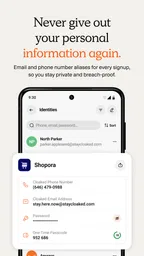
- Creates disposable email addresses to limit exposure of your main inbox.
- Offers virtual phone numbers for sign-ups and calls.
- Lets you block a contact or alias when it attracts unwanted messages.
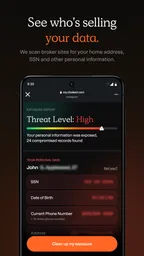
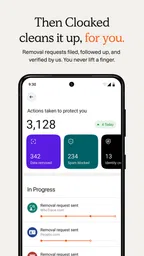
- Provides tools to manage personal information shared with businesses.
- Can reduce spam by keeping real contact details private.
What could be better
- Some features may require a paid subscription.
- Disposable contact details may not be accepted by every service.
- You may need to update accounts when an alias is removed.
- Privacy protection depends on keeping access to your Cloaked account secure.
- Availability of phone features may vary by region.





