




Cleo AI: Cash Advance & Money review
 Analysis by Appsdrops
I’d recommend Cleo AI to someone who wants a more conversational way to keep an eye on everyday money, rather than another spreadsheet to maintain. It is a finance app from Cleo AI built around spending awareness, budgeting, saving, credit improvement and cash advances. The chat-led approach gives it a distinct personality, but the useful question is whether that style helps you make better decisions. In my view, it can—provided you treat it as a guide and keep control of the bigger financial picture yourself.
Start with a routine you can actually keep
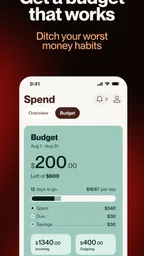
The most reliable way to use Cleo is to make it part of a small, repeatable check-in, not a place to visit only when your balance looks worrying. I’d start by getting comfortable with what the app shows, then use its budgeting and expense-tracking tools to notice patterns. A quick review after a grocery run or before the weekend is more useful than trying to reconstruct every purchase at the end of the month.
That habit matters because budget tools are only as helpful as the attention you give them. If you check in regularly, spending categories can prompt practical questions: Is takeaway becoming a routine expense? Did a social plan cost more than expected? Is there room to move a little money toward a goal before the next payday? Cleo’s conversational framing can make those questions feel less like filling in a ledger and more like a short money check.
For example, imagine you have several small purchases across the week and are unsure why your account feels tighter than usual. Instead of blaming one large bill, use the expense view to look for repeated everyday spending. The insight may be that a few individually harmless choices are adding up. That doesn’t mean you need to cut them all; it gives you a clearer choice about which ones are worth keeping.
I would avoid treating a budget as a strict scorecard. A realistic plan needs room for changing bills, irregular costs and the occasional treat. Use the app to spot a trend and decide what to do next, rather than expecting it to make every spending decision for you. That shift is especially useful for people who find traditional budget sheets too rigid or too easy to abandon.
Use the numbers to make one decision at a time
When I review spending, I find it more useful to pick one question for each session: What changed this week? Which category is easy to adjust? Is a saving goal still realistic? That keeps a quick check from turning into an anxious audit of every transaction. If something looks surprising, pause and make sure you understand it before changing your plan.
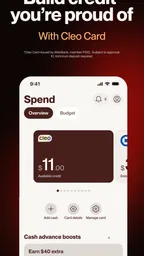
Cleo also brings credit improvement into the same money-management experience. I’d approach that as a longer-term part of your routine, not an instant fix. Credit health depends on choices and circumstances beyond any single app, so the sensible use is to follow the guidance available, understand the actions being suggested, and avoid making a financial move just because an app makes it feel urgent.
Check the terms before relying on a cash advance
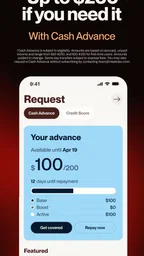
A cash advance can sound like an easy answer when a bill arrives before payday, but it is not the same as extra income. If you are considering one, read the terms shown in the app and think through how repayment would affect the next stretch of your budget. I would use this option, if it suits my circumstances, for a short timing gap—not to cover a recurring shortfall that needs a broader plan.
That distinction is important in everyday use. If your car needs an unexpected repair and your pay is close, a short-term advance might be something to assess alongside other choices. If rent, groceries or utility bills are repeatedly difficult to cover, borrowing can move the pressure forward rather than solve it. In that case, reviewing spending, contacting a bill provider about options, or seeking independent financial guidance may be more appropriate.
Settings and habits that make the app more useful
Before relying on any budgeting view, I’d spend time checking the settings and information the app asks you to review. Make sure the account details and preferences you provide are accurate, and understand what each feature is meant to do. A budget built on incomplete or outdated information can create a misleading picture, so it’s worth correcting the basics before drawing conclusions from a category or recommendation.
Privacy deserves the same practical attention. Money apps can involve sensitive financial information, and a friendly chat interface should not make that feel casual. Review the permissions and account connections presented during setup, consider whether you are comfortable with them, and use only the features you genuinely need. If you prefer not to connect financial accounts to an app, that preference may outweigh the convenience Cleo offers.
Notifications and prompts are another area to approach deliberately. If reminders help you build a check-in habit, keep the ones that support a clear action. If they become background noise, adjust them rather than letting the app interrupt you until you ignore everything. A useful reminder should bring you back to a decision—such as reviewing spending—not simply create a sense that you ought to open the app.
Build a simple weekly pattern
A practical routine can be as small as checking recent spending once a week, choosing one category to watch, and reviewing a saving intention. If you are working on credit, give that goal a separate moment so it doesn’t get lost in the daily flow of transactions. The point is not to spend more time managing money; it is to make the time you do spend more focused.
One useful trade-off is to set a budget that is slightly forgiving rather than aiming for an unrealistically perfect month. If you set a limit so tight that ordinary surprises break it, you may stop trusting the whole plan. I’d rather use a target that reflects how I actually spend, then adjust it after seeing a pattern, than make a strict promise that lasts only a few days.
For savings, a small, repeatable goal is often easier to maintain than a dramatic target. Use the app’s money-management tools to keep the goal visible, but judge progress against your real cash flow. If a month is unusually expensive, revising a target can be wiser than dipping into money needed for essentials just to preserve a number on screen.
Make the chat format work for you
The conversational style is one of Cleo’s clearest differences from a conventional finance dashboard. It can lower the barrier to checking in, particularly if rows of figures feel intimidating. I’d use that tone as a way into the information, while still reading the details carefully. A playful prompt can make money feel easier to discuss, but it does not replace the need to understand a balance, a budget choice or an advance’s terms.
People who enjoy quick, informal interactions may find it easier to return to Cleo than to a budgeting app that feels like bookkeeping. People who want dense reports, extensive manual control or a highly customizable spreadsheet-style system may prefer a more traditional tracker. The best choice is the one whose format you will keep using without confusing convenience with financial certainty.
Where Cleo fits—and where it doesn’t
Cleo is free to download, has a Teen content rating, and its current version is 3.89.0. It has an average rating of 4.6 from around 157,000 ratings, with over 5 million installs. Those figures suggest that many people have tried it, but they can’t tell you whether its approach suits your habits. I’d judge it by whether you find the spending review clear and whether its features support choices you would make anyway.
It is a strong fit for someone who wants budgeting, expense awareness and related money tools gathered in a chat-oriented app. It may also suit someone who needs a nudge to check spending regularly or wants to consider credit improvement alongside day-to-day money management. The developer is Cleo AI, and the app has been available since February 21, 2019, giving it an established presence in the finance category.
I would skip it if you want a completely hands-off solution, dislike conversational interfaces, or are uncomfortable sharing financial information with an app. I’d also look elsewhere if your main need is a detailed household accounting system with extensive custom reporting. A basic spreadsheet or a more traditional expense tracker can be better when you want full control over categories and calculations without a chat-first experience.
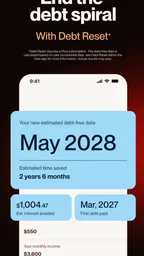
Another limitation is that an app can show patterns without resolving the causes behind them. If your budget is strained because income is irregular, costs are rising, or debt is difficult to manage, seeing the numbers is only the first step. Cleo can help make the picture more visible, but you still need a plan that matches your circumstances. The same goes for credit: use the app’s guidance as information, not as a promise of a particular outcome.
What to expect before making it your main tool
If you are deciding whether to install it, ask yourself what you want to do in the first few weeks. If the answer is “understand where my everyday spending goes,” the expense-tracking approach gives you a clear starting point. If you want help building a savings habit, choose a manageable goal and review it consistently. If you are interested in a cash advance, first decide whether the timing gap is temporary and read the terms before proceeding.
You do not need to use every feature for the app to be worthwhile. In fact, I’d begin with the parts that answer your immediate need and leave the rest alone until you understand how they fit. That makes it easier to tell whether Cleo’s style is genuinely helping, rather than mistaking a busy interface for progress.
For an experienced user, the advantage comes from combining a few habits: check spending at a consistent time, act on one useful pattern, keep a realistic budget, and review any borrowing decision separately from routine tracking. That is a more dependable workflow than opening the app repeatedly without a question in mind. It also helps keep a cash advance from becoming an automatic response to a low balance.
My verdict on making it a regular money companion
I see Cleo as a personable starting point for people who want to pay more attention to everyday money without building a complicated system from scratch. Its strongest quality is the combination of conversational interaction with budgeting, expense tracking, saving and credit-related tools. The format may make routine check-ins easier, but its value still depends on whether you review what you see and make thoughtful decisions.
My advice is to use it as a practical companion, not as an authority over your finances. Check the settings, keep your routine short, question anything you don’t understand, and assess an advance on its terms rather than its convenience. If you want an approachable way to notice spending patterns, it is worth considering. If you need detailed control, do not want to connect financial information, or are looking for a solution to ongoing financial hardship, a different tool or more direct support may serve you better.
What we like
- The app offers a way to check potential cash advances before borrowing.
- Budgeting tools can help users track spending and monitor their finances.
- Cleo’s conversational interface makes money management feel approachable.
- Users can review eligibility without committing to an advance.
- The app may help users build a clearer picture of their cash flow.
What could be better
- Advance eligibility and amounts can vary by user.
- Some features may require a paid subscription.
- Cash advances may include fees or optional tips.
- Repayment can reduce the funds available in a future pay period.
- Connecting financial accounts may raise privacy concerns.





