




Cleanup: Phone Storage Cleaner review
 Analysis by Appsdrops
Cleanup: Phone Storage Cleaner is a practical idea for a familiar problem: a phone gradually fills with screenshots, repeated photos, and other files that no longer earn their place. I find storage tools most helpful when they make it easy to review what can go, rather than encouraging a rushed, indiscriminate purge. This app focuses on clearing clutter and managing space, so its value depends on whether that process fits the way you use your phone—and whether you can comfortably navigate it.
Making a cleanup session understandable
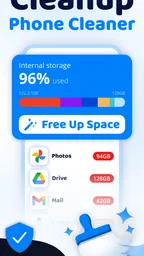
Cleanup is a free tools app from Deep Flow Apps. Its purpose is easy to grasp: help remove unwanted files, find duplicate photos, and make more room in device storage and memory. That narrow focus is useful for people who do not want a broader device-management suite full of settings they may never touch.
I would approach it as a review assistant, not as a magic fix. A cleaner can help you spot material worth reconsidering, but only you know whether a photo is an accidental repeat or the one version you meant to keep. The safest habit is to treat any proposed deletion as a decision to inspect, especially when the files involve family pictures, work documents, or records you cannot easily replace.
The app is rated for Everyone, and its audience is broad: someone who regularly takes photos, a person who saves many screenshots, or anyone who has begun seeing storage warnings. Its current version is 1.4.7. I would still recommend taking a little time to understand each screen before starting a large cleanup, rather than assuming that a simple purpose means every action is self-explanatory.
Readable choices matter more than speed
For a storage cleaner, good navigation is not just a matter of convenience. It affects whether people can tell what they are about to remove. I look for clear grouping, recognizable file previews, and action labels that distinguish reviewing from deleting. Those details reduce the chance of tapping through a task on autopilot.
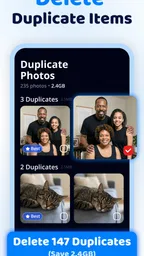
A useful first session is a small one: look through a limited set of duplicate-looking images, decide what should stay, and only then move on to a broader sweep. This gives you a chance to learn how Cleanup presents candidates before trusting it with a larger batch. If the choices are difficult to distinguish on your screen, pause instead of treating the app’s suggestion as proof that a file is disposable.
Duplicate cleanup also calls for a bit of judgment. Two pictures can look nearly identical yet differ in expression, focus, or a detail at the edge of the frame. I would compare them at a comfortable size and preserve the version with the context I care about. This is one reason I prefer a cleaner that supports deliberate review over relying solely on a phone’s available-storage figure.
Comfort, control, and different ways of using a phone
People use phones under very different conditions: with one hand while commuting, in bright daylight, late at night, or while managing fatigue or limited dexterity. A cleanup task can involve repeated scanning and selecting, so the interaction deserves more patience than a quick glance at a storage chart. If your hands tire easily, work through small batches and take breaks rather than trying to finish everything at once.
Visual comfort matters too. Photo review is more demanding than reading a short label because you may need to compare similar images and notice small differences. Enlarging an image with the phone’s usual viewing controls, where available, can help, but the core task still depends on being able to inspect the candidates. If you rely on spoken feedback, enlarged text, or other system accessibility settings, check whether the screens you need remain understandable with those settings enabled before committing to a long session.
I would not assume that a tool is accessible just because its job sounds simple. A clear category name does not guarantee that every control is easy to reach, that images are described in a useful way, or that actions are comfortable for every user. The sensible test is a brief, low-risk session on your own device, using the settings and input methods you normally depend on.
When and where cleanup is practical
A realistic use case is getting ready to record a trip or family event after your camera roll has filled with screenshots, saved references, and several takes of the same moment. I would open Cleanup before leaving, review the obvious clutter first, and leave emotionally important photos for a slower pass. That sequence can make the job less stressful than deleting files in a hurry when the camera is already needed.
Another good moment is during routine phone maintenance at home, when you have time to look carefully and can stop if a suggestion is unclear. A cleaner is less suitable when you are tired, in a rush, or using a small display in awkward lighting. In those conditions, the risk of removing something by mistake can outweigh the benefit of freeing space immediately.
Cleanup has reached more than ten million installs and holds a 4.4 average from around 379,000 ratings, which suggests it has attracted a substantial audience. Those figures can help establish that it is widely used, but they do not tell me whether a particular screen will work well with your vision, motor needs, or preferred phone settings. Your own short trial is more informative for that decision.
How it compares with built-in storage tools
Most phones already offer some way to inspect storage or remove files, and those built-in tools are often the better starting point if you only need to see what is taking up room. They may suit someone who wants the fewest extra steps or prefers to keep cleanup within familiar system menus. Cleanup is more appealing if you specifically want a dedicated place to look for duplicate photos alongside other clutter.
Compared with manually scrolling through a camera roll, a focused cleaner can make a large library feel more manageable by directing attention toward possible repeats. The trade-off is that automated grouping can never know which copy has personal meaning. I would use it to narrow the search, then make the final choice myself. That approach is especially worthwhile for people who keep alternate edits, burst-like sequences, or pictures that look alike but record different moments.
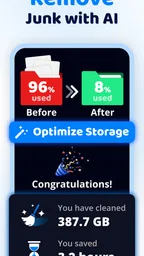
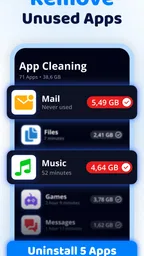
It is also worth separating storage from memory in everyday expectations. Clearing files can create more room for content, but it should not be treated as a guaranteed cure for every performance problem. If your concern is an app that freezes or a phone that feels slow for reasons unrelated to clutter, a storage cleaner may not address the underlying cause. I would not install one expecting it to replace troubleshooting or a careful review of which apps and files actually consume space.
Costs, confidence, and remaining barriers
The app is free to download, with in-app purchases listed from $6.99 to $39.99 per item. I would check the purchase details in the app store before buying anything and decide whether the free experience already covers the cleanup you need. A paid option only makes sense if it provides value for your own routine; there is little reason to spend simply because a storage warning feels urgent.
The main limitation is inherent to the task: deciding what is safe to remove takes attention. Duplicate detection can point you toward candidates, but it cannot understand the sentimental or practical value of a file. The process may also be tiring for anyone who finds image-by-image comparison difficult. If that describes you, a trusted person can help review important photos, or you can use the phone’s familiar file and photo tools at a slower pace.
Another possible friction is confidence. People may hesitate to grant a cleanup tool a role in managing personal material, or may not want to learn an additional interface for something they do only occasionally. If your storage is comfortable and your photo library is already organized, the app may add little to your day. The strongest case for trying it is a recurring clutter problem, not the idea that every phone needs constant cleaning.
Who I would recommend it to
I would suggest Cleanup to people who routinely accumulate screenshots and repeated images and who are willing to inspect suggestions before removing files. Its focused purpose can be useful when manual sorting feels overwhelming, while the free download gives you a way to judge the workflow before deciding whether any purchase is worthwhile. The Everyone content rating also makes its intended audience broad, though individual usability still depends on how the interface works with your needs.
I would steer away from it if you want a completely hands-off deletion process, if you are uncomfortable reviewing personal photos in a separate tool, or if the phone’s built-in storage screen already solves your problem. It is also not my first choice for a rushed cleanup just before an important event. A few careful decisions made earlier are safer than a fast sweep under pressure.
A measured recommendation for inclusive use
My overall view is that Cleanup addresses a real, specific nuisance and is most useful when it helps you find candidates while leaving the final call in your hands. It can support different situations by making a focused cleanup session possible, but the work still asks for visual attention, careful selection, and enough time to verify what you are removing. Start with a small, low-stakes review and see whether the screens are comfortable with your usual accessibility settings.
With a 4.4 average and over ten million installs, it is clearly an established option in the phone-cleaning space, but popularity is not a substitute for personal fit. I would try it if duplicate photos and accumulated clutter are regular annoyances; I would stick with built-in tools if you prefer the simplest route or need a workflow you already know. The best cleanup is the one that frees useful space without making you less certain about what you kept.
What we like
- Quickly identifies large files that may be taking up space.
- Helps locate duplicate photos for easier storage cleanup.
- A straightforward interface makes key cleanup tools easy to find.
- Lets users review files before deciding what to remove.
- Can help organize a cluttered photo library.
What could be better
- Cleanup suggestions may include files you would prefer to keep.
- Duplicate detection can mistake similar photos for duplicates.
- Some features may require a paid subscription.
- Cleaning storage does not necessarily improve phone performance.
- Access to photos and files requires sensitive device permissions.





