
Citizen: Protect The World review
 Analysis by Appsdrops
I see Citizen as a useful but deliberately serious kind of news app: it brings local reports of emergencies and crime into one place, so you can pay attention to what is happening nearby rather than relying only on broad headlines. That focus can make it valuable when I’m trying to understand a developing situation around home, work, or a route I use. It also asks for care from its users. Reports about emergencies can be upsetting, incomplete, or easy to misread, so I would treat the app as a prompt to seek context—not as the final word on what happened.
Local updates are useful, but trust needs context
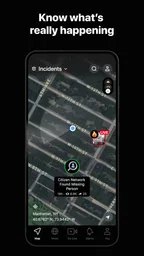
Developed by Sp0n Inc., Citizen belongs to the news and magazines category, though it feels more immediate and location-centered than a conventional news reader. Its core appeal is the possibility of seeing community crime and emergency updates as events unfold. That makes it different from opening a newspaper app for a considered overview or checking a general social feed where local posts may be mixed with unrelated content.
The trade-off is that immediacy is not the same as certainty. In a developing incident, details may change, and a short alert cannot provide the full context of a longer report. I’d use Citizen to notice that something may need attention, then look for reliable confirmation before sharing claims or changing plans in a consequential way. This is particularly important when a report involves another person or a sensitive event.
The app has a 4.5 average from around 113,000 ratings, and it has passed five million installs. Those figures suggest that many people find the service worth keeping, but they do not tell me whether a particular alert is complete or relevant to my neighborhood. For a reader deciding whether it fits, the more useful question is whether local, time-sensitive information helps them make everyday choices—and whether they can handle seeing crime-related updates without becoming unnecessarily anxious.
What the app is for—and what it is not
I would not choose Citizen as my only source for national or international news. Its community-level emphasis is a different job: drawing attention to nearby events that could affect a person’s immediate surroundings. If I want political analysis, a deep investigation, or a broad daily briefing, a traditional news app is the better companion. If I want a local signal that may help me pause and check what is happening, Citizen has a clearer reason to be installed.
That distinction also matters for expectations. A neighborhood update can be helpful without explaining causes, outcomes, or the full sequence of events. I would resist treating a brief report as a complete account, especially when the situation is active. The app is most useful as one layer in a sensible information routine, not as a substitute for official instructions or careful reporting.
Choose notifications with a purpose
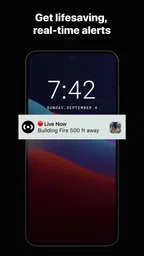
Emergency alerts are the feature most likely to make the app feel useful—and the one most likely to create friction. Before enabling every available alert, I’d think about what I actually need to know quickly. A person who walks or commutes through unfamiliar areas may value timely local awareness; someone who finds crime notifications stressful may prefer a more restrained setup, if the app’s current settings allow it. I would review the choices shown in the app rather than assume every alert type can be tuned in a particular way.
A practical workflow is to check an alert when it arrives, read the available context, and then decide whether it affects a real plan. For example, if I’m about to walk home and see an update near my route, I can pause, assess the information, and choose a different path if that seems prudent. I would not forward an unverified claim to friends simply because it appeared in a notification. That small pause helps keep a fast-moving feed from turning into a rumor chain.
Another useful habit is to separate awareness from constant monitoring. I would open the app when I have a reason—such as checking local conditions before heading out—rather than repeatedly refreshing it throughout the day. That approach gives the service a practical role without making every nearby incident feel personally urgent. It is a personal choice, not a guarantee that the app offers a particular quiet mode or notification schedule.
Privacy and trust deserve a deliberate check
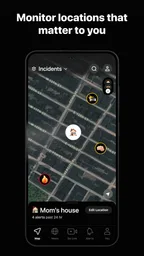
Because Citizen is built around local information, location is an obvious point to consider before relying on it. I would review the permission prompts on my device and choose only what I’m comfortable granting. If the operating system offers a choice about location access, I’d read the wording carefully and decide whether the benefit I expect justifies that access. Permission choices can affect how convenient a location-based service feels, but I would not assume a setting or privacy outcome that I have not personally checked.
I’d also take a moment to inspect the app’s own privacy and account controls, along with the controls available through the phone’s settings. The useful questions are concrete: what permissions are enabled, what account options are visible, and what choices does the app present about notifications or personal information? I would make those decisions before depending on the service, rather than trying to infer its data practices from the fact that it shows nearby updates. I can’t responsibly promise a particular privacy policy or account feature without seeing it in the app.
There are times when a community emergency report can involve sensitive circumstances. If I’m checking an update about a neighbor, a family member, or an event I witnessed, I would avoid posting identifying details or amplifying speculation. Even when an app makes it easy to follow local reports, discretion remains the user’s responsibility. This is one reason I see the app as a tool for awareness, not a place to turn a stressful situation into public commentary.
Where Citizen fits in a daily routine
Imagine I’m leaving work and receive an alert about an incident near a station I usually pass. I can use the report as a reason to stop and check the available details before continuing. If the situation seems relevant, I might choose another route or wait for clearer information. If it is not near my path, I can move on rather than letting a headline dominate the evening. The value lies in having a local signal at the right moment; the limitation is that I still have to judge how much the alert should change my plans.
For parents, students, people who travel across town, or anyone who wants a closer view of neighborhood events, that kind of awareness may be worthwhile. It may be less suitable for someone who prefers to avoid crime-related material, has no interest in local incident updates, or needs a carefully edited news digest. In those cases, a general news reader—or simply checking an established local newsroom when needed—may offer a calmer and more contextual experience.
Citizen is free to install, though it includes in-app purchases listed from $4.99 to $399.99 per item. I would check the purchase screen carefully before confirming anything and consider whether a paid option addresses a need I actually have. The app is rated Teen, a relevant point for households deciding whether its subject matter suits younger users. I would not assume that an age label means every update will feel comfortable or appropriate for every teenager.
Keep the useful parts, set your own limits
The current version is 0.1318.0, and the app first appeared on January 16, 2017. Those details establish that Citizen is an established offering, but I’d still judge it by the experience and settings currently visible on my device. A release history cannot replace a personal check of notifications, permissions, and account choices, especially for an app whose usefulness depends on local relevance.
My recommendation is cautious rather than universal. I’d try Citizen if nearby emergency and crime updates would genuinely help me make decisions, and I’d begin with deliberate permission and notification choices. I’d keep a second source available for confirmation, avoid treating an alert as a complete report, and step back if the feed makes me feel constantly on edge. For a person who values local awareness and can maintain that perspective, it can be a helpful addition; for someone seeking calm, comprehensive journalism, another kind of news app is likely a better fit.
What we like
- Real-time alerts help users stay informed about nearby incidents.
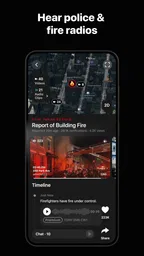
- Users can share videos and photos to support community reports.
- Safety features can connect users with people they trust.
- The app covers local incidents beyond traditional emergency alerts.
- A neighborhood feed helps users follow issues close to home.
What could be better
- Some reports may be unverified or lack important context.
- Alert usefulness depends on active users in your area.
- Frequent notifications may become distracting.
- Sharing location can raise privacy concerns.
- Content and features may vary by region.





