


Citi Mobile® review
 Analysis by Appsdrops
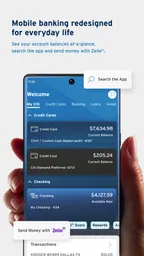
I find Citi Mobile® most useful when I want to check on my Citi accounts without turning a small banking task into a trip to a branch or a session at a computer. It is a finance app from Citibank N.A., and its appeal is practical rather than flashy: it gives Citi customers a mobile way to keep track of everyday account needs. If you already bank with Citi, it may earn a regular place on your phone; if you do not, the fact that it is free to download is not, by itself, a reason to switch banks.
Free to download, with value tied to being a Citi customer
The app is free, so there is no purchase price to weigh against its usefulness. That makes trying it a low-cost decision for an existing customer, but it does not mean banking itself is free or that every account-related service carries no charge. I would treat the download as a convenient access point to a banking relationship, not as a promise about fees, account eligibility, or the cost of any financial product.
That distinction matters when comparing it with a general budgeting tool or a financial app that can be useful before you choose a bank. Citi Mobile is built around managing Citi accounts. Its value therefore depends on whether you hold those accounts and want to handle routine checks on your phone. Someone choosing a new bank should compare account terms and service needs separately rather than letting a free app decide the choice.
The app has a 4.8 average from around 1.4 million ratings, alongside roughly 429,000 written reviews. It has passed 10 million installs. Those figures suggest that many people use and rate it positively, but they cannot tell me whether it suits a particular customer’s account setup or preferred way of banking. A high rating is reassuring context, not a substitute for checking whether the app fits your own routine.
Everyday account checks are where it makes sense
For a simple, realistic use case, imagine checking your finances before leaving home: you want to see where things stand, confirm an account detail, or decide whether a planned purchase fits your available funds. A mobile banking app can make that check easier to fit into the day than waiting until you reach a laptop. I would use it for quick, deliberate visits rather than repeatedly opening it out of habit.
That small change in timing can be useful. Checking before you pay may help you catch a mismatch between what you expected and what you see, or remind you that a payment is due. The app does not make the financial decision for you; it simply offers a more immediate way to consult your Citi banking information. For people who already manage their money through Citi, that convenience is the central benefit.
A helpful workflow is to decide what you need before opening the app. If you are checking a balance, make that the task; if you need to review a transaction or account detail, focus on that instead of treating the phone as a full financial planning session. Keeping mobile checks purposeful makes it easier to notice something that needs follow-up without confusing a quick glance with a careful review of your finances.
How it compares with other ways to bank
Compared with visiting a branch, a mobile app is plainly more convenient for a quick check when you are away from home. Compared with using a bank’s website on a computer, the phone format is better suited to short, on-the-go tasks, while a larger screen may feel more comfortable when you want to read carefully or review several details. I would not assume that one replaces the other: they serve different moments in a customer’s routine.
Compared with independent money-management apps, Citi Mobile has a narrower role. A dedicated budgeting product may be a better fit if your main goal is to bring accounts from several institutions into one planning view or build a broader household budget. Citi’s app makes more sense when the job is to manage the Citi side of your finances. Using both kinds of tools can be reasonable, as long as you are comfortable with how each handles access to financial information.
There is also a useful trade-off between convenience and attention. A phone makes an account check easy to do in spare moments, but that same ease can encourage hurried decisions. If a transaction looks unfamiliar or a balance raises a concern, I would pause and investigate through the appropriate banking channel rather than relying on a glance. A mobile view is a starting point for follow-up, not a reason to skip it.
What to consider before relying on it
The most important limitation is that the app is relevant only if Citi is already part of your banking life. It is not a universal account manager simply because it is available to download. If your money is held elsewhere, another bank’s app or a cross-bank finance tool may be more useful. If you prefer face-to-face help or find sensitive tasks uncomfortable on a phone, you may also prefer to handle some banking in person or on a computer.
Mobile access also asks you to think about the device itself. I would avoid treating a shared or unattended phone as a good place to conduct private banking, and I would be careful when checking account information in public. These are sensible habits for any financial app, but they are especially relevant when banking becomes something you can do in brief, distracted moments. Convenience is strongest when paired with a little care.
Another practical point is that an app can make routine access easier without removing the need to understand your accounts. Before depending on it for an important task, I would make sure I can sign in successfully and know where to go for help if access becomes inconvenient. That is a useful preparation for any banking tool: do not wait until you are in a hurry to discover that you would rather use another channel.
Who is likely to get the most value
I would recommend trying it to someone who already uses Citi and wants a convenient way to keep up with everyday account matters while away from a computer. It is particularly sensible for people who check their finances in short intervals, such as before making a purchase or while planning the day. Because the app is free to download, an existing customer can see whether this style of access suits them without paying an upfront app price.
It is less compelling for someone who wants a single place to manage accounts at many different banks, or who is selecting a bank primarily by comparing fees, service, and account features. The app cannot answer those broader questions just by being well regarded. In those cases, I would start with the banking service that fits the person’s needs and use its app as one part of that decision.
It is also worth being realistic about what a mobile banking app can improve. It can reduce friction around checking in, but it cannot make a confusing financial situation simple on its own. If you need detailed budgeting, long-term planning, or a consolidated view across institutions, a separate tool or a more deliberate review on a larger screen may be a better companion. The strongest setup is the one that matches the task, rather than asking one app to do everything.
A measured recommendation
Citi Mobile is a practical choice for Citi customers who want their banking access close at hand. Citibank N.A. released it on September 22, 2011, and the current version is 9.100.0; it requires iOS or Android 10 or later and is rated for Everyone. I would check that requirement before installing it on an older device, since an otherwise suitable customer may not be able to use the current release on an unsupported operating system.
My verdict is a straightforward try it if you already bank with Citi. Its free download and strong user ratings make it easy to consider, while its real value comes from making Citi account management more accessible in day-to-day life. I would skip it if you need a bank-neutral budgeting hub, do not have Citi accounts, or would rather avoid banking on a phone. For the right customer, it is a convenient companion; for everyone else, the better choice is the tool that serves their actual banking setup.
What we like
- Biometric sign-in offers a quick way to access your account.
- Card controls let you lock a misplaced card from the app.
- Custom alerts help you keep track of account activity.
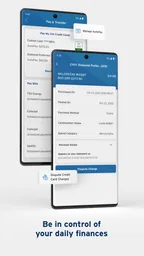
- You can schedule payments for eligible Citi accounts.
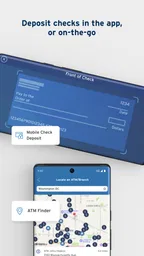
- The app supports mobile check deposits for eligible accounts.
What could be better
- Available features depend on your account and location.
- Some transactions may take time to appear in account activity.
- Mobile check deposit limits may apply.
- Access to certain features may require extra verification.
- The app requires a stable internet connection for most tasks.





