

Chatbot AI Assistant - Genie review
 Analysis by Appsdrops
I can see why an AI assistant feels exciting in the first few days: you can ask a question, request a rewrite, or try an image idea without first learning a complicated tool. With Chatbot AI Assistant - Genie, the longer-term question is more useful than the novelty question: does it become a dependable part of a routine, or do you return only when you want to experiment? My view is that it has the best chance of lasting for people who bring it recurring, small tasks—not those expecting it to replace careful research or a full creative-production workflow.
What makes the first week appealing
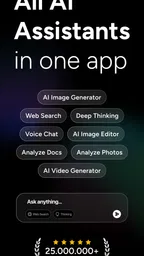
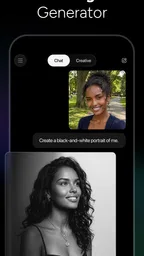
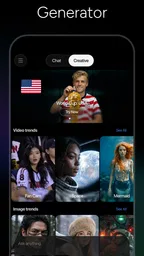
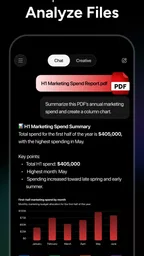
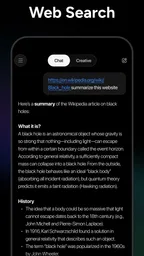
Genie is a free productivity app from APPNATION AS, built around access to several named AI models, including GPT-6, Gemini, Grok, DeepSeek, and Claude. It also offers AI image and video generation. That combination gives a new user several ways to explore one app rather than installing a separate chatbot for text and another tool for visual experiments. The experience is aimed at ordinary requests as much as ambitious ones: drafting a message, explaining a concept, or turning a rough visual idea into a prompt.
The first useful test is not “What can AI do?” but “Can it help me finish something I already need to do?” For example, if I had a busy afternoon, I might ask it to make a polite reply to a scheduling message, then ask for a shorter version that sounds less formal. That kind of back-and-forth is where a chatbot can save effort: I supply the situation and adjust the result, rather than staring at a blank page. I would still check the names, dates, and commitments before sending anything.
The app’s appeal is also easy to understand if you are curious about differences among AI models. Having several model names in one place invites comparison: ask each to explain the same unfamiliar topic, then see which answer is clearest for you. That can be more illuminating than choosing a model based on buzz alone. I would treat the answers as drafts and perspectives, not as a guarantee that one response is correct.
For someone who mainly wants quick assistance, that first-week range can be a genuine advantage. A student could request a simpler explanation of a difficult passage, while a small-business owner might draft several versions of a product description. A person planning a birthday could use a text prompt to develop invitation wording and then explore an image concept. These are modest jobs, but they are exactly the kind that make an assistant feel useful before you have built a formal workflow around it.
Where a little structure helps
I get more value from a chatbot when I give it constraints rather than a vague command. Instead of asking for “a good email,” I would describe the recipient, the purpose, the tone, and the length, then ask for a revision if the first draft misses. For visual generation, I would likewise specify the subject, mood, setting, and details that must remain visible. This is not a hidden Genie feature; it is a practical way to make a prompt-based tool produce results that are easier to judge.
A useful habit is to keep the original task visible in your own notes and use the assistant to create alternatives, not to make the final decision automatically. If you ask for a summary, compare it against the source when accuracy matters. If you request a message, remove any claim you cannot personally stand behind. The best recurring use is a clear, low-risk task with a human check at the end. That keeps the convenience while reducing the chance of confidently phrased mistakes slipping into work or personal plans.
Does it stay useful after the novelty wears off?
Genie has a 4.5 average from around 331,000 ratings, with more than 10 million installs. Those figures suggest it has attracted a broad audience, but popularity alone does not tell me whether it will fit your routine. The deciding factor is whether your everyday tasks are varied enough to benefit from a general assistant. If you regularly need help brainstorming, rewriting, explaining, and developing visual ideas, one flexible app may be easier to revisit than a collection of narrow tools.
For occasional use, I would keep expectations modest. If your only need is a quick factual lookup, a conventional search engine may be better because it helps you inspect sources directly. If you already write comfortably and rarely need a second draft, a chatbot could add an extra step rather than remove one. And if your work depends on exact citations, regulated advice, or dependable factual sourcing, I would use specialist resources and treat AI output only as a starting point.
The month-to-month value comes from repetition, not from testing every model or generation option once. I would choose two or three recurring jobs—for example, turning notes into a tidy outline, adjusting the tone of a message, and brainstorming a set of visual directions. If those tasks come up often and the app reliably helps me move forward, it earns a place in my routine. If I find myself opening it just to see what it might do, the initial curiosity may be doing more work than the tool itself.
One practical way to evaluate that is to notice where the time actually goes. A response that arrives quickly may still need substantial fact-checking or rewriting. On the other hand, even an imperfect first draft can be worthwhile if it gives you a structure you can improve faster than starting from nothing. I would judge Genie by the finished task, not by how impressive a single answer looks in isolation.
Text, images, and the limits of one app
Having text, image, and video generation in the same product is convenient for people who move between words and concepts. It can help a creator go from a rough campaign idea to draft copy and a visual direction without changing apps. But convenience is not the same as a complete professional pipeline. If your work requires precise editing controls, repeatable brand standards, detailed asset management, or a particular export workflow, a dedicated creative application may suit you better.
There is also a judgment call around generated material. I would use image or video generation to explore possibilities, build a mood reference, or make a personal concept—not assume that the result is automatically ready for publication. Review details carefully, especially text within images, faces, and anything that could misrepresent a real person or event. The generation options are most valuable when you are comfortable selecting, revising, or discarding outputs rather than expecting a perfect result on the first attempt.
People comparing Genie with a standard single-model chatbot should ask whether model variety matters to them. If they simply want one consistent assistant for a narrow job, a focused alternative may feel simpler. If they like testing different approaches or want text and visual generation under one roof, Genie’s breadth is more relevant. I would not choose it solely because a list of model names sounds impressive; I would choose it if that range answers tasks I actually repeat.
Keeping the habit without creating busywork
Maintenance is light in the everyday sense: you do not need to build a complicated system before asking a question. Still, a useful routine does require a little personal discipline. Keep sensitive details out of prompts unless you are comfortable sharing them with the service, and do not paste private conversations, financial information, or confidential work material casually. For an ordinary writing task, you can often describe the situation in general terms and replace identifying details yourself afterward.
Another small maintenance burden is checking whether the answer is fit for purpose. A polished tone can make uncertain content feel more authoritative than it deserves. For a recipe idea, casual brainstorming, or a first draft, a quick sense-check may be enough. For health, legal, financial, or safety decisions, I would not rely on a chatbot as the final authority. The app is best understood as an assistant for generating and reshaping material, not as a substitute for accountable expertise.
Cost is worth considering before a habit forms. Genie is free to download, with in-app purchases ranging from about $4.99 to $129.99 per item. I would start with the free experience and identify a specific limitation before paying for anything. If you only use it occasionally, a recurring or higher-priced option may not make sense; if it becomes part of frequent work, compare the cost with the time it genuinely saves. Avoid paying simply because you have not yet explored whether the free access meets your needs.
The app is rated for Everyone and requires Android 8.0 or later. Its current version is 10.7.3, and it was released on December 16, 2022. That makes it broadly approachable for compatible Android users, though the experience still depends on your own device and the way you use AI tools. I would check the app store details on my device before installing, especially if I am comparing platform availability or considering a purchase.
What can make it tiring
The biggest source of fatigue is often not the interface but the cycle of prompting, judging, and correcting. If your request is underspecified, the answer may be generic; if you keep revising without a clear target, you can spend longer polishing a draft than writing it yourself. My advice is to decide what “good enough” means before starting. For a quick message, one revision may be plenty. For a visual concept, generate options only until you have a useful direction, then move on to the work that matters.
Another trade-off is variety versus consistency. Different model choices can be useful when one answer is awkward or a task needs a different style, but comparing outputs can become a distraction. For routine tasks, stick with the approach that gives you a usable result rather than treating every prompt as a contest. If consistent wording matters—say, for customer replies—keep your own examples and standards nearby, and review each draft so the voice remains yours.
AI can also encourage overuse: it is tempting to ask for another list, another rewrite, or another image when the first result already solves the problem. I find it helps to use a simple rule: ask for a clear deliverable, check it against the real need, and stop once it is good enough. That turns Genie from an endless novelty into a practical tool. If you prefer direct controls, predictable templates, or source-first research, a conventional productivity app, search tool, or specialist editor may be less tiring.
Who should keep Genie installed
Genie is a good fit for curious users who regularly move between writing help, explanations, brainstorming, and visual experimentation. It may also suit someone who wants a low-friction way to explore several AI approaches before deciding which style works for them. APPNATION AS has positioned it as a broad productivity assistant, and its 2.5K reviews sit alongside a sizeable audience; I would take that as a reason to investigate, not as proof that every task will work well.
I would skip it if you need a dependable source of verified facts, a specialist tool with fine-grained creative controls, or a system that makes decisions on your behalf. It is also a poor fit if you dislike reviewing generated text or would rather not manage the possibility of paid in-app options. In those cases, a focused app—or simply doing the task directly—can be more efficient and predictable.
My long-term verdict is that Genie can earn lasting space, but only when you give it a few repeatable jobs and keep your standards intact. Start with one everyday task, such as rewriting a message or outlining an idea, and see whether the result saves effort after revisions. Add image or video generation only if you have a real reason to use it. If the app keeps helping with work you already do, it is more than a novelty; if it mostly invites you to experiment without finishing anything, uninstalling it is a perfectly sensible choice. Use it as a flexible first-draft partner, not as the final judge of what is true or good.
What we like
- Genie can help draft messages and other everyday text.
- It can answer questions in a conversational format.
- The interface makes it easy to start a chat.
- It can suggest ideas when you need a starting point.
- It may save time on routine writing tasks.
What could be better
- AI answers can be inaccurate and should be checked.
- Useful features may require a paid subscription.
- Some responses may feel generic or repetitive.
- The app needs an internet connection for AI chats.
- Avoid sharing sensitive personal information in prompts.





