




Cars.com: Buy and sell cars review
 Analysis by Appsdrops
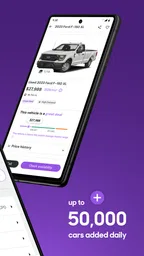
I think Cars.com: Buy and sell cars makes the most sense when you treat it as a practical companion to a car search, not as a shortcut to choosing a vehicle. Its value is in bringing a large set of listings into one mobile experience and helping you keep track of possibilities as you browse. That is especially useful when your search happens in spare moments—on a lunch break, between errands, or while comparing options with someone else.
As an Auto & Vehicles app from Cars.com, it is free to use and rated for Everyone. The app has a 4.7 average from over 200,000 ratings, and it has passed 10 million installs. I can see why it appeals to shoppers: starting a search on a phone is convenient, and returning to a set of listings is easier than trying to remember which cars caught your eye. The main trade-off is that browsing and listing details depend on a working connection, so the quality of the experience can change with your signal.
Where a steady connection makes the biggest difference
The core experience is built around finding vehicles and following listings, so network access matters from the outset. When I am comparing cars, I want results and listing details to load while I am making decisions, not after I get home. With a reliable connection, the app can serve as a useful first stop for narrowing a broad search into a shortlist worth investigating further.
That does not mean every listing should be treated as a complete picture of a car. A listing is a starting point for questions, not a substitute for checking the vehicle’s condition, history, or current availability. I would use the app to identify candidates and gather the details that matter to me, then confirm important points with the seller before making a trip. This keeps a promising result from becoming a wasted drive because the car has changed status or a detail was misunderstood.
One useful habit is to search with a clear set of priorities before browsing: the kind of vehicle you need, what you can reasonably spend, and which features are non-negotiable. Then use the app to compare a few plausible choices rather than scrolling indefinitely. That approach is particularly helpful on a phone, where a long session can blur the differences between similar listings. I find it easier to notice meaningful trade-offs—such as choosing between a newer vehicle and a better-equipped one—when I keep the shortlist small.
For a household with more than one driver, I would also agree on the criteria before sharing candidates. One person may focus on practicality, while another cares more about comfort or appearance. Keeping a common shortlist makes those conversations concrete: you can discuss actual vehicles rather than vague preferences. It is a simple workflow, but it makes a large marketplace feel less overwhelming.
Browsing in the gaps of a busy day
The phone format is most useful when a search stretches over several days. You might check listings during a commute break, revisit a promising option at home, then look again before contacting a seller. The app’s listing-tracking purpose fits that pattern better than a one-time browse. It gives a shopper a way to keep a search moving even when there is no convenient block of time to sit down at a computer.
A realistic example: I am looking for a family car and have a few minutes before picking someone up. I can use that window to review candidates, note which ones merit a closer look, and leave the actual decision for later. When I am ready to act, I can revisit those listings with a better connection and check the details more carefully. The key is not to make a rushed purchase decision from a quick glance; use short sessions to organize the search, then reserve time for verification.
That workflow also makes sense for someone selling a car. A seller can use the app as part of the process of putting a vehicle in front of people who are already looking. But a mobile listing is only one part of a sale. I would prepare accurate details and clear photos in advance rather than trying to write everything while distracted. A careful listing is more useful to serious shoppers and can reduce avoidable back-and-forth.
Cars.com is less compelling if you only want broad automotive reading or general vehicle advice. Its main appeal is the marketplace task: browsing vehicles, tracking listings, and selling. If you are not currently shopping or preparing to sell, you may have little reason to keep it in your regular rotation. For research that requires a deeper technical explanation of a model, a dedicated review or manufacturer information may serve you better alongside the app.
When a listing fails to load or details change
Mobile browsing is not always smooth. A weak connection can interrupt the moment when you are trying to inspect a listing, and marketplace information can change between one visit and the next. I would avoid assuming that a page that loaded earlier will remain current, especially when the next step involves travelling to see a vehicle. Refresh your search when you are ready to contact someone, and confirm that the car is still available before setting out.
If something does not load, I would first separate a connection problem from a listing problem: try again when reception is stronger, then revisit the result. If the details still do not make sense, do not fill in the gaps with guesses. Ask the seller a direct question. That is a better recovery strategy than treating a partial page or an old note as confirmation.
A practical safeguard is to keep your own concise record of what you need to verify. For each candidate, that might be the asking details, the seller’s response, and any question about condition that could change your decision. This is not a substitute for the app’s tracking role; it is a way to make sure a brief browsing session does not leave you relying on memory. It is especially helpful when several similar cars are in the running.
There is also a useful distinction between “interesting” and “ready to visit.” I would not make travel plans for every appealing result. First check that the listing still exists and that the seller can answer the questions that matter. Only then does it make sense to spend time arranging a viewing. That small pause can save effort and keeps the app’s speed from encouraging premature decisions.
Using the app thoughtfully on mobile data
Because the experience revolves around browsing listings, it is sensible to be deliberate about when you do the most detailed comparison. If you are watching your mobile-data use, save longer browsing sessions for a trusted connection and use shorter mobile sessions to revisit a few candidates or check a specific detail. I would not assume that every part of a listing is available without a network connection; the app’s usefulness depends on being able to reach current marketplace information.
There is a privacy-minded benefit to keeping searches purposeful, too. Rather than repeatedly opening a broad stream of results, decide what you need to learn in each session: find candidates, compare a shortlist, or prepare questions for a seller. This reduces aimless browsing and makes it easier to judge whether a new listing is genuinely better than the options you already have. It also helps you avoid making a decision simply because a fresh result has appeared.
For sellers, the same principle applies. Draft the information you want to present before starting the listing process, and check it carefully before publishing. If you are completing the task while out and about, a distraction or poor connection is a reason to pause rather than rush. Accuracy matters more than finishing in one sitting, because an unclear or incomplete description can make it harder for a buyer to decide whether to get in touch.
Compared with using a general search engine or checking individual dealer pages, a dedicated marketplace app can be more convenient for keeping multiple possibilities in view. The trade-off is that a broad set of listings does not automatically make comparisons fair: sellers may describe vehicles differently, and the information you need may not be presented in the same way each time. I would use Cars.com for discovery and tracking, then verify the details directly instead of assuming every listing is equally complete.
What the app is good at—and where I would use something else
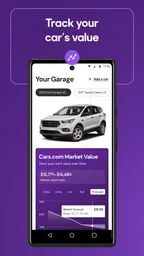
The most appealing part for me is the combination of browsing and keeping track of vehicles in one place. That is a better fit for a real search than opening a new page each time and trying to remember where each candidate came from. The developer, Cars.com, is closely associated with the app’s vehicle-marketplace focus, and the current version is 26.20.0. It has been available since March 2, 2011, so this is an established app rather than a newly launched experiment.
Still, a marketplace cannot make the purchase decision for you. If you need a professional inspection, detailed mechanical advice, or a definitive account of a car’s condition, you need to seek that information elsewhere. Likewise, someone who already knows which local dealer they want may find contacting that dealer directly more efficient than comparing a wide range of listings. The app is strongest when you have options to sort through, not when the decision has already been made.
I would also recommend it less strongly to a person who wants a completely uninterrupted search while moving between areas with unreliable reception. In that situation, plan the important browsing for a time and place with a stronger connection, and do not depend on being able to retrieve every detail at the roadside. That is not a flaw unique to this app; it is a practical constraint of a live listing service on a phone.
My connectivity verdict
Cars.com: Buy and sell cars is a useful choice if you are actively shopping for a vehicle or preparing to sell one and want a mobile way to browse and keep listings in view. I would use it to build a shortlist, return to promising candidates, and prepare better questions before contacting sellers. Its value is clearest when you approach it as a search organizer rather than the final authority on a car.
Connectivity is part of the deal: it supports the live, changing nature of vehicle listings, but it can also make quick checks inconvenient when reception is poor. My advice is to browse in deliberate sessions, verify availability before making a trip, and treat listing information as a prompt for follow-up rather than proof. If that matches how you shop, this free app is worth trying. If you need offline-first research, specialist mechanical guidance, or only one known seller, a different tool or direct contact may be a better fit.
What we like
- Compare listings from dealerships and private sellers in one place.
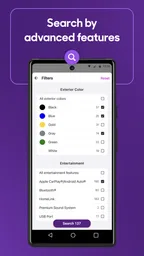
- Filter searches by price mileage location and vehicle features.
- Save favorite cars to revisit promising listings later.
- Vehicle history reports help assess selected used cars.
- Dealer reviews offer useful context before making contact.
What could be better
- Listing details and photos can vary in quality.
- Some vehicles may no longer be available when you inquire.
- Prices and fees may differ from the displayed listing.
- Seller responses and appointment availability are outside the app’s control.
- Vehicle history reports may not include every past issue.




