


CarMax: Used Cars for Sale review
 Analysis by Appsdrops
When I’m looking for a used vehicle, I want a way to narrow the field before spending an afternoon visiting dealerships. CarMax: Used Cars for Sale is built for that early research: it’s an Auto & Vehicles app from CarMax Enterprise Services, LLC, and its main job is helping me browse the company’s used-car inventory on a phone. I find it most useful as a practical starting point, not as a substitute for checking a vehicle carefully or comparing the wider market.
The app is free, rated for Everyone, and has a 4.6 average from around 37,000 ratings. It has been available since December 2012 and has more than five million installs. Those figures suggest a well-established tool, but they don’t tell me whether a particular car is right for me. The useful question is whether its browsing workflow makes a real shopping decision easier.
Start with a shortlist, not endless browsing
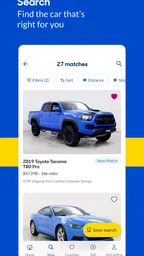
The inventory is the app’s natural starting point: it lets me search and browse a large selection of used cars, SUVs, and trucks. Rather than scrolling without a plan, I get more value by deciding what matters first. I might choose a vehicle type, set a comfortable price ceiling, and identify a few non-negotiables such as passenger space or a particular kind of body style. That turns browsing into a manageable comparison instead of a stream of attractive photos.
My most useful habit is to separate requirements from preferences. A requirement might be enough room for a child seat or a truck bed; a preference might be a certain color or trim. If I treat both as equally important, I can filter away sensible choices or waste time debating details before I know whether a car fits my day-to-day needs.
A realistic example: if I need a vehicle for commuting during the week and occasional family trips, I would first compare a few suitable sedans and SUVs rather than opening every listing that looks appealing. I would keep the same priorities in mind as I move between results, then save or note the strongest candidates using whatever comparison method works for me. The app helps with discovery; a simple shortlist helps me remember why each option made the cut.
That distinction matters because a broad inventory can feel like abundance and overload at once. The app’s value is not that every result deserves attention. It is that I can use search to reduce a large pool to a few vehicles worth investigating further. If I begin with an exact model in mind, I can look for that type of car. If I’m flexible, I can use the same browsing process to see which body styles and models fit my priorities.
Make each search answer a real question
I get better results when every search has a purpose. Instead of asking, “What’s available?”, I ask something narrower: “What fits my budget and carries my usual passengers?” or “Are there trucks that suit the way I plan to use one?” This makes it easier to notice trade-offs. A vehicle that fits the budget but misses a practical need is not a bargain for me, while a slightly less exciting option may be the more sensible choice.
For anyone shopping with another person, it helps to agree on the essentials before browsing together. One person can otherwise focus on appearance while the other is thinking about everyday practicality. I’d compare a small group of candidates against the same needs and discuss the compromises openly. That approach is especially useful when two vehicle types could work, such as an SUV and a sedan, because it keeps the decision grounded in actual use rather than first impressions.
Check your preferences before building momentum
Settings and search choices are worth revisiting whenever the results seem oddly narrow or unhelpful. I would check whether I have made the search too restrictive before concluding that there are no suitable cars. A combination of very specific preferences can rule out vehicles that meet the important requirements but differ on a secondary detail. Widening the search temporarily can reveal whether the limitation is the inventory being shown or the way I have framed my own search.
I also find it useful to keep a clear distinction between a search constraint and a personal note. A constraint should remove results I genuinely would not consider. A preference can stay flexible while I compare what is available. This is a repeatable habit rather than a special app feature: start with the essential filters, review the results, and only tighten the search when the larger set is difficult to manage.
If I’m researching in short sessions, I try to write down the details that matter about each candidate rather than trusting myself to remember several listings later. A simple note with the model, the reason it stood out, and the question I still need answered is enough. That is particularly handy when I’m switching between the app and conversations with family, or when I plan to look at vehicles in person on another day.
The app’s current version is 5.4.0, and it requires Android 10 or later. That makes compatibility worth checking before I depend on it for a shopping session. It is a practical point, not a judgment about the app’s search quality: someone using an older Android device may need another way to research cars.
Use repeatable comparisons to move faster
Experienced shoppers often save time by repeating the same evaluation process instead of treating every listing as a fresh decision. I would ask the same questions of each candidate: Does it meet the essential needs? Is the asking price within my planned range? What do I need to verify before making time to see it? A consistent checklist reduces the chance that a polished listing or a favorite color will distract me from a more important mismatch.
A useful pattern is to browse broadly once, then return to a shorter list with a more critical eye. During the first pass, I look for plausible options. During the second, I compare those options against my priorities and identify what remains uncertain. This avoids spending too long refining a search before I know which types of vehicle are worth pursuing.
I would also use the app at the right point in a larger buying routine. It works well for discovering candidates and preparing questions, while an in-person inspection and a careful review of the vehicle’s details remain separate steps. Before traveling to see a car, I’d confirm that the particular listing is still worth pursuing and make a note of anything I want to ask. That small pause can prevent a wasted trip caused by relying on an old mental snapshot of a result.
Compared with general classified listings, a retailer-focused app is most useful when I want to browse one seller’s selection in a consistent environment. A broad marketplace may be better when I want to compare offers from many sellers or explore a wider range of private listings. Neither approach replaces the other. I’d use CarMax to investigate its own inventory, then look elsewhere if my priority is finding the broadest possible cross-market comparison.
Where the app’s convenience has limits
The main limitation is also a matter of scope: browsing one company’s inventory is not the same as searching every used car for sale. If I am price-shopping across the whole market, comparing private sellers, or trying to find a rare model, I should not treat this app as my only source. Its large selection can still leave out the exact vehicle I want, and a long list of choices does not guarantee that a suitable one is currently available.
There is also a difference between identifying a promising listing and knowing whether the car is right. A phone-based search cannot replace seeing the vehicle, thinking through how it will fit my routine, or asking the questions that matter to me before buying. I would not make a decision based solely on a listing’s appeal. The app is a research aid; the final checks belong to the shopper.
Another point of friction is decision fatigue. When I browse without limits, more listings can make me less certain rather than more informed. My fix is to set a stopping point: once I have a handful of plausible candidates, I compare them rather than continuing to scroll for an imaginary perfect option. If none meets the essentials, I can deliberately broaden the search instead of browsing aimlessly.
Some shoppers may also prefer a tool that focuses on vehicle research, ownership costs, or comparisons across sellers. If that is the main task, a marketplace or a dedicated research resource may fit better alongside this app. I would not expect one retailer’s browsing app to answer every question involved in buying a used car. Its strongest role is helping me find candidates and organize the next step.
Who should use it, and who should look elsewhere
I’d recommend CarMax: Used Cars for Sale to someone who is considering buying from CarMax and wants to explore options without starting at a dealership. It is also useful for a shopper who has not settled on a particular model and wants to narrow choices by practical needs. The app is free, so it is easy to try as part of an early search, though the best results still come from knowing what I need before opening the inventory.
I would skip it as my sole research tool if I want a full-market survey, am committed to buying from a private seller, or need detailed answers that only a vehicle inspection and direct follow-up can provide. It may also be less useful if I already know the exact car I want and need information beyond browsing available listings. In those cases, I’d use it only if CarMax’s inventory is relevant, and pair it with other ways to compare and verify vehicles.
The app has a strong public track record, with about 9,000 written reviews alongside its rating, but I treat customer feedback as context rather than a guarantee of my own experience. Shopping needs vary, and a smooth browsing session cannot promise that a particular listing will suit me. What I can control is how carefully I define my criteria and follow through on promising results.
A sensible tool for the first stage of buying
After using CarMax: Used Cars for Sale as a way to structure a search, I see its best quality as straightforward focus: it helps me explore CarMax’s used-vehicle selection and move from a vague idea toward a short list. Its biggest weakness is the same boundary: it is not a universal marketplace or a complete car-buying guide. That is an acceptable trade-off if I use it for what it does well.
My recommendation is to start with a few real requirements, keep preferences flexible, and compare a short list rather than endlessly scrolling. Then use the app’s results as a prompt for further checking, not as the final word. For a shopper who wants to browse CarMax inventory on a phone, that is a useful, low-friction place to begin. For anyone who needs a view of the entire used-car market, it should be one part of a broader search.
What we like
- Browse used-car listings from a large nationwide inventory.
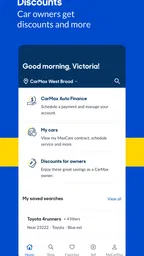
- Save searches to revisit cars that match your preferences.
- View vehicle history details for greater buying confidence.
- Estimate monthly payments with built-in financing tools.
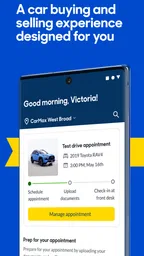
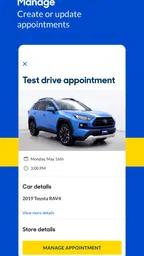
- Arrange a test drive through the app.
What could be better
- Inventory and prices can vary by location.
- Some listings may sell before you can arrange a visit.
- Financing estimates may differ from final loan terms.
- Vehicle history reports may not show every issue.
- The app is less useful if CarMax has few nearby locations.





