
Car Scanner ELM OBD2 review
 Analysis by Appsdrops
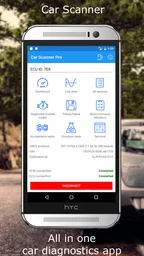
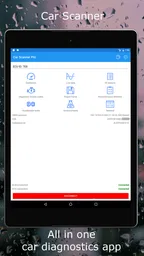
I tend to reach for a car diagnostic app when a warning light appears, a trip feels less economical than usual, or I want more than the basic information shown on the dashboard. Car Scanner ELM OBD2 is built for that sort of hands-on check: it turns compatible vehicle data into a mix of diagnostic readings and trip-monitoring tools. It is an Android and iOS app in the auto and vehicle category, made by CAR SCANNER LLC, and it is free to install, with optional in-app purchases.
From a warning light to a useful first check
The key thing to understand before installing it is that the app is only one part of the setup. It needs an appropriate OBD2 adapter to communicate with a vehicle. If you already own one, the app can give that hardware a more useful interface; if you do not, you will need to choose and obtain a compatible adapter separately. That extra step is easy to overlook when comparing it with a simple phone app that works on its own.
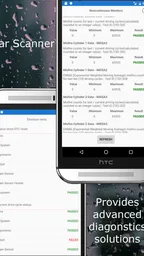
Once connected, the app’s purpose is clearer. Instead of treating a dashboard light as a mystery, I can use it to examine diagnostic information and get a broader view of what the car is reporting. It also works as a trip computer, so the same setup can serve routine driving rather than being opened only when something goes wrong. That combination is more appealing to me than a tool focused on just one occasional check.
The app has a 4.7 average from around 372,000 ratings, and it has passed 10 million installs. Those figures suggest that it has found a wide audience, but they do not mean every vehicle, adapter, or driver will have the same experience. Compatibility and the quality of the connection matter; I would treat the app as a way to inspect information, not as a guarantee that every issue can be diagnosed from a phone.
Set up the connection before you need it
My practical advice is to get the adapter paired and the app configured before a warning light or urgent problem forces you to troubleshoot under pressure. Keep the car parked while establishing the connection, then check that the app is receiving readings. This simple test separates a connection problem from a vehicle problem later, when the distinction matters much more.
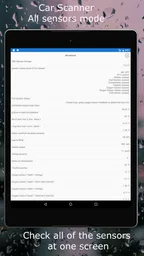
It is also worth learning where the readings you care about appear. A large set of dashboards can be useful, but it can feel busy if you open the app expecting one obvious answer. I would start with a modest display for the information relevant to your purpose, then add other indicators only when you know why you want them. A screen full of unfamiliar values can create more questions than it answers.
Use it as a trip computer, not just a fault reader
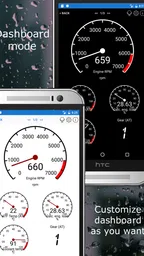
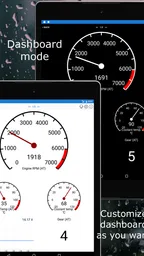
For everyday driving, the trip-computer side gives the app a reason to stay in use between diagnostic checks. A driver who likes to keep an eye on vehicle data can bring up a dashboard during a journey, rather than relying only on the car’s built-in display. The appeal is flexibility: the phone becomes a place to organize the information you want to see, instead of being limited to whatever the vehicle shows by default.
A realistic use is a longer drive where you want to compare how the car behaves across familiar routes. I would keep the phone mounted safely and glance at the display only when it is appropriate, not try to interpret a changing dashboard while moving. After the trip, the readings can help you frame a better question: was a change tied to the route, the driving conditions, or something that deserves a closer inspection? That is a more grounded use than treating one number as a verdict.
There is a trade-off here. A configurable dashboard is valuable if you enjoy choosing what to monitor, but it asks you to make those choices. If you simply want a passive screen with a few manufacturer-selected indicators, your car’s own display may be easier. The app is more compelling for someone willing to spend a little time shaping the view around their habits.
Move from an alert to a sensible next step
When a warning appears, I would use the app as an information-gathering step, not as permission to ignore the warning. Connect while safely parked, inspect what the vehicle is reporting, and note the result before deciding what to do next. If the issue is unfamiliar, persistent, or connected to a serious change in how the car drives, a mechanic remains the better handoff. The app can help you arrive with a more specific observation, but it does not replace professional diagnosis or repair.
This distinction is especially useful for drivers who are tempted to clear a fault and assume the problem is solved. A disappearing alert is not the same as fixing the cause. I would use diagnostic information to guide a conversation or decide whether a problem needs prompt attention, rather than using it to conceal a symptom. That cautious approach makes a phone-based tool more helpful and less likely to encourage false confidence.
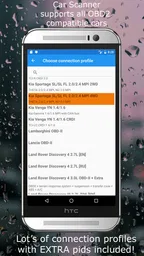
There is also a practical handoff from the app to the adapter. If readings do not appear, check the connection and setup before concluding that the vehicle has no useful information to report. An app cannot compensate for a poor or incompatible adapter, and a stable link is part of the experience rather than a minor accessory detail. For a first-time buyer, it is sensible to research adapter compatibility with the car before spending money on hardware.
Where it fits beside the usual alternatives
Compared with a basic dashboard display, this app offers a more configurable way to view vehicle information and combines that with diagnostic use. Compared with a dedicated diagnostic tool, it uses a phone and a separate adapter, which can be convenient for an owner who already carries a compatible device. The trade-off is that the experience depends on the phone, the adapter, and the connection working together. A workshop scanner or mechanic may be a better choice when the job requires deeper testing, certainty, or a repair decision.
It is also different from simply searching online after a warning light appears. A search may show common explanations, but the app’s value is in accessing information from the car itself. Even then, a reading needs context: the same symptom can have different causes, and a diagnostic indication is a starting point rather than a complete explanation. I would not buy it expecting a guaranteed plain-English diagnosis for every fault.
Drivers who enjoy learning how their vehicles behave are likely to get more from it than someone who never wants to look beyond the dashboard. It can also suit an owner who wants to make routine checks and then pass a clearer account of what they noticed to a repair shop. Someone who needs an immediate repair, has no interest in selecting an adapter, or wants a fully standalone tool may find the setup less attractive.
Limits that shape the experience
The biggest friction is the dependency on external hardware. Installing the app alone does not create a connection to the car, so the first-use experience involves an extra purchase decision and some setup. Optional purchases are available within the app, priced from around $1.49 to $4.39 per item; the core download is free. I would begin with the free version and judge whether the workflow suits me before paying for an add-on.
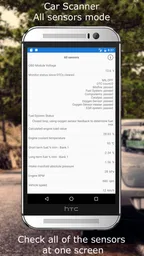
Another limitation is interpretation. A dashboard full of data can look authoritative, but numbers are useful only when you know what they mean and what conditions affect them. New users should resist the urge to monitor everything at once. Pick a specific goal—checking a warning, watching a particular trip, or becoming familiar with a selected reading—and learn that workflow first. This keeps the app from becoming an impressive-looking screen that leaves you unsure what to do.
Phone use also brings ordinary practical concerns: the screen needs to be positioned safely, and changing settings is better done while parked. I would not make live interaction with a phone part of the driving routine. If the app is mainly for occasional troubleshooting, setting it up before a journey and checking it only when stationary is a more sensible pattern.
Who I would recommend it to
I would recommend Car Scanner ELM OBD2 to a driver who already has a suitable adapter, wants more control over vehicle information, and is comfortable treating readings as clues rather than final answers. It is a particularly good fit for curious owners who want one app for both trip monitoring and basic diagnostic exploration. The app is marked for Everyone, and it supports Android from version 6.0, making it accessible to a broad range of Android devices that meet that requirement.
I would hesitate to recommend it to someone who expects a phone to diagnose and fix a car without any additional equipment or knowledge. If your main need is a dependable answer about a serious fault, professional service is the better route. If you only want a quick, uncomplicated driving display, the vehicle’s own dashboard may involve less setup and less interpretation.
The app was released on January 23, 2018, and its current version is 2.2.42. For me, the most useful way to judge it is not by how many readings it can put on screen, but by whether it helps you move from a vague concern to a more informed next step. Its strongest outcome is a clearer view of what the car is reporting and a better-prepared conversation with a mechanic. Car Scanner ELM OBD2 earns a place on my shortlist for that practical role, provided you are willing to handle the adapter setup and keep its diagnostic guidance in perspective.
What we like
- Displays live vehicle data such as engine speed and coolant temperature.
- Can read and clear many diagnostic trouble codes.
- Offers customizable dashboards with gauges and charts.
- Supports trip logging and fuel consumption estimates.
- Works with many ELM327-compatible Bluetooth and Wi-Fi adapters.
What could be better
- Vehicle features vary by make model and year.
- A compatible OBD2 adapter must be purchased separately.
- Some adapters may have unreliable connections.
- Advanced features may require a paid upgrade.
- Live data can be difficult for beginners to interpret.





