





CarGurus: Used & New Cars review
 Analysis by Appsdrops
I find CarGurus most useful when I treat it as a research tool rather than a shortcut to buying a car. It brings used and new vehicle shopping into one app, with options to explore financing or selling as well. That makes it handy at the start of a search, when I’m still working out what fits my budget and daily routine—not just when I’m ready to contact a seller.
CarGurus is a free Auto & Vehicles app from CarGurus, Inc. It has a 4.8 average from around 247,000 ratings, and more than 10 million installs. The app is rated for Everyone, and version 5.63 is listed for devices running Android 7.0 or later. Those figures suggest a well-established shopping service, but the part that matters in practice is whether its listings help me make a better decision.
Start with a workable search, not a perfect one
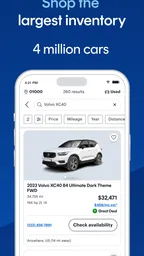
My first pass is broad: choose the kind of car I need, set a comfortable price range, and narrow the results only when the list feels unwieldy. It’s tempting to specify every preference immediately, but that can hide reasonable alternatives. If I’m shopping for a practical commuter, for example, I might begin with a body style and budget, then compare different makes before deciding which features are worth insisting on.
That approach suits CarGurus because its core job is helping shoppers browse vehicles and compare possibilities. A listing is a starting point, not a verdict. I still want to read the vehicle details carefully, inspect the photos, and check whether the car’s location and asking price make sense for me. The app can organize the hunt, but it can’t replace a careful inspection or a conversation with the seller.
A useful everyday scenario is replacing a car after a change in routine. Maybe a longer commute makes fuel economy more important, or a growing household needs more room. I’d save time by first browsing a few categories of vehicle, noting which trade-offs appear repeatedly, and only then tightening the search. That’s more informative than filtering down to one exact model before I know what the local choices look like.
The strongest habit is to separate “must have” from “nice to have.” I’d keep the non-negotiables—such as a realistic budget or enough seating—at the center of the search, while treating color, trim, or a particular badge as flexible. This makes it easier to notice a suitable car that might otherwise be buried beneath a long list of preferences.
Make comparisons repeatable
When I’m looking at several candidates, I use the same mental checklist for each: total asking price, mileage and condition as described, equipment, distance, and how much uncertainty remains. The point is not to pretend that every listing provides equally complete information. It’s to avoid letting one attractive photo or a familiar brand distract me from the details that affect ownership.
I also compare cars for the same job, not just cars that look similar in search results. A larger vehicle may cost more to buy and run, but could be the practical choice for regular passengers. A smaller one might be easier to park and adequate for a solo commute. CarGurus helps me gather candidates; the decision becomes clearer when I write down what each one would actually do in my week.
For a more disciplined search, I’d keep a short shortlist outside the stream of browsing—just a few options and the reason each remains under consideration. That’s especially helpful if I’m checking listings over several days. I can return with a clear question, such as whether a particular car is worth investigating, instead of repeatedly scrolling through the same broad results.
Settings and choices worth checking
Before settling into a long search, I’d review the filters I’ve chosen and make sure they reflect genuine needs. A narrow price ceiling can be sensible, but combining it with a very specific model, trim, and equipment list may leave too few options to compare. If results are sparse, I’d relax one preference at a time rather than abandoning the budget or changing everything at once.
Location deserves the same attention. A car that looks appealing from a distance may involve extra travel, time, and effort to see in person. I’d weigh that burden against the reasons for considering it: perhaps the vehicle is unusually well suited to my needs, or perhaps nearby alternatives would be easier to inspect. A listing’s apparent appeal is only part of its practical value.
Financing is another area where I’d slow down. CarGurus includes financing as part of its broader shopping purpose, but I would use any financing-related route as a way to explore the process—not as a reason to skip comparing the full cost of ownership. Before committing, I’d check the terms and consider insurance, maintenance, fuel, and any other costs relevant to my situation. A monthly figure alone can make an expensive choice feel deceptively manageable.
If I’m selling rather than buying, I’d approach the app with a different checklist. I’d want the vehicle description and photos to be accurate, and I’d think through the questions a serious shopper is likely to ask. The app can help connect the selling task to the same car-shopping environment, but a seller still needs to present the vehicle honestly and handle the eventual transaction carefully.
Faster habits without rushing the decision
Experienced shoppers tend to repeat a simple cycle: browse broadly, shortlist, compare, then investigate. I find that more efficient than opening every promising result in one sitting. On an early pass, I’m only looking for plausible candidates. On a later pass, I’m checking details and deciding which ones deserve follow-up.
Another useful shortcut is to change a single search constraint when the results disappoint. If I’m seeing too few options, I might widen the acceptable model range while leaving the budget intact. If there are too many, I can tighten a requirement that genuinely matters. Changing one thing at a time helps me understand what is shaping the results rather than turning the search into guesswork.
I’d also avoid treating a listed price as the whole comparison. Two cars can appear similar at a glance but differ in condition, equipment, mileage, or distance from home. The practical shortcut is not to rank them by price alone; it’s to identify which details are missing and ask targeted questions before arranging a visit. That saves effort without pretending the app can settle questions that require direct verification.
For a busy shopper, this staged method is useful even in short sessions. I can spend a few minutes finding candidates, then return later to evaluate them with a clearer head. It reduces impulsive decisions and makes it easier to spot when a new listing is genuinely better suited than the options already on my shortlist.
Where the app’s help ends
CarGurus is not a substitute for inspecting a vehicle, reviewing its history, or having a qualified person assess its condition. A polished listing can still leave important questions unanswered. Before buying, I’d verify the details directly, arrange an in-person inspection when possible, and make sure the paperwork and transaction terms are clear. The app can help me decide what to investigate; it cannot guarantee the car will match its presentation.
It may also be the wrong choice for someone who already knows exactly where they want to buy and prefers dealing directly with a single local seller or dealership. In that case, a focused search or a direct visit may be quicker than browsing a broad marketplace. Likewise, people who want a professional to manage the whole process may prefer a service built around that kind of assistance rather than an app for exploring listings.
Compared with the usual alternatives—individual dealer inventory pages, local classified listings, or visiting lots—the advantage here is having a broad search starting point in a single app. The trade-off is that no marketplace view can make every listing equally informative or remove the need to verify claims. I’d use CarGurus to discover and compare, then move to direct questions and checks before making a decision.
The app’s breadth can also encourage endless browsing. More candidates are not automatically better, especially when several listings meet the same basic need. Setting a few decision rules beforehand helps: how far I’m willing to travel, which costs I can accept, and what condition or equipment would rule a car out. Once a candidate passes those checks, further scrolling may add little value.
Who I’d recommend it to
I’d recommend CarGurus to people who are still defining their options, want to compare new and used vehicles, or need a central place to begin a buying or selling journey. It works particularly well for a shopper willing to make a shortlist and verify details rather than expecting an app to make the choice for them. Its free access makes it easy to try as a research companion before deciding how to proceed.
I’d be less enthusiastic about it for someone who dislikes comparing listings, needs hands-on advice throughout the purchase, or expects every vehicle’s description to answer every question. Those shoppers may be better served by working directly with a trusted local professional. And if I already have a specific vehicle in mind, I’d compare CarGurus with direct seller or dealer information rather than relying on just one source.
A sensible tool for the whole search
My overall view is that CarGurus is most valuable when I use it with a repeatable process: start broad, set realistic filters, keep a manageable shortlist, and verify the details before taking action. It gives me a convenient way to explore cars and consider financing or selling, while leaving the important judgment in my hands.
That balance is a strength, but also the app’s central limitation. It can make the search more organized; it cannot make a used car risk-free or decide what fits my life. I’d keep it installed if I were actively shopping, especially while comparing different types of vehicle. For a final purchase decision, I’d pair the app’s browsing with direct research and a careful inspection. Used that way, CarGurus is a practical companion rather than a substitute for due diligence.
What we like
- Compare prices with similar cars to spot potential deals.
- Save searches and receive alerts for matching listings.
- Browse both new and used cars in one place.
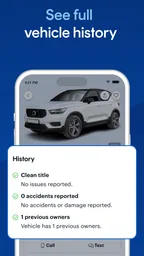
- View vehicle history details on eligible listings.
- Contact sellers directly through the app.
What could be better
- Listing details and accuracy depend on individual sellers.
- Some vehicles may sell before a listing is updated.
- Vehicle history reports may not be available for every car.
- Search results can vary depending on your location.
- The app does not replace an independent vehicle inspection.